
In Brief
- Through the utilization of cloud computing, firms can obtain computing resources without the requirement for large expenditure on physical infrastructure.
- Organisations can subscribe to cloud service models like IaaS, PaaS, SaaS, and serverless computing.
- The cloud guarantees greater scalability, flexibility of operation, collaboration, and business continuity.
- The expenses of using cloud computing technology depend upon the type of infrastructure utilized, the amount of space required for storage, the security level necessary, and the implementation size.
- Business implementation strategies are necessary for the successful migration of workloads and for controlling the long-term costs associated with cloud computing.
Cloud computing is transforming the way companies create and grow their digital infrastructure.
For enterprises, cloud adoption requires a structured cloud implementation strategy that connects infrastructure decisions with business priorities, security requirements, scalability, and long-term cost management.
By utilizing a cloud-based solution, a company can easily overcome the need to invest substantial amounts of time and money in on-premises technology infrastructure. The cloud allows companies to swap on-premises technology infrastructure for cloud-based technology resources. Thus, the organization can be more flexible when expanding business operations and deploying applications.
However, moving to the cloud requires more than just switching providers and moving data. It is important to learn the various cloud models that exist, to analyze what the costs will be like, to prepare a migration plan, and to figure out how to confront the challenges of each cloud service. This guide is about several advantages and types of cloud computing services, the factors influencing the costs of migration, and the processes that should be applied in the implementation of the cloud strategy.
Introduction to Cloud Computing for Enterprises
With the help of cloud computing, the way companies manage and use technology has dramatically changed. Rather than continuously buying and upgrading physical technology, firms now have an opportunity to use technology as a service.
The available resources may consist of storage, computing power, databases, networking, and software solutions.
For businesses, the cloud provides a new approach to investment in technology. Organizations can adjust their resources as demand changes, relieve them from the necessity of performing in-house maintenance, and facilitate swift delivery of digital goods and services. However, it is important to know how cloud computing functions and what kind of cloud services are more suitable for the needs of a particular business.
What is Cloud Computing?
Cloud computing is an approach to utilizing IT resources remotely through data centers. Organizations can access various services, such as servers, storage, networking, and software, without owning and managing the infrastructure themselves.
Cloud services are usually available on-demand, which means businesses can use their resources depending on their needs. This approach is suitable for organizations of any size, from start-ups wishing to save on the costs of IT infrastructure to big companies managing huge systems and data processing.
Why Are Businesses Switching to Cloud Technology?
Businesses are very much concerned with the costs associated with traditional IT infrastructure, its inability to scale, and prolonged construction periods. Cloud computing provides greater flexibility by allowing organisations to increase or reduce resources without making significant upfront investments in physical hardware.
The cloud also supports remote accessibility, faster deployment, data backup, and business continuity. As businesses increasingly rely on digital applications, data analytics, and AI-driven technologies, cloud infrastructure provides the computing environment needed to support these operations at scale.
How Does Cloud Computing Work?
Cloud computing functions by using remote data centers that are operated by cloud providers. Using the internet to access services instead of using local storage and applications is one of the major advantages of using cloud services.
While the underlying infrastructure is managed by the provider of cloud services, the businesses that take advantage of the cloud services decide which service they want to use. Depending on the cloud model used, organizations may control their usage of cloud applications and services or they may use someone else’s services to manage their cloud needs.
The Role of Cloud Service Providers
Providers, which make this hardware available to commercial clients through certain types of services and pricing, are also responsible for maintaining the operation of the hardware. In the case of using some types of cloud services, the client may be involved in the management of the infrastructure as well.
Cloud Infrastructure and Resource Delivery
Cloud infrastructure consists of interconnected computing resources that are virtualised and delivered to users via the internet. The concept of virtualisation allows a single physical infrastructure environment to be able to support multiple customers and workloads while allocating resources depending on demand.
Companies that want to use the cloud can obtain separate services through web dashboards, APIs, and management platforms. Computing power, storage, and other services can easily be made available so that businesses are able to start using them and scale infrastructure fast without waiting for new physical equipment to arrive.
Types of Cloud Computing Services
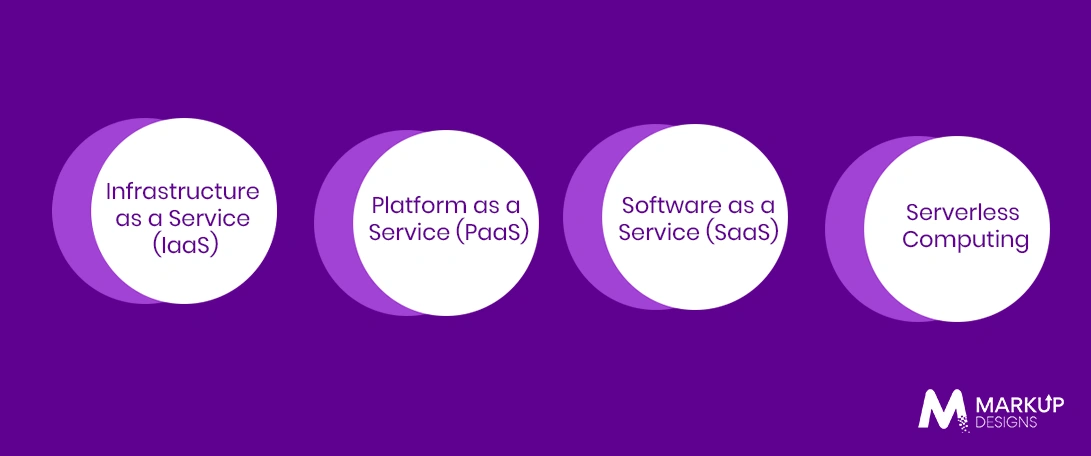
Cloud computing services are generally provided according to different models. These different models are based on how much infrastructure is managed by the provider and how much responsibility is retained by the company. Choosing the right cloud deployment model is a critical part of an enterprise cloud infrastructure strategy, influencing security, scalability, compliance, cost, and operational control.
Infrastructure as a Service (IaaS)
Infrastructure as a Service gives customers access to such resources as servers, storage and networking. The vendor takes care of the physical infrastructure while the customer usually maintains the operating system, application, etc.
IaaS is useful for companies looking to have more power over their computing systems without having to manage physical data centers. It is good for hosting operations, as well as for development and workloads that need flexible resource distribution.
Platform as a Service (PaaS)
Platform as a Service is responsible for developing, testing, and deploying applications. The service provider manages the basic infrastructure and the platform components, which allows development teams to focus mainly on creating applications.
PaaS enables less complex infrastructure management as well as facilitating the development process. This option is great for businesses looking to create software without worrying much about their servers and so on.
Software as a Service (SaaS)
Software as a Service means that ready-to-use apps are provided via the Internet. Users are able to access the software using their web browser or app interface, while the service provider takes care of the hardware, maintenance, and updates.
SaaS is used by businesses to perform their standard operations like CRM, collaboration, accounting, etc. This solution simplifies the process of using software, eliminating the need for users to do the installation and maintenance themselves, while providing them with an opportunity to increase service usage appropriately.
Serverless Computing
Serverless computing permits developers to create and operate applications without getting involved with server administration. The cloud provider manages the infrastructure provisioning, resource allocation, and scaling automatically based on application needs.
This model is very advantageous for event-driven applications and workloads with variable usage. Companies generally get charged according to the actual execution or resource utilization, enabling a decrease in infrastructure costs for applications that do not need the servers to be running all the time.
Types of Cloud Deployment Models
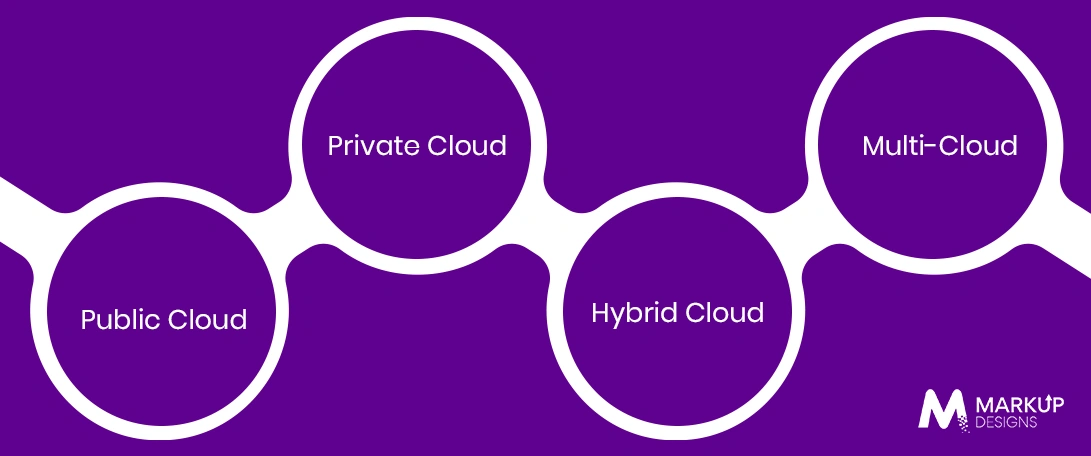
Cloud deployment models describe where cloud infrastructure is hosted, who owns and manages it, and how resources are utilized. An appropriate model helps a business to meet security needs, regulatory obligations, availability, and other aspects influencing their company.
Public Cloud
Public cloud is a third-party cloud provider offering computing services through the resources it owns and runs. The provider’s infrastructure is shared by different businesses while the data and workloads are kept separated logically.
That is why this model is widely adopted – it ensures scalability, flexibility, and low initial infrastructure expenditure. Public cloud environments are perfect for businesses that need effective application deployment and quick adjustment to fluctuations in computing needs.
Private Cloud
The term private cloud refers to the use of a specific cloud system, which is exclusively reserved for a certain business organization. Furthermore, the necessary infrastructure may be located at the data center of the respective organization, but it can also be operated by a separate service.
Benefits of Private Cloud
The private cloud model is advantageous because it provides more flexibility in terms of managing the whole infrastructure, while ensuring sufficient security and proper administration of data. This system is typically adopted by companies that deal with sensitive data or work in regulated sectors of the economy, as such organizations need to comply with certain requirements concerning governance.
Hybrid Cloud
Hybrid cloud is a type of cloud deployment model, which is formed as a combination of public cloud services and private systems. Businesses have an opportunity to move and transfer some workload and data between both types of systems in order to meet the specific needs of the public and private infrastructure.
Companies may keep their sensitive data in private cloud databases, while making use of public cloud systems to carry out any operations with applications that require more computing power.
Multi Cloud Strategy
A multi-cloud strategy is defined as the approach of cloud services availing from more than one provider. Companies may adopt this approach to have specialized services, increase resilience, or lessen reliance on a single supplier. However, administration of more than one cloud environment raises operational complexity. Companies need distinct governance, security, and integration strategies to enable them to oversee and control various platforms.
Read Also: Why Cloud is Essential for Successful Digital Transformation
Key Benefits of Cloud Computing
Cloud computing gives companies the possibility to improve flexibility and have access to technological resources without having to invest in physical infrastructure. Nevertheless, this is feasible if the right architecture of a cloud is selected and the resources are managed.
Reduced Cost of IT Infrastructure
Cloud computing means a decreased amount of money spent on initial investment in servers, storage, and data center infrastructure. Companies may use the amount of computing resources as needed rather than investing in hardware beforehand. However, this does not necessarily mean having lower expenditures. Inefficient resource use, wasteful data storage, and uncontrolled consumption will increase expenses over time, making it important to control them.
Scalability and Flexibility
Organizations can adjust their cloud resources to suit their needs up or down depending on their business requirements. This means businesses will be able to meet seasonal demand, unexpected traffic surges and increasing volumes without needing to buy or install more gear.
The possibility to adjust the resources also means that the company can test something new without the obligation of investing massively in something that it hasn’t yet approved.
Improved Business Continuity
Cloud infrastructures allow companies to have proper access to their critical data and applications even during times of disruption of the infrastructure. The resources can be scattered across various locations, thus eliminating the dependency on one server or data centre.
Through appropriate continuity planning, businesses can revamp their operations in a matter of minutes after a breakdown of hardware or problems happening in a specific location.
Enhanced Collaboration and Accessibility
Cloud applications allow authorized employees to access files, systems, and solutions from anywhere. This means that cooperation between remote teams can be improved so that their dependence on the office location and their specialists, as well as external parties, was minimal and insignificant.
This can shorten development cycles and make it easier for businesses to test new products, features, and digital services. Cloud based tools can also support automation and continuous delivery practices.
Stronger Data Security and Compliance
When it comes to security, cloud providers have effective options available which include encryption and identity management as well as access control. All these features can contribute positively to a business when managed and configured well.
Nevertheless, it must be acknowledged that cloud security operates on the principle of shared responsibility, meaning that while the providers secure the underlying infrastructure, organizations must take care of data access, user authorizations, application security and compliance.
Disaster Recovery and Backup Capabilities
Cloud solutions enable companies to implement automated data recovery and backup procedures over the infrastructure distributed on various geographic territories. This helps to avoid permanent data loss that may be the result of hardware malfunction or local disturbances and catastrophes.
Furthermore, organizations have an opportunity to develop disaster recovery strategies and bring critical systems and applications back into operation in accordance with the recovery objectives. Of course, the success of these measures depends on systematic testing and the effectiveness of configuration as opposed to just storing data in the cloud.
Cloud Computing Use Cases Across Businesses
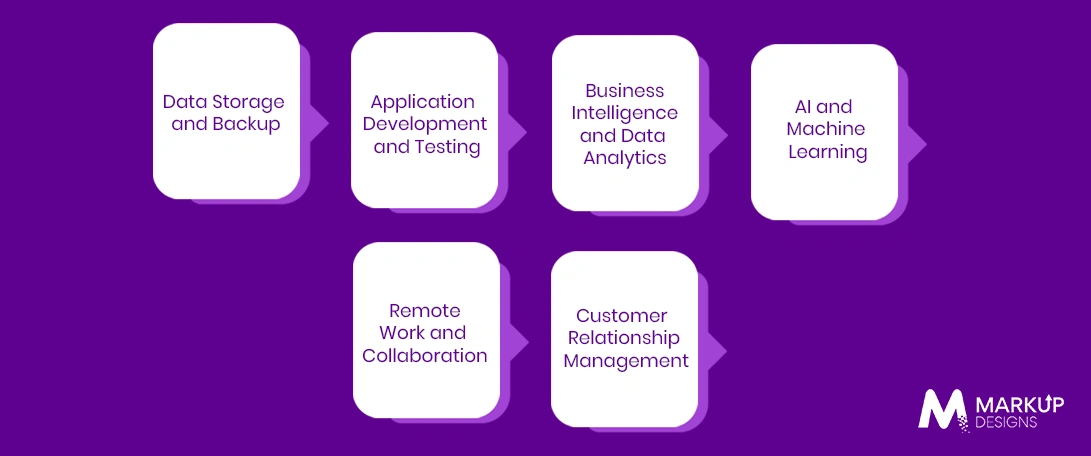
Cloud computing supports a wide range of business operations, from basic data storage to advanced AI workloads. The most suitable use case depends on the organisation’s technology maturity, operational needs, and long-term digital strategy.
Data Storage and Backup
Companies are using cloud storage to store files, databases, media assets, and other operational data without being reliant on only the on-premise storage systems. In addition, cloud storage can scale as available data grows and can offer access from different locations.
With the help of automated backup solutions, companies can safeguard their important information, as well as enhance their recovery abilities after any unintended deletion, hardware problems or other inconveniences.
Application Development and Testing
Cloud infrastructures give companies the chance to develop applications and conduct their testing, thus avoiding maintenance of sensitive in-house infrastructure. Teams can acquire IT resources for their particular projects and get rid of them when no longer needed.
Such flexibility can bring faster development cycles and permit having simultaneous production, testing, and development environments.
Business Intelligence and Data Analytics
Cloud computing provides the opportunity for effective storage and processing of a great amount of data. Organizations may collect data from various platforms and employ analytical tools to detect patterns and make certain decisions.
Scalable cloud infrastructure is particularly useful when data volumes and processing requirements change over time.
Artificial Intelligence and Machine Learning
In many cases, both AI programs and machine learning require powerful computing resources and large data sets to operate. With cloud technology, businesses can utilize flexible infrastructure and services when training, distributing and using AI programs, removing the need to build their own data facilities.
Remote Working and Collaboration
Cloud technology also allows people to work with separate documents, communication tools, and business applications regardless of the location. This ensures better collaboration between the team members.
Many organizations use cloud infrastructure in order to promote uniformity in the functioning of their offices.
Customer Relationship Management
Cloud technologies allow businesses to collect data on customers and their purchases with ease. The data can be used by all the departments of a company for quick access to updated information about the clients.
Cloud-based CRM systems can be integrated with CRM, marketing, and analytical tools for efficient operations of a company.
How Much Does Cloud Computing Cost?
There is no fixed cost for cloud computing because businesses pay based on the services, infrastructure, and resources they use. A small business running a few cloud-based applications may spend a few hundred dollars per month. For large organisations, enterprise cloud computing costs should be evaluated across infrastructure consumption, migration, integration, security, governance, monitoring, and ongoing optimisation. The total cost also extends beyond monthly infrastructure usage. Migration, integration, security configuration, cloud architecture, monitoring, and ongoing optimisation can all influence the overall investment. Understanding these cost drivers is essential before planning a cloud infrastructure strategy.
Key Factors Affecting Cloud Computing Costs
Several factors determine how much a business spends on cloud infrastructure. The final cost depends on the combination of services used and the complexity of the business environment.
Cloud Service Model
The chosen service model directly affects cost and management responsibilities. IaaS may require businesses to manage more of their infrastructure and applications, while PaaS and SaaS can include additional managed services within the pricing structure.
Serverless computing can also change the cost model by charging based on actual execution rather than continuously running infrastructure.
Deployment Model
Public cloud environments are generally more cost-effective for businesses that need flexible and scalable infrastructure. Private cloud environments may involve higher costs because resources are dedicated to a single organisation.
Hybrid and multi-cloud strategies can provide greater flexibility but may increase costs related to integration, management and data movement between environments.
Storage and Computing Requirements
Cloud costs increase based on the amount of storage, processing power and memory required. High-performance applications, large databases, and AI workloads can require significantly more computing resources than basic business applications.
Businesses should also consider how demand may change over time, particularly for applications with seasonal traffic or rapid growth.
Data Transfer and Network Usage
Moving data into, within, and out of cloud environments can generate additional charges depending on the provider and service configuration. High volumes of data transfer between regions, applications, or cloud providers can increase operational costs.
This is particularly important for businesses running data-intensive applications, content platforms, or multi-cloud environments.
Security and Compliance Requirements
Businesses operating in regulated industries may need additional security controls, encryption, monitoring, and compliance management tools. These requirements can increase cloud spending but may be necessary to meet legal and industry obligations.
Costs can also increase when businesses require advanced identity management, threat detection, audit logging, and dedicated security infrastructure.
Migration and Implementation Complexity
Moving existing applications and data to the cloud can require assessment, architecture redesign, data migration, and integration work. Legacy systems may need significant modification before they can operate effectively in a cloud environment.
The complexity of this process can increase the initial implementation cost, particularly for businesses with large application portfolios or complex dependencies.
Cloud Computing Cost Models
Cloud providers offer different pricing structures depending on the type of service and level of resource commitment. Businesses should select a model based on usage patterns rather than choosing solely based on the lowest advertised price.
Pay As You Go
Pay as you go pricing allows businesses to pay only for the computing resources they consume. This model provides flexibility and is useful for workloads with unpredictable or fluctuating demand.
However, without monitoring and usage controls, variable consumption can lead to unexpected costs.
Reserved Capacity
Reserved capacity allows businesses to commit to a certain level of cloud usage for a longer period in exchange for lower rates. This model can be more cost-efficient for stable workloads with predictable resource requirements.
The drawback is reduced flexibility. Businesses may pay for unused capacity if their requirements decrease significantly.
Subscription-Based Pricing
Subscription-based pricing is common for SaaS products and managed cloud services. Businesses pay a fixed monthly or annual fee based on factors such as users, features or service tiers.
This model provides predictable spending but may become expensive as the number of users or required features increases.
Estimated Cloud Computing Costs for Businesses
Cloud computing costs can range from $500 to $5,000 per month for smaller businesses with standard applications and infrastructure needs. Mid-sized businesses using multiple cloud applications, databases, and advanced security services may spend $5,000 to $50,000 or more per month.
Large enterprises running complex infrastructure, high-volume data processing, global applications, or AI workloads can spend $50,000 to $500,000+ per month. These figures are broad estimates, and actual costs depend heavily on architecture, provider pricing, usage patterns, and optimisation practices.
Step-by-Step Guide to Implementing Cloud Computing
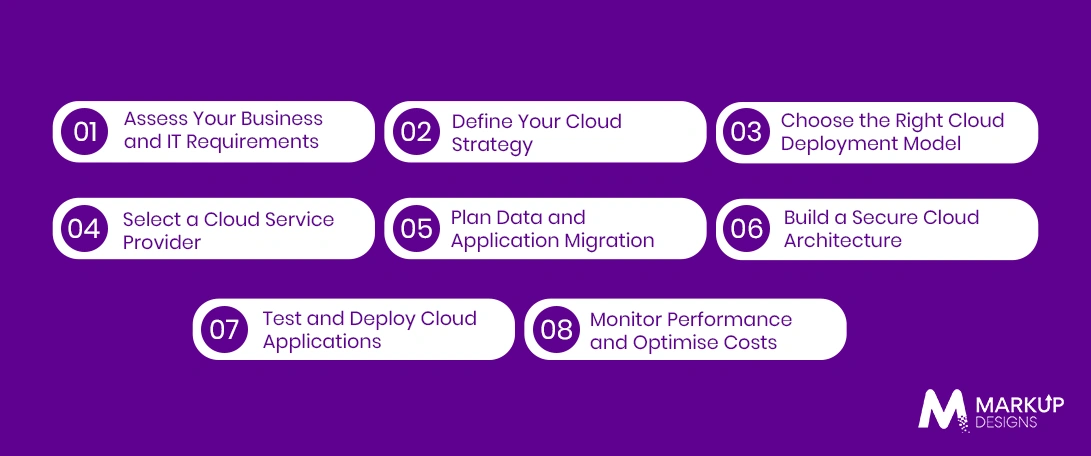
Successful cloud adoption requires more than moving applications from one environment to another. Businesses need a structured implementation approach that considers technical requirements, operational risks, security and long-term cost management.
Step 1: Assess Your Business and IT Requirements
Start by reviewing existing applications, infrastructure, data and operational processes. Identify which workloads are suitable for cloud migration and which may need to remain within existing environments.
The assessment should also consider business goals, performance requirements, security obligations, and expected growth.
Step 2: Define Your Cloud Strategy
Develop a clear cloud infrastructure strategy that defines why the business is adopting the cloud and what outcomes it expects to achieve. This may include cost optimisation, scalability, improved resilience or faster application development.
The strategy should also establish governance, migration priorities and responsibilities across technical and business teams.
Step 3: Choose the Right Cloud Deployment Model
Select between public, private, hybrid or multi-cloud environments based on workload requirements. Businesses should evaluate factors such as data sensitivity, compliance requirements, scalability, and integration with existing systems.
A single deployment model may not be suitable for every workload within an organisation.
Step 4: Select a Cloud Service Provider
Compare cloud service providers based on the services, security capabilities, pricing structure, and geographic availability relevant to the business. Integration options, technical support, and service level agreements should also be considered.
The provider should align with both current requirements and long-term growth plans.
Step 5: Plan Data and Application Migration
Create a migration plan that identifies application dependencies, data transfer requirements, and potential risks. Not every application should be moved using the same approach, as some may require redesign while others can be migrated with minimal changes.
Testing migration processes before moving critical workloads can help reduce operational disruption.
Step 6: Build a Secure Cloud Architecture
Configure identity and access management, encryption, network security, and monitoring before deploying critical workloads. Security responsibilities should be clearly defined between the business and the cloud provider.
The architecture should also include backup, recovery, and incident response processes.
Step 7: Test and Deploy Cloud Applications
Test applications for performance, security, reliability, and integration before full deployment. Businesses should validate how systems perform under expected workloads and identify potential issues before they affect users.
Deployment should follow a controlled process with clear rollback and recovery procedures.
Step 8: Monitor Performance and Optimise Costs
Cloud implementation is not complete after deployment. Businesses need continuous monitoring of application performance, security, and infrastructure usage.
Regular cost optimisation can identify unused resources, oversized infrastructure, and inefficient workloads. Ongoing monitoring helps businesses maintain performance while preventing unnecessary cloud spending.
Challenges of Cloud Computing and How to Address Them
Cloud computing offers clear operational advantages, but adoption also introduces technical, financial, and governance challenges. Businesses that move to the cloud without proper planning can face security gaps, rising costs, and integration issues. Identifying these challenges early makes it easier to build a cloud environment that remains secure, manageable and cost-effective.
Data Security and Privacy Risks
Moving data to the cloud does not eliminate security risks. Weak access controls, misconfigured storage, compromised credentials and inadequate monitoring can expose sensitive business and customer information.
Businesses should implement strong identity and access management, encryption, multi factor authentication and continuous security monitoring. Clear responsibility for protecting data should also be established under the shared responsibility model.
Vendor Lock In
Businesses can become dependent on a single cloud provider when applications are built around proprietary services and technologies. Moving these workloads to another environment later may require significant redevelopment and migration effort.
To reduce this risk, businesses can use portable technologies, standardised architectures and open source tools where practical. However, trying to avoid all vendor specific services can also add unnecessary complexity, so the strategy should balance flexibility with operational value.
Unexpected Cloud Costs
Cloud spending can increase quickly when resources are left running unnecessarily, storage grows without controls or applications consume more computing power than expected. Flexible pricing does not automatically mean predictable costs.
Businesses should use cost monitoring tools, resource tagging, usage alerts and regular optimisation reviews. Setting budgets and accountability across teams can also prevent uncontrolled cloud spending.
Migration Complexity
Legacy applications may not be designed to run efficiently in cloud environments. Complex dependencies, outdated technologies and large volumes of data can make migration more difficult than expected.
A detailed assessment should identify which applications can be moved directly, which need modification, and which should be replaced. Phased migration and testing can reduce the risk of major operational disruption.
Compliance and Regulatory Requirements
Businesses operating in sectors such as healthcare, finance and government may need to meet strict requirements for data protection, storage and access. Cloud adoption can introduce additional complexity when data is distributed across regions and services.
Organisations should identify relevant regulations before selecting cloud services and configure the environment accordingly. Regular audits, access controls and documented data governance policies are essential.
Limited Internal Cloud Expertise
Cloud adoption requires skills in architecture, security, automation and cost management. Businesses without internal expertise may struggle to configure and manage cloud environments effectively.
Training existing teams, hiring specialised professionals or working with an experienced cloud development partner can help address skill gaps. The right approach depends on the organisation’s internal capabilities and long-term technology strategy.
How to Choose the Right Cloud Service Provider
The right cloud service provider should support the business’s current workloads while providing enough flexibility for future growth. Provider selection should not be based only on pricing because security, reliability, integration, and technical support can have a greater long-term impact.
Security and Compliance Capabilities
Assess the provider’s security controls, data protection features and compliance certifications. Businesses should also understand which security responsibilities remain with their internal teams.
The provider should offer the tools required to manage identity, encryption, access controls and security monitoring based on the organisation’s specific risk and regulatory requirements.
Scalability and Performance
Evaluate whether the provider can support expected growth in users, applications, storage and computing demand. Performance should also be assessed across the geographic regions where customers and employees operate.
The ability to scale is important, but businesses should also consider how easily resources can be adjusted and optimised as workloads change.
Pricing and Cost Transparency
Review the provider’s pricing structure beyond basic computing costs. Data transfer, storage, managed services and support can add significant expenses depending on the workload.
Businesses should understand how costs are calculated and use pricing tools to estimate spending before deployment.
Service Level Agreements
Service level agreements define the provider’s commitments for availability, performance and support. Businesses should review these terms carefully, particularly for applications that support critical operations.
The agreement should align with the organisation’s uptime requirements and recovery expectations.
Integration Capabilities
Cloud services should integrate effectively with existing applications, databases and business systems. Limited integration options can increase implementation time and create operational silos.
Businesses should evaluate available APIs, third party integrations and compatibility with their existing technology stack.
Technical Support and Expertise
The level of technical support can vary significantly between providers and service plans. Businesses should assess response times, support availability and access to specialised expertise.
For complex or business critical environments, basic support may not be sufficient. The required level of support should match the organisation’s internal cloud capabilities.
Cloud Computing Trends Shaping Business Growth
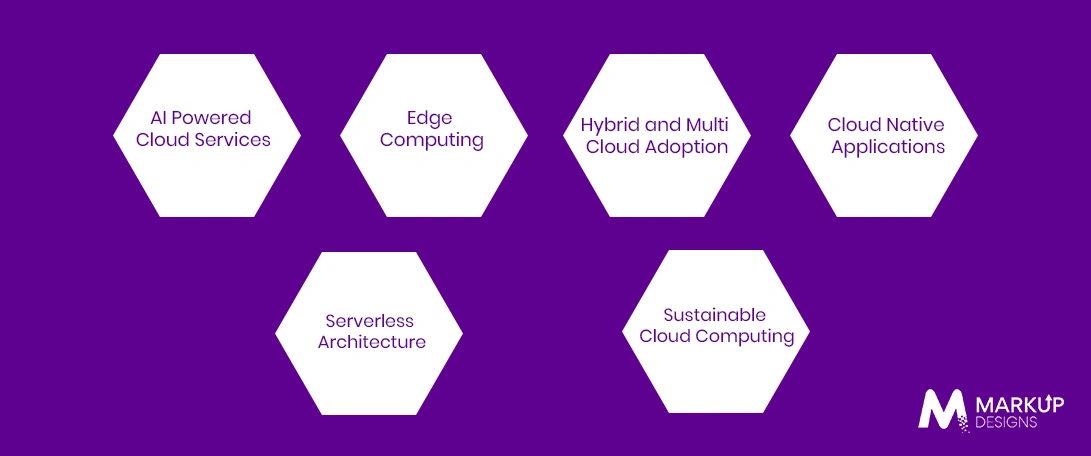
Cloud computing continues to evolve beyond basic infrastructure hosting. New technologies are changing how businesses build cloud-based applications, process data and manage distributed workloads.
AI Powered Cloud Services
Cloud platforms are making AI capabilities more accessible through managed machine learning tools, AI infrastructure and pre built services. Businesses can use these resources to develop AI driven applications without building every underlying component from scratch.
This can support use cases such as automation, predictive analytics, intelligent search and customer service.
Edge Computing
Edge computing processes data closer to where it is generated rather than sending every workload to a centralised cloud environment. This can reduce latency and improve response times for applications that require near real time processing.
It is particularly relevant for connected devices, industrial systems and applications where immediate data processing is important.
Hybrid and Multi Cloud Adoption
Businesses are increasingly combining different cloud environments to meet specific performance, security and operational requirements. Hybrid and multi cloud strategies can provide greater flexibility and reduce dependence on a single provider.
However, these environments require stronger governance and management practices to avoid unnecessary complexity and fragmented security controls.
Cloud Native Applications
Cloud native applications are designed specifically to take advantage of cloud environments. They commonly use technologies such as containers, microservices and automated deployment pipelines.
This approach can improve scalability and speed of development, but it also requires appropriate architecture and technical expertise.
Serverless Architecture
Serverless architecture allows businesses to run application functions without managing underlying servers directly. Resources scale automatically based on demand, and pricing is often linked to actual usage.
This model can reduce infrastructure management for suitable workloads, particularly event-driven applications. It is not automatically the best option for every application, especially those with consistent and high volume processing requirements.
Sustainable Cloud Computing
Businesses and cloud providers are placing greater focus on reducing the environmental impact of digital infrastructure. This includes improving energy efficiency, optimising resource usage and using data centres powered by cleaner energy sources.
For businesses, sustainable cloud practices can also reduce unnecessary resource consumption and support broader environmental objectives.
Why Choose Markup Designs for Cloud Computing Solutions?
Choosing the right cloud partner matters because cloud adoption is not just a migration exercise. Markup Designs helps businesses assess their existing infrastructure, define a practical cloud strategy, and build solutions aligned with operational requirements and long term growth. Our capabilities cover cloud architecture, application development and migration, security, system integration and ongoing optimisation, helping businesses move to the cloud without creating unnecessary complexity or uncontrolled costs.
Ready to Build a Cloud Strategy That Supports Business Growth?
Whether you are planning your first cloud migration or optimising an existing environment, Markup Designs can help you assess requirements, build the right cloud architecture and manage implementation with greater clarity and control.

Conclusion
Cloud computing gives businesses a more flexible way to access and manage technology resources, but successful adoption depends on much more than choosing a cloud provider. Businesses need to evaluate the right service and deployment models, understand the cost structure, address security and compliance requirements and create a structured implementation plan.
The most effective cloud strategy is one that supports specific business goals rather than simply moving every workload to the cloud. With the right architecture, migration approach and ongoing optimisation, businesses can improve scalability, operational resilience and their ability to adapt as technology requirements evolve.
FAQs
1. What is cloud computing in simple terms?
Cloud computing means accessing computing resources such as servers, storage, databases and software over the internet instead of owning and maintaining all the physical infrastructure yourself. Businesses can use these resources on demand and scale them based on their requirements.
2. Which type of cloud computing is best for enterprises?
There is no single cloud model that is best for every business. SaaS works well for ready-to-use business applications, PaaS can support application development and IaaS provides greater infrastructure control. The right choice depends on business requirements, technical expertise, security needs and budget.
3. How much does cloud computing cost?
Cloud computing costs vary based on resource usage, service model, storage requirements, data transfer, security needs and implementation complexity. Small businesses may spend a few hundred or several thousand dollars monthly, while enterprise environments can involve significantly higher costs.
4. Is cloud computing secure for businesses?
Cloud computing can provide strong security capabilities, including encryption, access controls, identity management and continuous monitoring. However, security depends on proper configuration and management. Businesses remain responsible for protecting their data, applications, and user access within the shared responsibility model.
5. How long does cloud migration take?
Cloud migration can take anywhere from a few weeks to several months or longer. The timeline depends on the number of applications, data volume, system dependencies, migration approach, and the complexity of the existing infrastructure.
Author's Perspective
Cloud computing is often presented as an automatic solution for reducing costs and improving performance. That is misleading. A poorly planned cloud environment can become expensive, difficult to manage, and less secure than expected. The real value comes from choosing the right workloads, architecture, and operating model. Businesses should treat cloud adoption as a long-term technology strategy, not a simple infrastructure migration.
Discuss Your Project NowAjit Kumar Jha
VP - Business Operations
Related Posts
How Cloud Product Development Helps Businesses Build Faster...
Cloud Services Company in Kuwait: Benefits, Solutions &...
How is DevOps Charting a New Model for...
Insights Are Valuable & Execution is Priceless
You’ve read about the digital future. Now, let’s build the infrastructure to take you there. Move your strategy from the page to the product.
Design Your Solution Now
Contact Us
Schedule The Appointment At Your Convenience Date And Time.
30 Min
Web Conference
Time Zone
Indian standard time (08:30pm)

Thanks For Getting In Touch!
You’ve Taken The First Step Toward Transforming Your Digital Presence. Our Experts Will Reach Out Shortly To Take It Forward.
Launch Your Dream Project
Provide a brief overview of your project, and our specialists will evaluate your requirements. We will connect with you to explore how the right digital solutions can help you launch faster.