
In Brief
- ERP systems consolidate all data, processes, and workflows from various functions within one system.
- To ensure a successful ERP system, a company must determine its business objectives and have the proper architecture in place.
- It is easy to introduce new capabilities as companies grow thanks to the modular system design.
- Effective implementation relies on successful data migration, testing, and acceptance by employees.
- The use of AI, automation, and cloud systems increases the intelligence and scalability of ERP solutions.
When operating different parts of the business using different systems, companies create data silos, duplication of employees’ efforts, and delays in making business decisions. ERP helps in integrating these processes into one system, enabling better business visibility and process automation. However, ERP implementation is more than just the development of software. Companies need to plan the functionality of their future ERP system, determine architecture, implement separate modules, deploy the whole system, and prepare it for scalability.
This guide explores the complete ERP development journey, from building and implementing an ERP platform to scaling it as business demands evolve.
What Is ERP Development?
The development of an ERP system entails constructing a computer program that administers key processes of the company in a single system; instead of handling all the functions with several applications or programs, an ERP program offers an integrated environment for data to move around the company at any given time.
The principal aim of this process is to decrease manual work, elevate transparency, and improve productivity within companies. Depending on the company’s processes, ERP software can be custom-developed according to its particular requirements and needs.
Why Businesses Need an ERP System
Eliminate Data Silos
An ERP provides the company with the possibility to link information between departments and avoid duplication of data in the different divisions and teams.
Improve Operational Efficiency
An ERP makes numerous processes within the organization automated and centralized by decreasing the workload and effort of employees.
Enable Real-Time Decision Making
Special dashboards as well as real-time access to the data allow organization managers to have a more precise understanding of the business performance.
Automate Repetitive Processes
As the majority of repetitive operations (such as invoices, updates, approvals, and reporting) can be automated, it saves time for employees.
Support Business Growth and Scalability
A properly integrated ERP system can handle an increase in transactions, users, locations, and business activities without the need to introduce new systems.
Core Modules of an ERP System
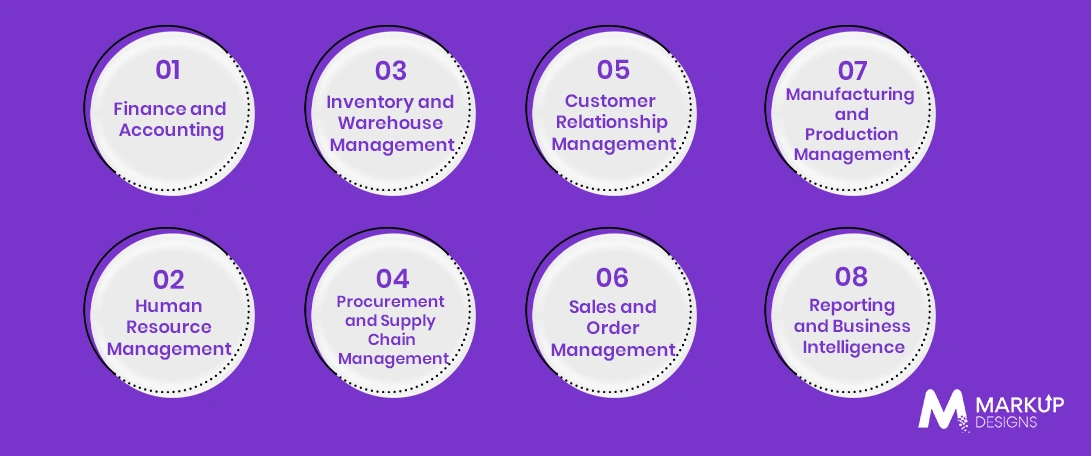
Different ERP system modules depend on the business industry and operating needs of the company. The most common modules are:
Finance and Accounting
Handles budgeting, invoicing, spending, payments, financial reporting, and general financial transparency purposes.
Human Resource Management
Concentrates all the information about employees, including payroll, leave, absence, and the recruitment process.
Inventory and Warehouse Management
Allows companies to monitor their stock level accuracy, delivery, warehouse, and stock availability.
Procurement and Supply Chain Management
Regulates purchasing, suppliers, orders, and warehouse activities, helping save costs.
Customer Relationship Management
Allows companies to keep records of customers, communication, and sales.
Sales and Order Management
Monitors pricing, orders, fulfillment, and operations, allowing for better visibility during sales.
Manufacturing and Production Management
Works on manufacturing planning, resource allocation, material accounting, and quality control.
Reporting and Business Intelligence
Turns business information into reports, dashboards, and valuable insights.
Types of ERP Systems
Different methods and deployment techniques for ERP systems are available to businesses depending on their infrastructure, industry standards, and vision for future growth.
On-Premise ERP
ERP systems installed on a business’s own servers allow the company to exercise maximum control over its data, technologies, and customizations. On-premises ERP is often the best choice for companies that require strict adherence to security and compliance regulations.
Cloud-Based ERP
Is built and hosted on cloud servers, making it easy to implement, expand, and reduce its scale.
Hybrid ERP
Is a combination of cloud and on-premises technologies, allowing organizations to store some of their systems internally while improving their capabilities via the cloud.
ERP Designed Specifically for an Industry
ERP systems tailored for the uniquely shaped processes and needs of a particular sector, such as health care, manufacturing, retail, transportation, or construction.
Custom vs. Ready-Made ERP
Ready-made ERP solutions are faster to implement but may restrain their flexibility. Developing custom ERP software allows companies to maximize their control over workflows and features.
Essential Features of a Modern ERP System
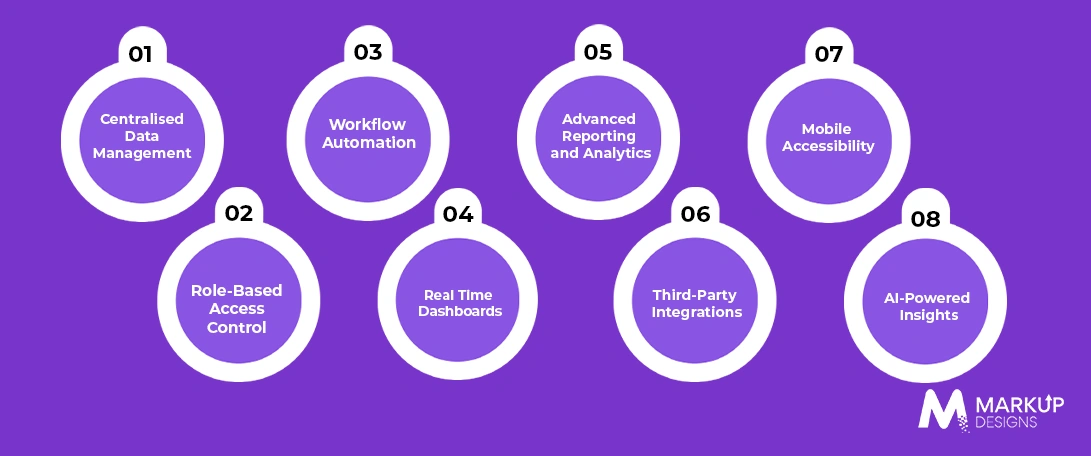
Modern ERP systems need the flexibility, visibility, and automation required for successful management of connected business functions.
Centralized Data Management
Creates one source of truth by integrating data coming from several departments and processes into one interconnected system.
Role-Based Access Control
Limits access based on users’ roles and obligations, thus helping keep sensitive business data secure.
Workflow Automation
Automates repetitive tasks, approvals, and notifications to minimize human effort.
Real-Time Dashboards
Provides an instant overview of key performance and financial indicators in real time, helping teams monitor performance.
Advanced Reporting and Analytics
Turns raw data into valuable reports and insights, thus aiding in data-driven decision-making.
Third-Party Integrations
Provides a connection between the ERP system and already used tools, platforms, and outside services via APIs and other methods of integration.
Mobile Access
Gives authorized users access to the relevant ERP features and data from any device, thus allowing teams to work out of the office.
AI-Powered Insights
Takes advantage of AI to discover patterns and help with forecasting and automation of data-driven processes.
How to Build an ERP System: Step-by-Step Process
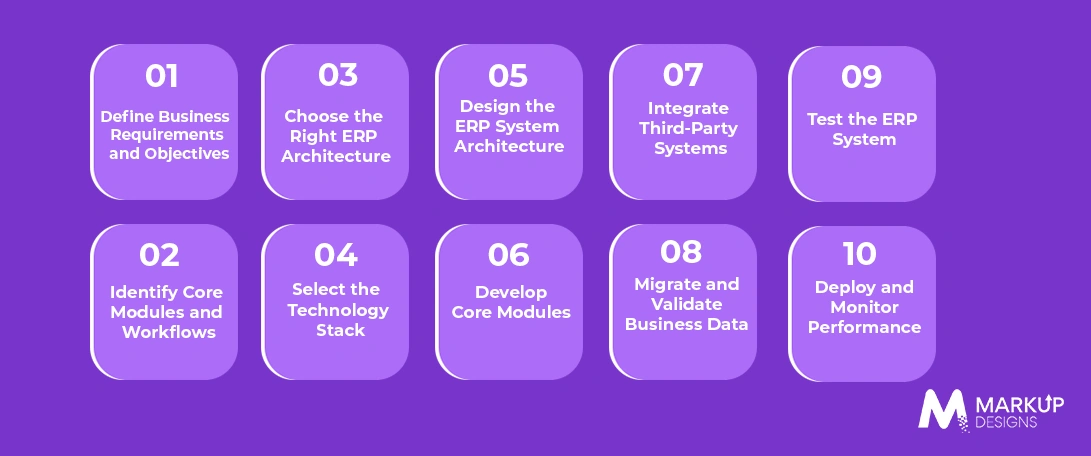
Creating a successful ERP solution requires more than just putting together individual components. At each step, the software should be designed to align with relevant business processes while keeping future expansions and integrations in mind.
Step 1: Define Business Goals and Requirements
Find out the business issues, objectives, and specific tasks that will be targeted by the ERP software.
Step 2: Identify Key Modules and Workflows
Establish which aspects, processes, and departments should be covered by the system.
Step 3: Choose the Correct ERP Architecture
Choose between cloud, on-premises, and hybrid architecture, taking into consideration scalability, accessibility, and security.
Step 4: Choose the Technology Stack
Determine the right combination of technologies in the backend, frontend, integration, cloud, and database layers.
Step 5: Develop the ERP System Architecture
Decide how data will be organized, modules connected, and users served through the system before the development process.
Step 6: Create Core Modules
First, develop and configure the most important modules, allowing them to function in accordance with the real business processes.
Step 7: Connect Third-Party Software to the ERP System
Integrate relevant applications, such as CRM systems, payment services, accounting software, and outside data sources.
Stage 8: Transfer and Confirm the Company’s Data
Move the current information into the new system, fix mistakes in the records, and confirm the accuracy of the information before the actual start.
Step 9: Test the ERP System
The testing process should include operational, integration, security, and working tests to spot problems before the start.
Step 10: Launch the System and Follow its Work
The launching of the ERP system should happen thoroughly, while problems should be solved, and the application should be improved.
Read Also: 7 Phases of Software Development Every Enterprise Should Know
ERP Implementation Process
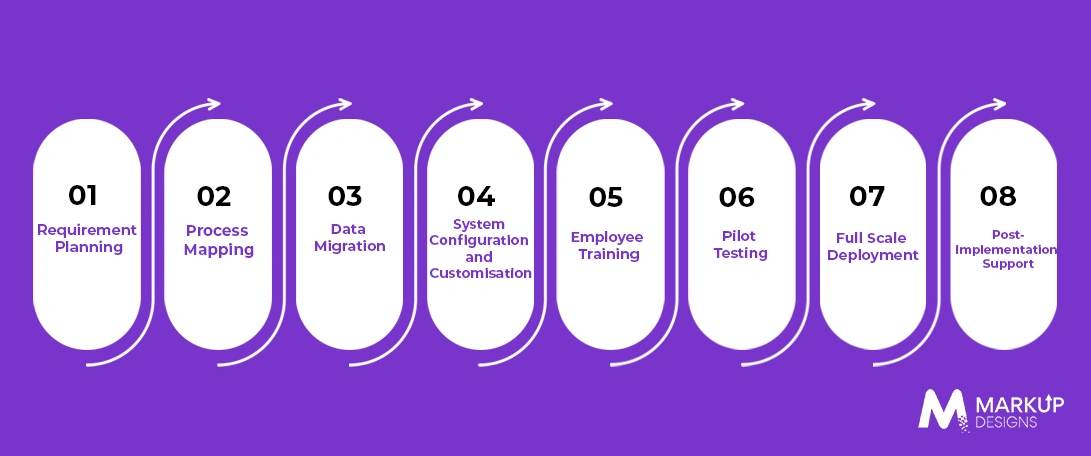
The successful process of ERP implementation requires the proper planning, executing steps with a plan according to a series of principles, as well as the support after the implementation.
Planning
The process of defining business objectives, users’ demands, significant workings processes, and expected results starts before the beginning of the work.
Process Mapping
Process mapping includes findings of the inefficiencies and deciding the way the workings should be performed in the ERP system.
Data Migration
The data from the legacy system should be cleaned, organized, and transferred.
System Configuring
The ERP system should be configured as per business demand and customized if necessary.
Employee Training
Train the workforce to use the various functions of the system, facilitate acceptance, and minimize operational mistakes.
Pilot Testing
Put in place the ERP solution for a group or department first in order to identify defects before a larger implementation.
Full Scale Deployment
Deploy the ERP solution in the organization across the company in a structured manner based on the readiness of the teams, processes, and data.
Post Implementation Support
Keep track of the performance of the system, deal with any defects and optimize it along its evolution.
Technology Stack for ERP Development
The choice of the right tools depends on the scale of the ERP system along with its architecture and integration requirements.
Frontend
Technologies like React, Angular, and Vue.js may be deployed for the creation of user-friendly and responsive ERP interfaces.
Backend
Node.js, Java, Python, and .NET are widely used for backend solution development.
Databases
Systems like PostgreSQL, MySQL, and SQL Server may allow working with structured data, whilst NoSQL technologies may be used for specific cases with high data volumes.
Cloud Infrastructure
Platforms such as AWS, Microsoft Azure and Google Cloud provide scalable computing, storage, backup and deployment capabilities.
APIs and Integration Tools
REST APIs, GraphQL and middleware solutions help connect ERP systems with CRM, accounting, payment and other third-party platforms.
AI and Analytics Technologies
Machine learning frameworks and analytics tools can support forecasting, automation, anomaly detection, and data-driven insights.
Security Technologies
Encryption, identity management, multi-factor authentication, and security monitoring help protect sensitive business and operational data.
Challenges in ERP Development and Implementation
ERP projects can become complex when business processes, legacy systems modernization, and organisational requirements are not managed effectively.
Complex Legacy System Integration
Older systems may use outdated technologies or inconsistent data formats, making integration more difficult and time-consuming.
Data Migration Issues
Incomplete, duplicate, or inaccurate data can affect system reliability if not cleaned and validated before migration.
Scope Creep
Adding new requirements during development can increase costs, extend timelines, and complicate implementation.
User Adoption Resistance
Employees may struggle to adapt to new workflows without proper communication, training, and support.
High Implementation Costs
Custom development, integrations, infrastructure, and ongoing maintenance can significantly increase the overall investment.
Security and Compliance Risks
ERP systems store sensitive business data, making strong access controls, security measures, and regulatory compliance essential.
Scalability Challenges
Poor system architecture can create performance issues as transaction volumes, users, locations, and business operations grow.
Best Practices for Successful ERP Development
A successful ERP project depends on more than choosing the right technology. Clear planning, scalable architecture, and continuous improvement are essential to building a system that delivers long-term value.
Start with Clearly Defined Business Goals
Identify the specific operational problems the ERP should solve and establish measurable outcomes before development begins.
Build a Modular Architecture
Develop independent but connected modules that can be added, updated or expanded without disrupting the entire system.
Prioritise User Experience
Keep workflows intuitive and role-specific to reduce complexity and improve employee adoption.
Plan Data Migration Early
Assess, clean and organise existing data early to avoid delays and accuracy issues during implementation.
Implement Strong Security Controls
Use role-based access, encryption, authentication, and regular monitoring to protect sensitive business data.
Use Agile Development
Build the system in manageable stages, gather feedback, and make improvements throughout the development process.
Invest in Employee Training
Provide practical training that helps users understand new workflows and use the ERP effectively.
Monitor and Optimise Continuously
Track system performance, user feedback, and evolving business needs to identify areas for improvement.
How to Scale an ERP System as Your Business Grows
As operations expand, the ERP system must handle more users, transactions, data, and business processes without affecting performance.
Adopt Cloud Infrastructure
Cloud environments make it easier to scale computing resources, storage, and system capacity as demand increases.
Use a Modular ERP Architecture
A modular structure allows new departments, features, and capabilities to be added without rebuilding the entire platform.
Optimise Database Performance
Regular optimisation, indexing and efficient data management help maintain speed as data volumes grow.
Expand Integrations Through APIs
APIs make it easier to connect new applications, services and business platforms as the technology ecosystem expands.
Introduce AI and Automation
AI and automation can reduce manual workloads, improve process efficiency, and support smarter decision-making at scale.
Strengthen Security and Access Controls
Growing systems require stronger identity management, permissions, and security Operations Services to protect expanding data environments.
How AI Is Transforming Modern ERP Systems
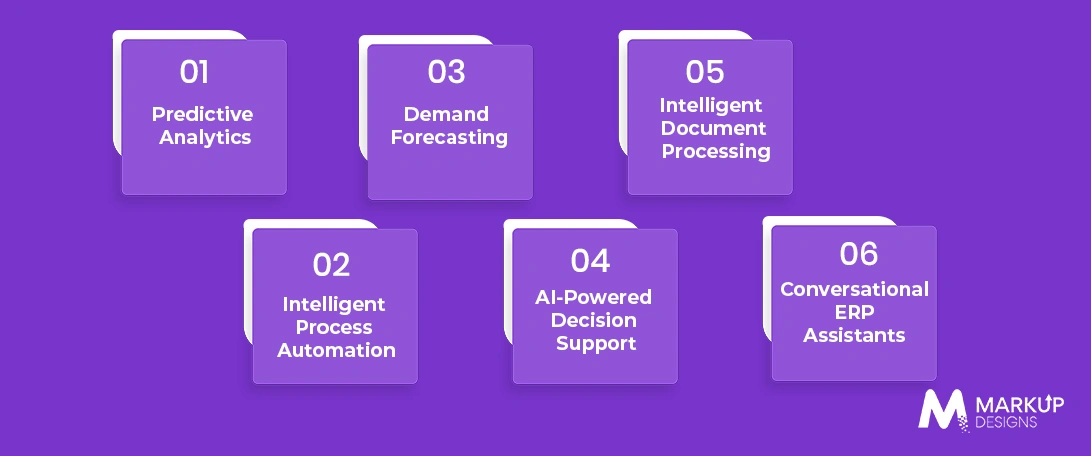
AI is making ERP platforms more proactive by analysing data, identifying patterns, and automating decisions that previously required manual effort.
Predictive Analytics
AI analyses historical and real-time data to identify trends and help businesses anticipate potential outcomes.
Intelligent Process Automation
AI can automate repetitive and data-intensive tasks while improving workflow speed and consistency.
Demand Forecasting
Machine learning models can analyse sales, inventory, and market data to generate more accurate demand predictions.
AI-Powered Decision Support
AI helps decision-makers identify relevant insights, anomalies, and recommendations from large volumes of business data.
Intelligent Document Processing
AI can extract, classify, and process information from invoices, forms, and other business documents, reducing manual data entry.
Conversational ERP Assistants
AI-powered assistants can help users retrieve information, generate reports, and interact with ERP functions using natural language.
ERP Development Cost: What Determines the Investment?
The cost of ERP development depends on the system’s scope, complexity, and long-term requirements. A basic solution with limited modules will require a lower investment than an enterprise platform involving advanced integrations, AI capabilities, and large-scale data migration.
Number and Complexity of Modules
More modules and complex workflows increase development time, testing requirements, and overall project cost.
Customisation Requirements
Highly customised features designed around unique business processes require more development effort than standard functionality.
Third-Party Integrations
Connecting the ERP with CRM, accounting, payment, logistics, or other external platforms can add to development complexity and cost.
Data Migration Complexity
The volume, quality, and structure of existing data can significantly affect the time and resources required for migration.
Technology Stack
Technology choices influence development, infrastructure, and long-term maintenance costs based on scalability and performance needs.
Deployment Model
Cloud, on-premises, and hybrid deployments involve different infrastructure, hosting, and security requirements.
Ongoing Maintenance and Support
Regular updates, security monitoring, performance optimisation, and feature enhancements should be considered as part of the long-term investment.
How to Choose the Right ERP Development Partner
Choosing the wrong development partner can turn an ERP project into an expensive failure. The right team should understand both the technology and the business processes the system is intended to improve.
Industry Experience
Look for a partner with experience building solutions for similar business models, workflows, or industry requirements.
Technical Expertise
The development team should have strong capabilities across architecture, integrations, cloud technologies, data management, and scalable software development.
ERP Customisation Capabilities
Your partner should be able to adapt modules, workflows, and features around actual business requirements rather than forcing your processes into a rigid system.
Security and Compliance Knowledge
Experience with data security, access controls and relevant compliance requirements is essential when handling sensitive business information.
Post Launch Support
ERP development does not end at deployment. Choose a partner that can provide maintenance, monitoring and ongoing enhancements.
Proven Development Methodology
A structured approach to discovery, development, testing, and deployment helps reduce project risks and keeps implementation aligned with business objectives.
How Markup Designs Can Help Build and Scale Your ERP System
Markup Designs helps businesses build ERP systems that align with real operational requirements and future growth plans. Our team supports the complete development journey, from business process analysis and scalable system architecture to custom module development, Enterprise AI integration and third-party connectivity. We also help businesses manage cloud deployment, data migration and continuous optimisation, creating ERP platforms that can evolve alongside changing workflows, users and business demands.
Ready to Build an ERP System That Grows With Your Business?
Transform disconnected processes into a unified, scalable platform. Markup Designs helps businesses plan, develop, and optimise custom ERP solutions built around real operational needs.

Conclusion
ERP development is a long-term business investment, not simply a software project. A well-designed system can connect departments, centralise data, automate workflows and give businesses greater control over complex operations. However, success depends on clearly defined requirements, scalable architecture, accurate data migration and effective user adoption.
As businesses grow, their ERP systems must evolve with them. Modular architecture, cloud infrastructure, APIs and AI capabilities can help organisations expand functionality without rebuilding their entire technology ecosystem. The right development approach ensures the ERP remains relevant, secure and capable of supporting future operational demands.
FAQs
1. What is the time period of development of an ERP system?
The period of development depends on several factors. How many modules will be included, how much customisation is required to build a system, what integrations should be provided, and whether data should be moved to a new system.
2. How much money is required to build a custom ERP system?
The cost will depend on the complexity of the solution, how many modules the system must include, what technologies will be used, what integrations should be provided and how the system will be deployed.
3. Is it better to choose a cloud-based ERP system or on-premises software?
A cloud-based ERP system will suit companies that need an easily scalable system with the possibility of remote access and minimised infrastructure maintenance effort. On-premises ERP software will be needed by companies that require full control over the infrastructure and data and careful compliance with the rules.
4. Is it possible to connect ERP solution with current business solutions?
Definitely. Modern ERP solutions have the opportunity to be connected with different business applications such as CRM systems, accountancy, payment systems, logistics software, and many others.
5. What are some ways AI contributes to ERP functionality?
AI enhances the ERP system by improving its forecasting capabilities, automating repetitive tasks, discovering anomalies, processing large amounts of data, and delivering intelligent recommendations to assist in making quick decisions.
6. Is customized ERP somewhat better than the off-the-shelf ERP?
Not necessarily. Pre-developed ERP solutions may be available for implementation faster than the customized ones, while some off-the-shelf packages may serve the standard needs of businesses pretty well. However, custom ERP solution development is often employed only in case the organization possesses unique business processes, complicated integrations, and requirements that cannot be implemented in a standardized manner.
Author's Perspective
Businesses’ most common mistake in ERP development is concentrating on features only. A long list of modules included does not guarantee that the system itself will be useful. Instead, it should focus on understanding how the company really operates, as well as on ensuring that technology is constructed around these workflows.
The best-performing ERP systems are adaptive and flexible. Start by doing what your company actually needs, create a scalable basis, and then develop further, incrementally responding to changing needs.
Discuss Your Project NowAjit Kumar Jha
VP - Business Operations
Related Posts

Custom Software Development Services in Abu Dhabi for...

Custom Software Development Cost in Bahrain: Factors, Benefits,...
How Much Does Healthcare Software Development Cost in...
Insights Are Valuable & Execution is Priceless
You’ve read about the digital future. Now, let’s build the infrastructure to take you there. Move your strategy from the page to the product.
Design Your Solution Now
Contact Us
Schedule The Appointment At Your Convenience Date And Time.
30 Min
Web Conference
Time Zone
Indian standard time (08:30pm)

Thanks For Getting In Touch!
You’ve Taken The First Step Toward Transforming Your Digital Presence. Our Experts Will Reach Out Shortly To Take It Forward.
Launch Your Dream Project
Provide a brief overview of your project, and our specialists will evaluate your requirements. We will connect with you to explore how the right digital solutions can help you launch faster.