

In Brief
- Understanding Flutter: Clear up how Flutter works, where and why it is applied for the purpose of cross-platform app creation.
- Development Trends in 2026: Know all the latest trends concerning Flutter, from the renewal of rendering and multiplatform realization to AI involvement and modern Dart usage.
- Architecture and Best Practices: Learn to create Flutter applications that are scalable, reliable, secure, and performance-oriented.
- Performance and Business Restrictions: Learn about the improvement of the process of optimization, costs of development, requirements, and all the aspects that can lead to the successful realization of the project.
- The Future of Flutter: See where the development of Flutter is heading to and when the use of Flutter is really beneficial for business purposes.
Flutter originated as a framework only for the cross-platform mobile sphere but turned out to be a bigger technology for mobile, web, and desktop application generation. What makes Flutter so attractive is the ability to write one codebase for all platforms. But the choice of Flutter only depending on how fast it takes to create an application is a poor choice.
However, choosing Flutter based solely on development speed is short-sighted. The quality of the final application depends heavily on architecture, state management, performance optimisation, security, testing, and how effectively native capabilities are integrated.
As Flutter continues to evolve in 2026, organizations and development teams must look beyond the standard cross-platform benefits that Flutter offers. Advancements in rendering, Dart, web capabilities, developer tools, and multi-platform capabilities impact the design and development of Flutter apps. This guide will provide insights, trends, and practical strategies for assessing whether Flutter is the right option for companies by developing apps that are stable, scalable, and competitive at their launch.
What Is Flutter App Development?
Flutter application development is building applications using Flutter – a UI framework by Google that is open-source. Flutter makes it possible for developers to build apps for different platforms using a common codebase while keeping the user experience the same.
How Does Flutter Work?
Dart:
Provides application logic and functionality.
Widget-based UI:
Uses reusable widgets to design interfaces.
Rendering engine:
Converts Flutter widgets into visual representations.
Platform integration:
Connects apps to native characteristics of devices and platform APIs.
Why Are Businesses Choosing Flutter?
Flutter helps businesses reduce duplicate development work while accelerating product delivery. Its shared codebase, consistent UI, and faster development workflow make it particularly useful for products targeting multiple platforms.
Key Benefits of Flutter App Development
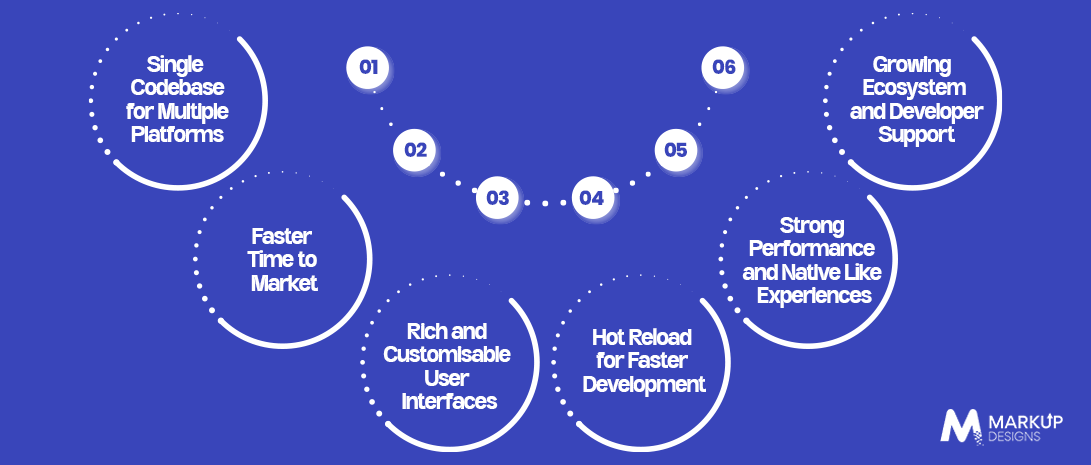
Single Codebase for Numerous Platforms
Using a common codebase creates mobile applications for Androids, iPhones, web and other compatible platforms.
Quicker Time to Market
Hot Reload and reusable utilities allow developers to create and examine functionalities much faster than before.
Improvable UIs
Flutter allows controlling UI components, animations and interaction.
Reliable Performance
Flutter’s rendering method allows for continuously flowing application performance.
Easy Care
Common codebase allows for making updates, repairing bugs and adding improvements with ease.
What Kind of Programs Can Be Developed Using Flutter?
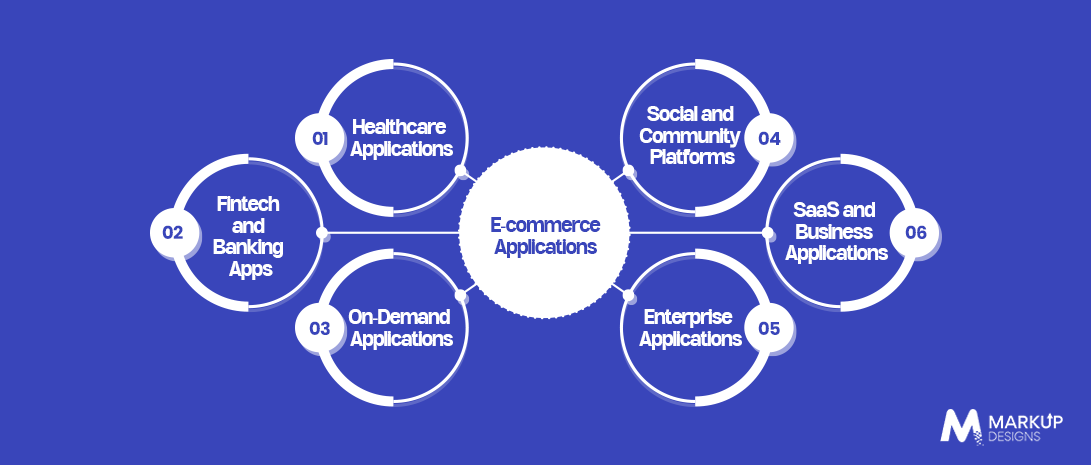
Flutter can be used to develop far more than simple mobile applications. Its cross platform capabilities, UI flexibility and ability to integrate with APIs, databases, cloud services and device features make it suitable for a wide range of consumer facing and business applications.
However, the fact that an application can be built with Flutter does not automatically mean it should be. The right choice depends on the application’s functionality, performance requirements, target platforms and long term product strategy.
Here are some of the application types where Flutter can be a practical technology choice.
E-commerce Apps
Flutter can be used to build e-commerce applications that combine product discovery, search, filtering, shopping carts, checkout, payment integration, order tracking, and customer accounts within a single mobile experience.
For businesses, a shared Flutter codebase can help maintain a consistent shopping journey across Android and iOS while allowing teams to update features and interfaces efficiently.
Flutter can be particularly useful for retailers launching a new mobile shopping channel, expanding an existing web store into mobile, or testing a new commerce concept before making a larger technology investment.
Fintech Apps
Financial applications can include personal finance platforms, digital wallets, investment applications, payment solutions, insurance platforms, and money management tools.
Flutter can provide the interface layer for these products while connecting with secure backend systems, payment gateways, APIs, authentication services and financial data platforms.
However, fintech applications have demanding security, compliance and performance requirements. Flutter should therefore be considered as part of the wider technology architecture rather than as a complete solution for financial security.
Healthcare Apps
Healthcare organisations can use Flutter to develop patient portals, appointment booking applications, telemedicine platforms, medication management tools, health tracking applications and provider-facing solutions.
A shared codebase can help healthcare businesses maintain a consistent experience across devices while integrating with backend systems and relevant healthcare APIs.
For healthcare projects, factors such as data protection, authentication, interoperability, and regulatory requirements need to be considered during architecture and technology selection.
On-Demand Apps
On-demand businesses depend on real-time interactions between customers, service providers, and administrators. Examples include food delivery, transportation, home maintenance, beauty services and logistics platforms.
Flutter can support customer and service provider applications with features such as location services, booking, payments, notifications, order tracking, and communication.
For businesses entering a competitive on-demand market, the ability to develop and iterate multiple mobile applications from a shared technology foundation can help simplify product development.
Social and Community Apps
Social platforms require more than user profiles and content feeds. They may include messaging, media uploads, notifications, reactions, comments, communities, content discovery, and real-time interactions.
Flutter can provide the front-end experience while backend services manage user accounts, content, messaging, and data processing.
This makes it suitable for businesses building niche communities, membership platforms, or social products where consistent design and frequent interface iteration are important.
Enterprise and SaaS Applications
Flutter is also relevant beyond consumer applications. Businesses can use it to create mobile interfaces for CRM platforms, workforce management systems, inventory solutions, field service applications, dashboards, and SaaS products.
For example, a field service company could use a Flutter application to allow employees to access customer information, update job statuses, upload documents, and capture information while working remotely.
The business case is strongest when employees need access to the same core workflows across different mobile platforms without maintaining completely separate applications.
Flutter App Development Trends to Watch in 2026
Flutter is developing far beyond basic cross-platform development as features such as performance improvements, better web capabilities, platform integration, and improvements in developer tools change its future.
Impeller and Better Rendering Performance
The Impeller rendering engine of Flutter is improving both the animation performance and the rendering process and its consistency regarding visual effects on any of the supported platforms.
WebAssembly for Flutter Web
WebAssembly is making Flutter more powerful in terms of delivering more efficient web performance.
AI Integration in Flutter applications
Flutter applications are being increasingly used as interfaces in AI-based technologies.
Cross-platform development
The abilities of Flutter go beyond simple Android and iOS development and thus allow for the creation of various applications.
Great Native Integration
The integration with different platform-specific APIs has allowed Flutter developers to make the existing solution even more versatile.
Modern Dart Development
Dart continues to evolve and make the Flutter development process much easier.
New Developer Tools
Flutter DevTools and the development environment itself allow for great debugging and profiling.
Flutter App Architecture: What Businesses Need to Know
In order to easily develop, test, maintain, and scale a Flutter application, architecture needs to be planned properly. For business applications, separating presentation from processing and data ensures a manageable codebase even as applications grow.
Why Architecture Matters in Flutter Development
Good architecture enhances maintainability, testability, scalability, and collaboration, which minimizes the chance of tight coupling.
MVVM Architecture for Scalable Applications
MVVM architecture provides a clear distinction between the UI and the application logic that enables easier development and testing of individual components. Flutter architecture suggestions advise separating UI and data with the help of views, view models, repositories, and services.
Repository Pattern for Data Management
Repositories provide a consistent layer for working with data coming from APIs, databases, and other sources without exposing information about this work to the UI.
Dependency Injection
By separating dependencies from the classes that use them, dependency injection simplifies testing, replacing, and maintaining components.
State Management Strategies
It is recommended to choose state management depending on your application’s complexity, your team’s experience, and scalability needs.
When to Introduce a Domain Layer
A domain layer can be useful when business rules become complex and need to remain independent from the UI and data layers.
Essential Features of a Modern Flutter App
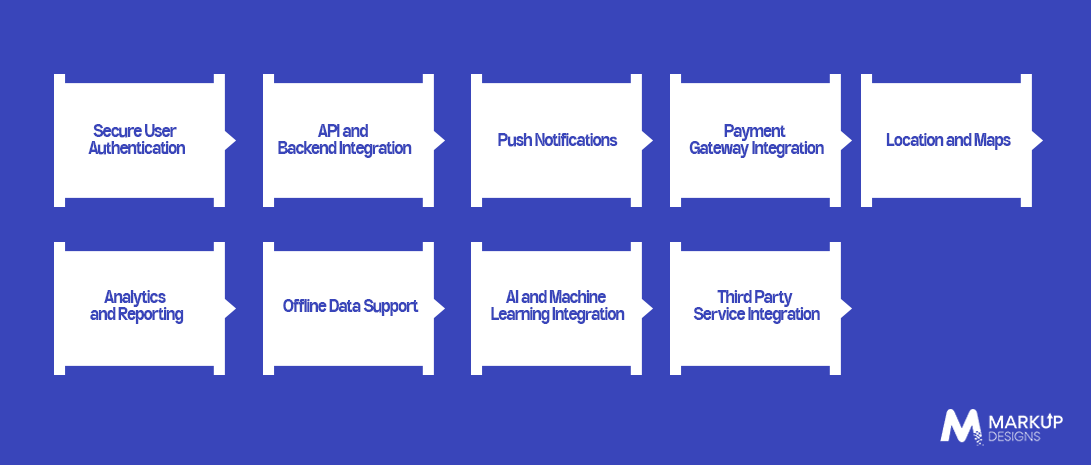
Different products will require distinct features, but it is common for Flutter applications to avail of:
Secure User Authentication
Making sure that all appropriate authentication methods would be used during login, registration and while maintaining sessions
API and Backend Integration
APIs let the application work with back-end services for data transfer and business processes.
Push Notifications
It helps keep users informed about any events or updates.
Integration of Payment Gateway
Allows transactions to be made inside the app.
Location and Maps
This function becomes necessary while dealing with the delivery of goods, logistics, traveling etc.
Analytics and Reporting
It tracks user activity and the results of the application.
Offline Data Support
Ensures that some processes would work even without any connection.
AI and Machine Learning Integration
Allows implementing such features as suggestions and virtual assistants.
Third Party Service Integration
Connecting the application with outside services: CRM, cloud storages, communication and marketing platforms.
Flutter App Development Best Practices
Good Flutter development is more about structuring the application properly, making it easy to test and maintain rather than adding technologies.
Follow a Scalable Project Structure
Organise files and modules logically so the codebase remains manageable as the application expands.
Keep Business Logic Out of Widgets
Widgets should focus primarily on presentation rather than handling complex business operations.
Use Reusable Components
Create reusable widgets and components instead of repeatedly building the same interface elements.
Implement Proper State Management
Use an approach that matches the application’s complexity and avoids unnecessary state updates.
Apply Dependency Injection
Keep dependencies manageable and make individual components easier to test.
Follow Dart and Flutter Coding Standards
Consistent naming, formatting, and coding practices improve readability and team collaboration.
Write Unit, Widget and Integration Tests
Test individual logic, UI components, and complete application flows to identify problems before release.
Use Version Control and CI/CD
Automated builds, testing, and deployment help teams release updates more reliably.
How to Optimise Flutter App Performance
Performance should be considered throughout development rather than treated as a final stage before launch.
Minimise Unnecessary Widget Rebuilds
Reduce avoidable rebuilds to keep interfaces responsive.
Use const Widgets Wherever Appropriate
Const widgets can reduce unnecessary work during widget reconstruction.
Optimise Lists and Grids
Use lazy loading and efficient list construction for large datasets.
Reduce Expensive Layout Operations
Keep widget trees efficient and avoid unnecessary layout calculations.
Optimise Images and Assets
Compress, resize, and load visual assets appropriately to reduce memory and loading costs.
Monitor Performance With DevTools
Use Flutter’s profiling tools to identify rendering, memory and performance bottlenecks.
Test Performance in Profile Mode
Evaluate performance in conditions closer to production rather than relying only on debug mode.
Flutter App Security Best Practices
Security needs to be built into the application from architecture through deployment, particularly when handling personal, financial, or business data.
Secure API Communication
Use encrypted communication and secure authentication mechanisms when exchanging data.
Protect Sensitive User Data
Minimise collected data and protect sensitive information both in transit and at rest.
Implement Strong Authentication
Use secure authentication and appropriate session management for the application’s risk level.
Secure Local Data Storage
Store sensitive information using secure platform-supported storage rather than plain text.
Manage API Keys and Secrets Properly
Never expose sensitive credentials directly in application code or public repositories.
Keep Dependencies Updated
Regularly review Flutter, Dart, and third-party packages for security issues and compatibility.
Conduct Security Testing Before Deployment
Test authentication, authorisation, data handling, APIs, and common attack surfaces before releasing the application.
Flutter vs Native App Development: Which Approach Is Better?
Flutter and native app development both have clear advantages. The right choice depends on the application’s requirements, target platforms, performance expectations and long term maintenance needs.
Flutter vs Android Development
Compare shared codebase benefits with Android-specific capabilities, native APIs and platform optimisation.
Flutter vs iOS Development
Consider development efficiency against Apple’s platform-specific features, native integrations and iOS-focused experiences.
Development Speed
Flutter can reduce duplicate development work when the same product needs to support multiple platforms.
Performance
Native development can provide deeper platform optimisation, while well built Flutter applications can deliver strong performance for most business use cases.
UI Consistency
Flutter offers greater control over creating a consistent interface across platforms.
Maintenance and Scalability
A shared Flutter codebase can simplify updates, although complex applications still require disciplined architecture and platform specific expertise.
Development Cost
Flutter can reduce development effort for multi-platform products, but actual costs depend on application complexity and requirements.
Read Also: React Native vs Native App Development: Cost & Performance
Flutter vs React Native: What Should Businesses Choose?
Both frameworks support cross-platform development, but their architecture, ecosystem, and development approaches differ.
Programming Language and Ecosystem
Compare Dart and JavaScript or TypeScript, along with their respective development ecosystems.
Performance and Rendering
Examine how each framework handles rendering, animations and application performance.
UI Development
Compare widget-based development with React Native’s component approach and platform UI integration.
Native Integration
Evaluate access to native APIs, modules, and platform-specific functionality.
Development Experience
Consider tooling, debugging, hot reload, documentation, and developer productivity.
Community and Ecosystem
Compare available libraries, packages, developer communities, and third-party support.
Long-Term Scalability
Assess which option better fits the application’s expected complexity, team capabilities, and future requirements.
How Much Does Flutter App Development Cost?
There is no fixed price for Flutter development. The final cost depends on the application’s scope, technical complexity, and development requirements.
Factors Affecting Flutter App Development Cost
App Complexity
Simple applications require less development effort than feature-rich enterprise products.
Number of Platforms
Supporting mobile, web, or desktop alongside Android and iOS can affect development and testing requirements.
UI/UX Requirements
Custom interfaces, animations, and advanced interactions can increase design and development effort.
Backend and API Integration
Complex backend systems, APIs and real time functionality can add to development costs.
Third Party Integrations
Payments, maps, analytics, communication tools and other external services can affect the overall budget.
Developer Expertise and Location
Team experience, technical specialisation and location influence development rates.
Maintenance and Post-Launch Support
Updates, monitoring, bug fixes, security patches and new features contribute to the long term cost.
How to Reduce Flutter Development Costs Without Compromising Quality
Start with a focused MVP, prioritise essential features, use reusable components and establish the right architecture before development scales.
How to Build a Successful Flutter App
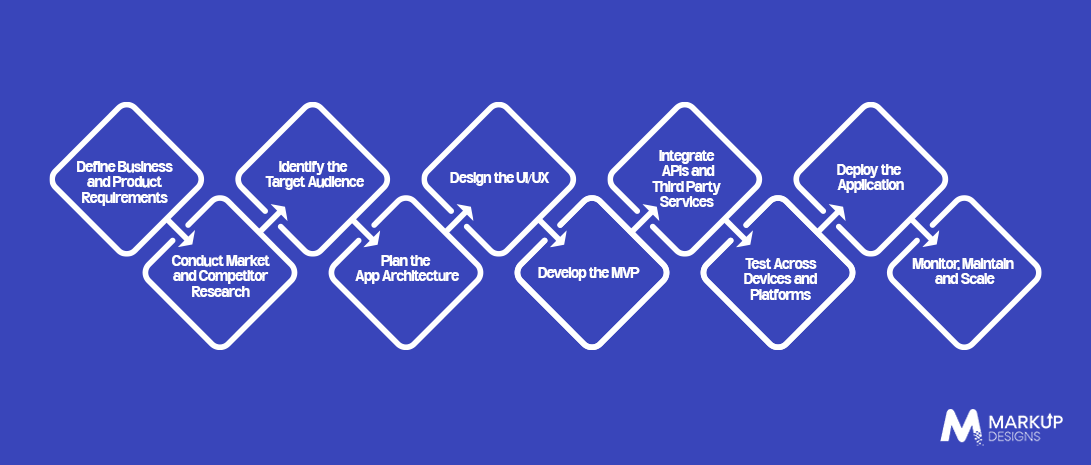
Define Business and Product Requirements
Establish the problem, objectives, features and measurable business goals.
Conduct Market and Competitor Research
Identify market gaps, competing products and opportunities for differentiation.
Identify the Target Audience
Understand user expectations, behaviours and platform preferences.
Plan the App Architecture
Choose the architecture, state management approach, backend structure and integrations before development.
Design the UI/UX
Create intuitive interfaces and responsive user experiences for the target platforms.
Develop the MVP
Build the essential functionality first and validate the product before expanding its scope.
Integrate APIs and Third Party Services
Connect the application with the backend and required external services.
Test Across Devices and Platforms
Test functionality, performance, security and usability across supported environments.
Deploy the Application
Prepare the application for the relevant app stores and production environments.
Monitor, Maintain and Scale
Track performance and user feedback, resolve issues and continuously improve the application.
Common Challenges in Flutter App Development
Flutter simplifies cross-platform development, but it does not eliminate technical challenges.
Managing Platform-Specific Requirements
Some features still require native Android or iOS implementation.
Large Application Size
Flutter applications can have a larger footprint than some native alternatives, depending on configuration and dependencies.
Dependency and Plugin Management
Third-party packages need careful evaluation for reliability, compatibility, and long-term maintenance.
Performance Issues From Poor Implementation
Inefficient widget trees, unnecessary rebuilds, or poorly handled resources can affect performance.
Complex Native Integrations
Specialised device features may require platform-specific code alongside Flutter.
Maintaining Large Flutter Codebases
Without clear architecture and coding standards, growing applications can become difficult to maintain.
When Should You Choose Flutter for App Development?
Choosing Flutter should not be based simply on the fact that it can build applications for multiple platforms. The better question is whether Flutter aligns with your product goals, development timeline, user experience requirements, budget, and long-term roadmap.
For business owners and product teams, the following scenarios can help determine whether Flutter is a practical technology choice.
When Android and iOS Need to Launch Together
If your product needs to reach both Android and iOS users without maintaining two completely separate mobile codebases, Flutter can be a strong option. A shared codebase allows teams to build and maintain much of the application logic across platforms while still delivering platform-specific functionality where required.
Choose Flutter when: your priority is launching comparable Android and iOS experiences while reducing duplicated development effort.
Think twice when: your application depends heavily on highly specialised native functionality or platform-specific behaviour that requires extensive native development.
When Time to Market Is a Business Priority
For startups and businesses working against a tight launch window, development efficiency can directly affect the product roadmap. Flutter allows teams to work from a shared codebase and use hot reload during development, which can make UI iteration and testing more efficient.
Choose Flutter when: you need to launch an MVP, validate a product idea or release an initial version within a defined timeframe.
Think twice when: speed is being prioritised at the expense of proper architecture, testing or long term maintainability. Flutter does not compensate for weak engineering practices.
When Brand Consistency Matters Across Platforms
Businesses that invest heavily in a distinctive mobile experience may want Android and iOS applications to look and behave consistently. Flutter provides extensive control over the UI, allowing teams to create a unified visual system rather than relying entirely on each platform’s default interface components.
Choose Flutter when: maintaining consistent branding, layouts, animations and interactions across platforms is important.
Think twice when: your product specifically needs each platform to follow deeply native interaction patterns.
When You Need to Validate an MVP Before a Larger Investment
Flutter can be particularly useful when the business case has not yet been fully validated. Instead of funding two independent mobile applications from the beginning, a team can develop an MVP with a shared foundation, gather user feedback and determine which features deserve further investment.
Choose Flutter when: you need to test product-market fit before committing significant development resources.
Think twice when: the MVP is expected to rely on complex native capabilities that may require substantial platform specific work from the outset.
When Your Product Roadmap Extends Beyond Mobile
If your long term roadmap includes platforms such as web or desktop alongside Android and iOS, Flutter may provide an opportunity to extend parts of the product across multiple environments. However, this should be evaluated against the requirements of each platform rather than assumed to be a guaranteed advantage.
Choose Flutter when: multiple platform support is part of the roadmap and the product experience can remain consistent across those environments.
Think twice when: each platform requires substantially different functionality, interaction models or performance characteristics.
When You Need a Product That Can Scale
Flutter can support applications that grow in users, features and complexity, but the framework alone does not make an application scalable. Architecture, state management, API design, backend infrastructure, testing and code quality will have a much greater impact on long term maintainability.
Choose Flutter when: you have an experienced engineering team capable of building a modular, testable and maintainable architecture.
Think twice when: the project is expected to scale rapidly but there is no clear technical architecture or engineering strategy.
A Practical Decision Framework
Flutter is generally a strong candidate when you need Android and iOS development, faster product validation, consistent UI and efficient development from a shared codebase.
It may be less suitable when your application depends heavily on specialised native capabilities, requires fundamentally different platform experiences or has performance requirements that demand extensive platform specific optimisation.
The right decision is therefore not simply “Can Flutter build this app?” Almost certainly, in many cases, it can. The more important question is “Does Flutter provide the right balance of development efficiency, product experience, technical flexibility and long term maintainability for this particular application?”
When Flutter May Not Be the Right Choice
Flutter is not automatically the best technology for every application.
Apps Requiring Heavy Platform Specific Functionality
Native development may be more appropriate when the product depends extensively on specialised platform APIs.
Extremely Graphics Intensive Applications
Applications with demanding graphics or specialised rendering requirements may require a different technical approach.
Projects Dependent on Highly Specialised Native SDKs
If critical functionality relies on native SDKs without mature Flutter support, native development may reduce technical complexity.
Apps Where Platform Specific UX Is the Primary Requirement
Native development may be preferable when each platform requires a deeply platform specific experience.
How to Choose a Flutter App Development Company
Evaluate Technical Expertise
Look for experience with Flutter architecture, Dart, APIs, testing and native integrations.
Review Previous Flutter Projects
Assess the quality, complexity and relevance of their previous applications.
Check Architecture and Development Practices
Ask how the team approaches scalability, state management, testing, and code quality.
Assess UI/UX Capabilities
Review whether the team can create functional interfaces rather than simply attractive designs.
Evaluate Testing and Security Processes
Understand how the application will be tested, secured and prepared for production.
Check Post Launch Support
Confirm what maintenance, monitoring and upgrade services are available after launch.
Understand Pricing and Development Timelines
Request a transparent scope based estimate rather than choosing a vendor solely on the lowest quote.
Future of Flutter App Development
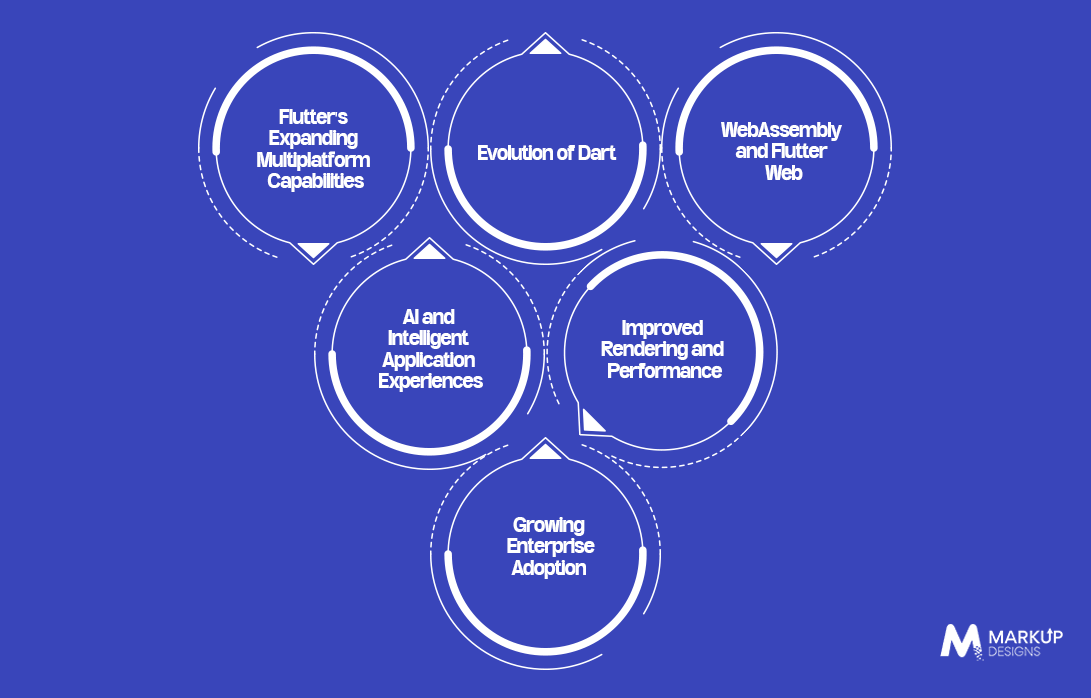
Flutter’s future is moving beyond its original cross platform mobile positioning, with continued development around performance, multiplatform support, Dart and web technologies.
Expanding Multiplatform Capabilities
Flutter continues to support broader application development across mobile, web and desktop environments.
Evolution of Dart
Ongoing Dart improvements are focused on developer productivity, performance and modern application development.
WebAssembly and Flutter Web
Wasm is an important area of web application development for improving Flutter’s capabilities on the web.
AI and Intelligent Application Experiences
AI integrations are creating opportunities for smarter search, recommendations, assistants and automated workflows within Flutter applications.
Improved Rendering and Performance
Continued work on Flutter’s rendering technology aims to improve application responsiveness and visual performance.
Growing Enterprise Adoption
As the ecosystem matures, Flutter is becoming a more viable consideration for larger business applications where cross-platform efficiency is important.
Flutter’s 2026 roadmap continues to focus on Dart, WebAssembly, performance, platform integration, and predictable development releases, indicating that the framework is being developed as more than just a mobile UI toolkit.
How Markup Designs Can Help With Flutter App Development
Choosing Flutter is only the starting point. Successful application development requires the right architecture, design, integrations, and ongoing optimisation. Markup Designs can support the complete development lifecycle, from initial technology planning to post-launch scaling.
Flutter Consulting and Technology Selection
Assess your product requirements and determine whether Flutter is the right fit for your application and business goals.
UI/UX Design
Create intuitive, responsive interfaces designed around user behaviour and platform requirements.
Custom Flutter Application Development
Build scalable Flutter applications for Android, iOS, and other supported platforms.
API and Third-Party Integrations
Connect applications with APIs, payment gateways, cloud services, and other business systems.
Backend Development
Develop secure and scalable backend infrastructure to support application functionality and data management.
Testing and Quality Assurance
Test functionality, usability, compatibility, performance and security before release.
App Deployment
Prepare and deploy applications across the required platforms and environments.
Maintenance and Scaling
Provide ongoing updates, performance improvements, bug fixes and feature enhancements as the application grows.
Build Your Next App With Flutter
From product strategy and UI/UX to development, testing and scaling, build a Flutter application around your actual business requirements.

Conclusion
Flutter offers businesses a practical way to build applications across multiple platforms, but its value goes beyond maintaining a shared codebase. The right architecture, performance strategy, security practices and development approach determine whether a Flutter application can remain reliable as users and features increase. By evaluating these factors from the beginning, businesses can use Flutter web applications that are efficient to launch and easier to maintain and scale over time.
FAQs
1. Is Flutter good for app development in 2026?
Yes. Flutter remains a strong option for cross platform application development, particularly when businesses want to support multiple platforms from a shared codebase. The suitability still depends on the application’s technical and platform specific requirements.
2. Is Flutter suitable for large scale applications?
Yes. Flutter can support large applications when they are built with a scalable architecture, appropriate state management, effective testing and well structured code.
3. How much does it cost to develop a Flutter app?
The cost depends on factors such as application complexity, number of platforms, UI/UX requirements, backend development, integrations, development team and ongoing maintenance.
4. How long does it take to develop a Flutter application?
Development time varies according to scope and complexity. A basic MVP may take considerably less time than a feature rich enterprise application requiring complex integrations and backend systems.
5. Is Flutter better than React Native?
Neither is universally better. The right choice depends on factors such as development expertise, application requirements, performance expectations, native integrations, and long-term maintenance needs.
6. Is Flutter suitable for both Android and iOS?
Yes. Supporting Android and iOS from a shared Flutter codebase is one of its primary advantages, although platform-specific functionality may still require native implementation.
Author's Perspective
A successful Flutter app is not defined by how quickly it launches. It is defined by how well it performs after launch. The real advantage of Flutter comes from combining cross platform development with sound architecture, thoughtful UX, reliable integrations and disciplined engineering. Businesses should choose Flutter because it fits their product strategy, not simply because it promises faster development.
Discuss Your Project NowGaurav Goyal
Global Sales- VP
Related Posts

Why UAE Startups Choose Flutter for MVP App...
Insights Are Valuable & Execution is Priceless
You’ve read about the digital future. Now, let’s build the infrastructure to take you there. Move your strategy from the page to the product.
Design Your Solution Now
Contact Us
Schedule The Appointment At Your Convenience Date And Time.
30 Min
Web Conference
Time Zone
Indian standard time (08:30pm)

Thanks For Getting In Touch!
You’ve Taken The First Step Toward Transforming Your Digital Presence. Our Experts Will Reach Out Shortly To Take It Forward.
Launch Your Dream Project
Provide a brief overview of your project, and our specialists will evaluate your requirements. We will connect with you to explore how the right digital solutions can help you launch faster.