
In Brief
- Web application development refers to the process of creating web-based applications that allow users to conduct interactive operations, handle information, and use services without having to download any software on their gadgets.
- Current web applications are built using client-server architecture, API, cloud technology, database systems, and responsive front-end technologies, providing users with a secure, robust, and effective experience.
- Companies from different fields allocate resources to custom web application development to improve their processes, enhance the level of customer involvement, automate their activities, and facilitate their digital transformation.
- The price of creating a web application is usually from $30,000 to $300,000+, being influenced by the level of complexity of the app, its features, integration methods, technology stack, security needs, and the team engaged in its development.
- It is very important to choose the right company specializing in web application development in order to create solutions capable of providing users with a great experience and using enterprise-level security solutions, as well as scalable architecture.
As society turned digital in 2026, web applications started moving far beyond common websites and becoming the core of customer engagement, workflow processes, and innovations.
Web applications have created opportunities for organizations to offer end-users a smooth experience, as they can access any platform with the help of a web browser. Thanks to their real-time communication, cloud compatibility, ability for cross-platform usage, and no interruption in updates, web application programming has become an effective investment for any company that wants to be competitive in today’s digital economy.
It does not matter if you are about to create an online portal, corporate management tool, e-commerce platform, or any other type of application; being aware of the web app development process is crucial in making the right decisions along the way. The given article covers all aspects of web development, from its definition to benefits and features, required team structure and technology stack, development challenges and security actions, and project budget, so that you get complete information about the process.
Web Apps vs Websites
Although the terms web application and website are often used interchangeably, they serve distinct purposes and are built with different objectives in mind. A website primarily delivers information to visitors, while a web application enables users to interact with the system, perform tasks, manage data, and collaborate in real time. Understanding these differences helps businesses choose the right solution based on their operational and customer engagement goals.
| Feature | Web Application | Website |
| Definition | A browser-based software application designed to perform specific functions and process user interactions. | A collection of web pages primarily created to provide information to visitors. |
| Purpose | Enables users to complete tasks such as booking appointments, managing projects, shopping online, or collaborating. | Shares information, promotes a brand, educates visitors, or publishes content. |
| Interactivity | Highly interactive with forms, dashboards, user accounts, and real-time functionality. | Limited interaction, mainly navigation, contact forms, or basic enquiries. |
| Content | Dynamic and personalised based on user roles, preferences, or data. | Mostly static content with occasional updates. |
| Development Complexity | Requires frontend and backend development, APIs, databases, authentication, and business logic. | Primarily focuses on frontend design and content management with minimal backend functionality. |
| User Authentication | Commonly includes secure login systems, user roles, permissions, and personalised dashboards. | Usually not required unless the website includes a member portal or restricted content. |
| Updates | Frequently updated with new features, security patches, integrations, and performance enhancements. | Updated periodically to refresh content, design, or company information. |
| Examples | Google Docs, Salesforce, Slack, Trello, Canva, Shopify. | Corporate websites, news portals, blogs, educational websites, company portfolios. |
Web Applications vs Mobile Apps
Both web applications and mobile applications deliver digital services, but they differ in how users access them, how they are distributed, and the technologies used to build them. The right choice depends on business objectives, target audience, budget, and the level of device functionality required.
| Feature | Web Application | Mobile Application |
| Platform | Runs through a web browser on desktops, tablets, and smartphones. | Installed directly on Android or iOS devices. |
| Distribution | Accessible instantly through a URL without installation. | Distributed through app stores such as Google Play and the Apple App Store. |
| User Experience | Provides a responsive experience across multiple devices with internet connectivity. | Offers a highly optimised experience by leveraging native device capabilities. |
| Complexity | A single codebase can support multiple platforms, simplifying development and maintenance. | Often requires separate development for Android and iOS unless cross-platform frameworks are used. |
| Accessibility | Accessible from virtually any internet-enabled device with a browser. | Requires installation and periodic updates on each device. |
Benefits of Web Application Development
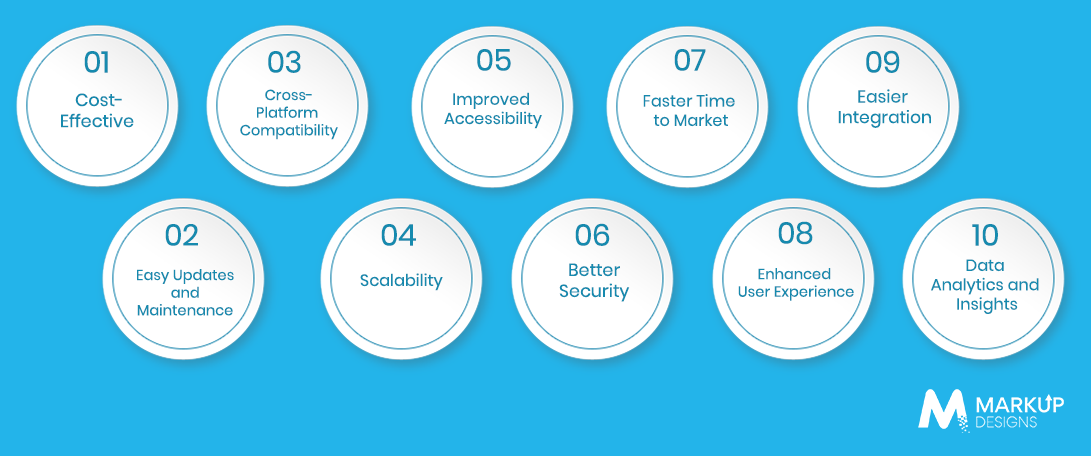
Investing in web application development helps businesses optimize their operations, enhance user interaction, and create scalable digital experiences independent of the limitations of different platforms. Modern web applications support business development by combining flexibility, accessibility, and enterprise-level efficiency and simplifying operational processes.
Cost Efficiency
Unlike developing several native applications for a range of operating systems, web applications give a more cost-effective option for business development. Web applications enable companies to develop and support only one web application that is used across various devices and browsers, thus saving on development, deployment, and further maintenance costs and increasing ROI.
Easy Updates and Maintenance
Due to the centralized hosting of the web application, developers can implement various updates and improvements, including bug-fixing and security updates, without forcing users to download and install any updates on their computers.
Cross-Platform Compatibility
A quality web application should be able to work well with any desktop, laptop, tablet, and smartphone, independently of its operating system.
Scalability
Nowadays, web applications are made adaptive to the changing requirements of business development. Using cloud technologies, microservices, and container services, companies can handle their workloads without loss of quality.
Better Accessibility
Internet-connected devices help users to connect to web services no matter where they are. This enables remote work and allows organizations to provide their services worldwide.
Improved Security
Enterprise web applications use many security techniques to protect important business data, including encryption, two-factor authentication, and the use of secure APIs.
Faster Time to Market
Modern approaches in development enable businesses to create applications much more efficiently and quickly. Faster deployment enables organisations to validate ideas quickly, respond to market demands, and gain a competitive advantage.
Enhanced User Experience
Responsive designs, intuitive navigation, personalized dashboards, and real-time interactions enable a seamless user experience. A well-designed web application enhances customer satisfaction, boosts engagement, and fosters long-term user retention.
Easier Integration
Web applications can connect with numerous third-party services such as payment systems, CRM applications, ERP solutions, analytical tools, cloud services, communication services, and AI solutions. This connectivity increases operational efficiency, thus enabling businesses to automate processes.
Data Analytics and Insights
Integrated analytical tools allow businesses to track user behavior, application efficiency, conversion rates, and operational indicators in real time. Such information allows businesses to make informed decisions, discover improvement possibilities, and continuously upgrade their digital products.
Types of Web Applications
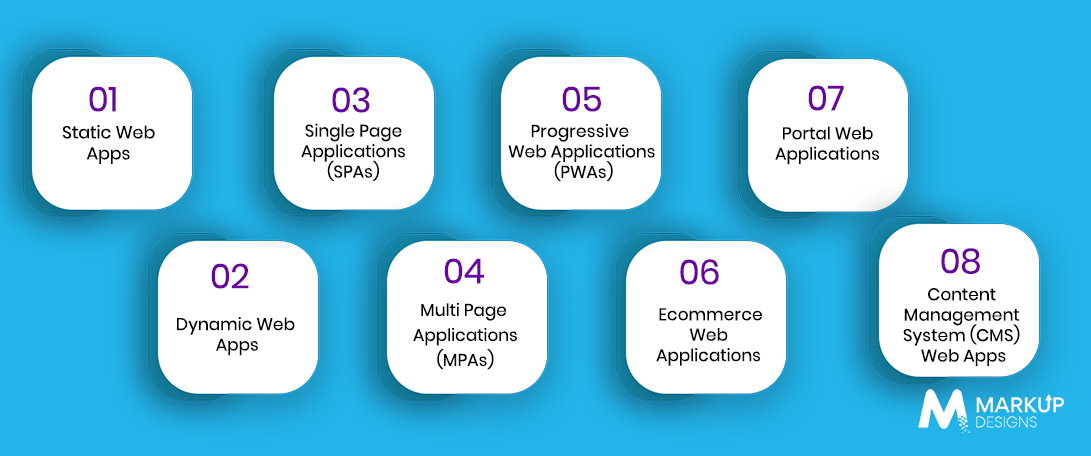
Web applications can fulfill various business needs, from showing basic information to handling complex business processes. Choosing a proper type of web application is determined by such criteria as business objectives, target audience, scalability requirements, and level of user engagement necessary.
Here are some common types of web applications along with examples of how they can be applied.
Static Web Applications
Static web applications are composed of unchanging pages that have the same content for every user, unless the developers choose to change anything in it. This type of application is lightweight and is quick to load and can therefore be used by companies in need of online presence but without complex functionality and frequent content changes.
Industries
- Corporate organizations
- Professional services
- Educational institutions
- Personal portfolios
- Event websites
Examples
- Corporate websites
- Landing pages
- Product showcasing websites
- Online portfolios
Dynamic Web Applications
Unlike the static version, dynamic web applications create content on the fly according to the user’s requests, preferences, and database. They need server processing, databases, and APIs to create a personalized experience and are suitable for companies that regularly change their content or have a high volume of users.
For example, Netflix customizes movie suggestions of movies, user playlists, and streaming automatically based on viewing habits.
Industries
- Entertainment
- Banking and finance
- Healthcare
- Social media
- Traveling
Examples
- Netflix
- Banks’ sites
Single Page Applications
Single Page Applications load a single web page and update the content with the help of dynamic methods without reloading the page.
A multi-page application is an application made of multiple pages. It involves separate requests made to the server for every page. It is the best choice for applications with huge content, several routes for users, and vast businesses with each page designed for a specific need.
Industries
- Ecommerce
- Government
- Banking
- Academia
- Enterprise Software
Examples
- Amazon
- eBay
- Government portals
- Online banking websites
Progressive Web Applications (PWAs)
PWAs fuse the ease of web applications with a plethora of features usually associated with native mobile apps. Progressive web applications (PWAs) can be installed on gadgets, work offline to some degree, and provide a seamless user experience sans any downloading from app stores.
Key Features
- Offline working using service workers
- App-like ease of use
- Push-notifications
- Speedy loading time
- Responsive design
- Available for home screen installation
- Automatic updates
- Secure HTTPS connections
Industries
- Retail
- Food delivery
- Healthcare
- News
- Travel
Ecommerce Web Applications
Ecommerce web applications allow businesses to conduct online sales, while keeping track of inventory, payments, customers, shipping, and orders, all from one place. These web applications are created with safe transactions and personalized shopping experiences in mind.
Related Industries
- Retail
- Fashion
- Electronics
- Grocery
- Wholesale
Examples
- Amazon
- Shopify
- Etsy
- Walmart
Portal Web Applications
Portal web applications give only authorized people access to personalized information, resources, and services in one place. Most portal web applications include user authentication, role-based access, dashboards, and integration with different business systems.
Related Industries
- Healthcare
- Education
- Government
- HR
- Banking
Examples
- Patient portals
- Employee self-service portals
- Learning Management System (LMS)
- Banking customer portals
Content Management System (CMS) Web Apps
Content Management System (CMS) web applications allow organizations to create and manage digital content without requiring much technical knowledge. They provide user-friendly administrative dashboards for site management and cooperation among users.
Related Industries
- Publishing
- Media
- Corporate communications
- Education
- Marketing
Examples
- WordPress
- Drupal
- Joomla
- Contentful
Different types of web applications can solve different business issues, and choosing the right type is crucial when it comes to achieving long-term success.
According to business requirements, one can choose among static websites, SaaS platforms, enterprise portals, and eCommerce solutions. This is made possible by partnering with an expert web application development company that takes full responsibility for the future scalability and security of web applications by implementing the right tech stack and security measures.
Must-Have Features for Web Apps
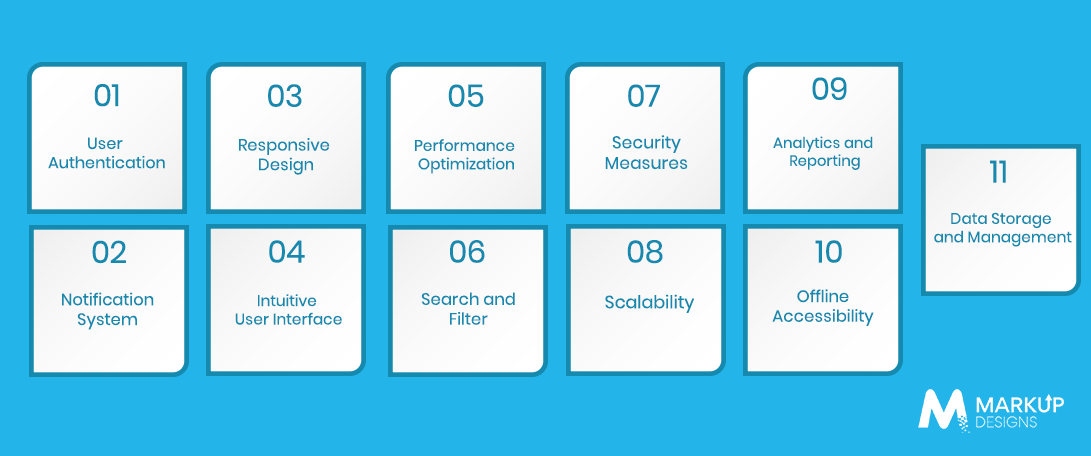
A great web application combines a good user interface and functionality. However, the most important thing is that it offers a secure and user-friendly experience capable of supporting business development. Here are some must-have features for web applications.
User Authentication
User authentication is an important step to authorize a user who tries to access the application. A strong authentication system prevents sensitive data from being stolen by means of credentials, social login, password recovery, biometric authentication, and a role-based authorization scheme. Depending on the nature and requirements of the business, companies can decide whether to utilize email or SSO, or MFA for their user account safety.
Notification System
A notification system plays an essential role in the process of communication with users, informing them about news, transactions, reminders, and activities inside the system. Responsive design ensures that the application automatically adapts to different screen sizes and resolutions, providing a consistent and seamless experience regardless of the device being used.
Intuitive Interface
It becomes easier to navigate applications using the step-by-step guides and makes the tasks easier. Provide a clear arrangement of items, logical flow patterns, the same elements in design, as well as accessibility requirements.
Performance Optimisation
Application speed affects user engagement and also the outcome of the business. Performance optimisation includes reducing the page loading time, compressing files, adding caching, optimising each database request, and using CDNs to help users to enjoy smooth navigation.
Search and Filter
As the apps become more complicated, users need effective methods for finding information. Advanced searching and effective filtering and sorting mechanisms allow users to find various products or documents quickly.
Security Measures
Security must be taken into account when developing web applications since sensitive customer or corporate data is processed. Establishing several layers of defence helps reduce the risks of cyber attacks, data leakage, and unauthorised access.
- Encryption
It is very important to encrypt the data not only during its transmission but also while stored in databases in order to maintain confidentiality.
- Multi-factor authentication
Multi-factor authentication implies the use of several steps of verification, which makes it possible to protect the user account from being hacked.
- Input Validation
The process of validating user inputs enables protection against malicious attacks such as SQL injection and Cross-Site Scripting (XSS), reducing the risk of other vulnerabilities by processing only allowed data.
- Security Headers
Security headers based on HTTP technology are effective in improving the security of web applications by preventing web-based attacks like clickjacking, code injection, or MIME sniffing.
Scalability
Scalability is crucial for achieving success in the long run due to the changing needs of the businesses. An easily scalable web application is capable of accommodating more users, transactions, or information without any costs associated with additional supply.
Analytics and Reporting
Using integrated analytics enables the business to gather rich information about the behavior of users, application performance, customer engagement, and organizational efficiency.
Offline Accessibility
The use of offline capabilities allows the business to still get access to necessary application features in case of а limited internet connection. Implementation of various technologies such as Progressive Web Apps (PWAs) allows for avoiding any problems in business operations.
Data Storage and Management
Reliable data storage ensures secure, organised, and efficient management of application data. Modern web applications utilise relational databases, NoSQL databases, cloud storage, automated backups, and disaster recovery strategies to maintain data integrity, availability, and compliance.
Web App Development Process – The Essential Steps
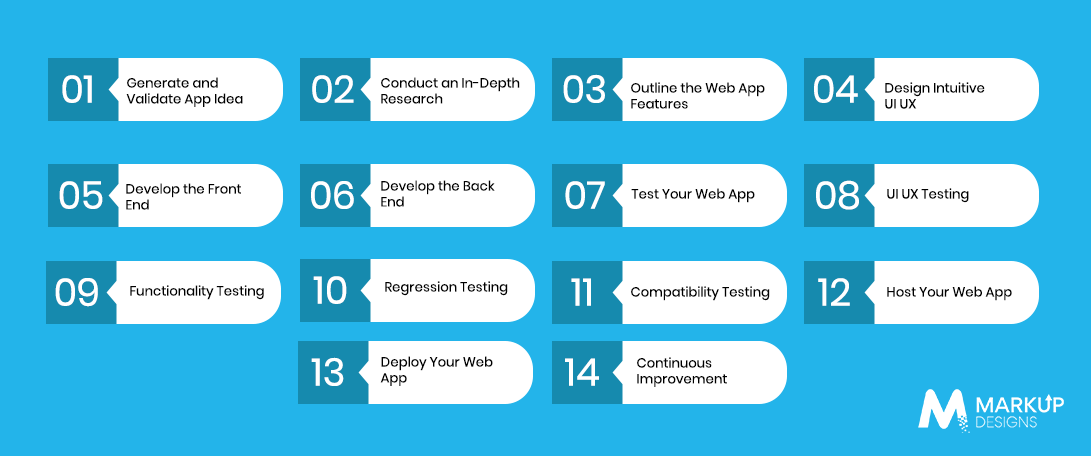
The process of developing a successful web application follows a systematised method that incorporates strategic planning, user-oriented design, good engineering procedures, strict testing, and constant improvements. Following a clear web application development process can significantly reduce risks, keep development costs under control, and make sure that the end product corresponds to the aims of the business.
Generate and Validate App Idea
Every successful web application begins with identifying a real-world business problem and/or opportunity. During this stage, the following tasks should be done: define the purpose of the application, select the target audience, study competitors, validate the level of demand in the market, and check the technical feasibility of the application.
Conduct an In-Depth Research
Research forms the basis for productive decision-making. When companies need to create a new product, they have to consider customer expectations and needs, market trends, competitors’ proposals, legal limitations, and new technologies. Such kind of research allows development teams to find out market gaps.
Outline the Web App Features
Once the idea is validated, the next step is defining the functions of the application, including their functions and characteristics. At this stage, the development team will define the essential
Development teams prioritise core features for the Minimum Viable Product (MVP), establish user journeys, create workflows, define user roles, and identify third-party integrations. A clear feature roadmap ensures efficient resource allocation throughout development.’
- Design Intuitive UI UX
To ensure a successful user experience, a thoughtful design approach is essential. Designers prepare wireframes, user flows, prototypes, and authentic interfaces that combine aesthetics and usability. The aim is to create an appropriate user navigation experience, unified branding, usability, and smooth operations that drive user interaction and satisfaction.
- Develop the Front End
The focus of frontend development is on creating the visual interface that users interact with. Developers employ various tools such as HTML, CSS, JavaScript, React, Angular, and Vue.js to build responsive designs, interactive elements, and smooth customer interaction.
- Develop the Back End
Backend development means the development of the application’s business logic, server-side architecture, application programming interface, databases, and information security systems. This layer oversees user request processing, protects data, and provides a sound link between frontend and backend operating systems.
Test Your Web App
Complete testing ensures the application can work in real-life conditions before launching it. Finding and fixing bugs at this stage will greatly reduce costs and increase customer trust.
- UI UX Testing
The purpose of UI UX testing is to test the usability, navigation, responsiveness, accessibility, and overall usability of the application.
- Functionality Testing
This is the process of checking if each feature works properly like forms, authentication, workflow, API, payment gateway, and business logic.
- Regression Testing
It confirms that the newly added features, changes, or fixes introduced in the web application will not change the functionality or reliability of the application.
- Compatibility Testing
This is the process of making sure that all versions of the software provide a uniform user experience across different browsers, operating systems, device sizes, and screen sizes.
Hosting of the Web Application
After testing is done, the web application needs to be hosted on secure and robust infrastructure. Typically, businesses use either the cloud or dedicated hosting with the help of technologies that provide max availability, regular backups, etc.
Deployment of the Web Application
This is the stage where the application goes live. It is all about configuring the servers, databases, security certificates, monitoring tools, and the one that allows providing appropriate service.
Monitoring and Maintenance
It is worth noting that the process of development of the web application is continuous as well.
Regular updates, feature enhancements, bug fixes, infrastructure optimisation, and security patches ensure the application remains reliable, secure, and aligned with evolving business requirements over time.
Read Also: Hire Software Developers in 2026: Guide to Talent, Risk, and Scaling Strategies
Web Application Development Team Structure
Building a successful web application requires collaboration between multiple specialists, each contributing expertise throughout the development lifecycle. A well-structured team ensures efficient planning, seamless execution, high-quality delivery, and long-term scalability.
- Business Analyst: Gathers business requirements, analyses user needs, and translates them into technical specifications.
- Project Manager: Oversees project planning, timelines, resource allocation, and communication between stakeholders and the development team.
- UI Designer: Designs visually appealing interfaces that align with the brand identity and enhance user engagement.
- UX Designer: Creates intuitive user journeys, wireframes, and prototypes to deliver a seamless user experience.
- Frontend Developer: Builds responsive and interactive user interfaces using technologies such as HTML, CSS, JavaScript, React, or Angular.
- Backend Developer: Develops server-side logic, APIs, databases, authentication systems, and application functionality.
- QA Engineer: Tests the application to identify bugs, validate functionality, and ensure quality across devices and browsers.
- DevOps Engineer: Automates development, deployment, and infrastructure management to improve delivery speed and reliability.
- Cloud Engineer: Manages cloud infrastructure, storage, networking, scalability, and application availability.
- Solution Architect: Defines the overall technical architecture, technology stack, and integration strategy for scalable and secure solutions.
- Product Owner: Prioritises features, manages the product roadmap, and ensures the application aligns with business goals and user expectations.
Tech Stacks Used for Web App Development
Various tech stacks are used in creating web applications. The selection of technology stacks impacts performance, scalability, security, and maintenance of web applications directly. With the proper tech stacks of frontend and backend technology, web applications can achieve a seamless user interface for interaction and performance as well.
Front End Development (Client Side)
The front end of web applications represents the visual layer of interactions.
Flutter
Flutter enables developers to build cross-platform web applications from a single codebase using the Dart programming language. Flutter web app development is an excellent choice for businesses looking to create high-performance web experiences while sharing code across web, mobile, and desktop applications.
HTML
Gives the structure and content of web pages.
CSS
Provides the layout and style for the interface.
JavaScript
Delivers interactivity, dynamic content, and immediacy of actions.
UI Frameworks
Modern frameworks skirt the problem for developers by stimulating the frontend development and improving its quality.
- React
- Angular
- Vue.js
Back End Development (Server Side)
Back end deals with business logic, databases, API, and server-side.
Database
Gathers and maintains data of the application.
- PostgreSQL
- MySQL
- MongoDB
Server
Сalls requests from users and sends the response generated by the application.
- Apache
- Ngnix
Programming Languages
It is responsible for the back end of the application.
- Node.js
- Ruby
- Java
Storage
This tool provides cloud-type reliable storage.
- AWS S3
- Firebase Storage
Web App Development Cost
The web app development cost depends on the project’s scope, complexity, features, technology stack, and development requirements. On average, businesses can expect the following investment.
Average Cost Range
A custom web application typically costs between $30,000 and $300,000+, depending on its complexity and business requirements.
Cost Factors
The overall development cost is influenced by several factors, including:
- App complexity
- Features and functionality
- UI/UX design
- Technology stack
- Development team
- Third-party integrations
- Ongoing maintenance
- Security requirements
Estimated Timeline
| Project Type | Estimated Timeline |
| Simple Web App | 4–6 Months |
| Medium Complexity Web App | 6–9 Months |
| Enterprise Grade Web App | 9–18+ Months |
Common Challenges in Web Application Development
Developing a modern web application comes with several technical and operational challenges that require careful planning and the right development expertise.
Choosing the Right Architecture: Selecting an architecture that supports scalability, flexibility, and future business growth.
Performance Bottlenecks: Optimising application speed, load times, and responsiveness to deliver a seamless user experience.
Scaling Applications: Ensuring the application can efficiently handle increasing users, data, and traffic without compromising performance.
Security Risks: Protecting sensitive data from cyber threats through robust security practices and regular vulnerability assessments.
Cross-Browser Compatibility: Delivering a consistent experience across different browsers, operating systems, and devices.
Legacy System Migration: Modernising outdated applications while preserving existing data and minimising business disruption.
API Integrations: Seamlessly connecting third-party services, payment gateways, CRM systems, and other business tools.
Deployment Challenges: Ensuring smooth releases with minimal downtime through automated deployment and testing processes.
Maintenance and Updates: Continuously monitoring, fixing issues, improving performance, and introducing new features to keep the application secure and up to date.
Enterprise Level Security Best Practices
Security should be integrated throughout the web application development process to protect business data, users, and digital assets. Key best practices include:
- Following OWASP Top 10 security guidelines
- Securing communication with HTTPS
- Implementing Role-Based Access Control (RBAC)
- Using OAuth for secure authorisation
- Protecting sessions with JWT Authentication
- Enabling Single Sign On (SSO)
- Encrypting sensitive data
- Maintaining comprehensive audit logs
- Securing APIs
- Applying rate limiting to prevent abuse
- Protecting against DDoS attacks
- Adopting a Zero Trust security model
- Complying with GDPR, HIPAA, SOC 2, and PCI DSS where applicable
Popular Web Application Examples
Many globally recognised platforms demonstrate the power and versatility of modern web applications across collaboration, productivity, entertainment, e-commerce, and enterprise software.
- Google Docs
- Slack
- Notion
- Canva
- Trello
- Netflix
- Spotify
- Figma
- GitHub
- Salesforce
- Shopify
- Dropbox
Markup Designs: Your Go-To Partner in Web App Development
At Markup Designs, we build secure, scalable, and high-performing web applications that help businesses accelerate digital transformation and achieve sustainable growth. From startups to large enterprises, our experienced development team delivers customised solutions tailored to unique business requirements.
Company Expertise
With expertise across modern frameworks, cloud technologies, AI integration, and enterprise architecture, we develop web applications that are future-ready, secure, and performance-driven.
Industries Served
We deliver custom web application solutions for healthcare, finance, retail, ecommerce, education, logistics, manufacturing, real estate, travel, and many other industries.
Development Approach
Our agile development methodology combines strategic planning, intuitive UI/UX design, robust engineering, rigorous testing, and continuous support to ensure successful project delivery.
Why Choose Markup Designs
- Experienced team of web application specialists
- Custom solutions aligned with business goals
- Modern technology stack and scalable architecture
- Enterprise-grade security and compliance
- Transparent communication and dedicated support
Ready to Build Your Next Web Application?
Partner with Markup Designs to transform your ideas into secure, scalable, and innovative web applications that deliver measurable business results.
FAQs
1. What is web application development?
Web application development is the process of designing, developing, testing, deploying, and maintaining browser-based applications that enable users to perform interactive tasks over the internet. These applications use frontend technologies, backend servers, databases, and APIs to deliver secure, scalable, and responsive digital experiences.
2. What is the cost of developing a web application?
The cost of web application development typically ranges from $30,000 to $300,000+, depending on factors such as application complexity, features, UI/UX design, technology stack, third-party integrations, security requirements, and the size of the development team.
3. How to build a web application?
Building a web application involves several stages, including idea validation, market research, feature planning, UI/UX design, frontend and backend development, testing, deployment, and ongoing maintenance. Partnering with an experienced web app development company ensures a structured development process and successful project delivery.
4. How does a web application work?
A web application works by processing user requests through a web browser. The request is sent to the backend server via APIs, where the business logic is executed, data is retrieved or stored in a database, and the processed response is returned to the browser for display to the user.
Author's Perspective
Web applications have become the foundation of digital business transformation, enabling organisations to streamline operations, enhance customer experiences, and scale efficiently in an increasingly connected world. However, building a successful web application requires much more than writing code. It demands strategic planning, user-centric design, the right technology stack, robust security, and a development approach that supports long-term scalability.
At Markup Designs, we combine technical expertise with industry knowledge to deliver custom web application solutions that are secure, high-performing, and aligned with business objectives. Whether you are building a customer portal, enterprise platform, SaaS product, or ecommerce solution, our team focuses on creating future-ready applications that drive innovation, operational efficiency, and sustainable business growth.
Discuss Your Project NowGaurav Goyal
Global Sales- VP
Related Posts
How Progressive Web Apps Help Businesses Drive Growth,...
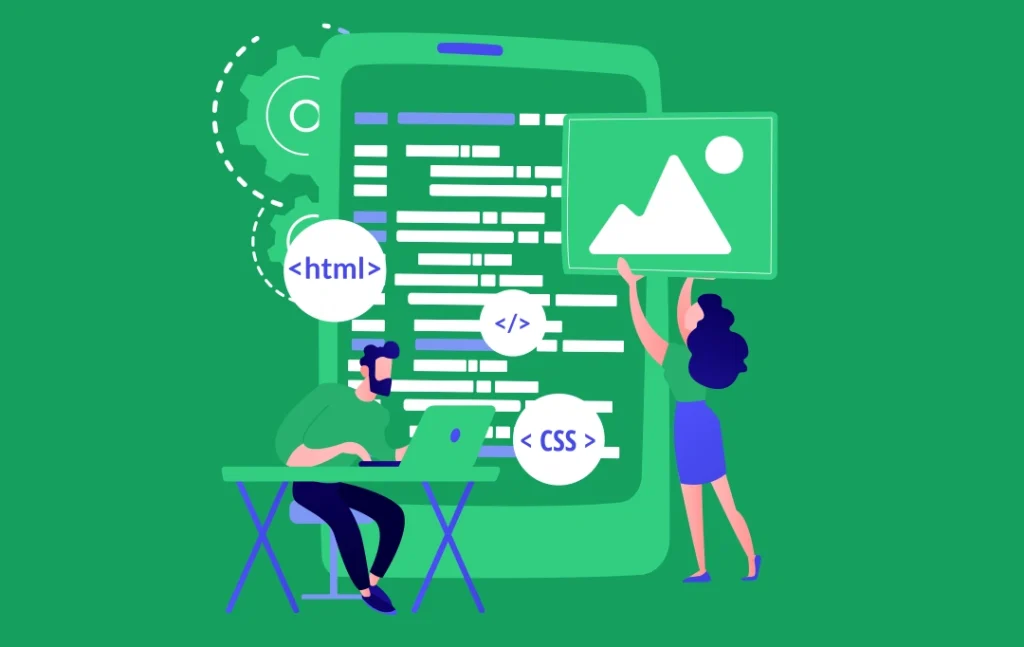
Flutter Web App Development: Process, Benefits, and Best...
Insights Are Valuable & Execution is Priceless
You’ve read about the digital future. Now, let’s build the infrastructure to take you there. Move your strategy from the page to the product.
Design Your Solution Now
Contact Us
Schedule The Appointment At Your Convenience Date And Time.
30 Min
Web Conference
Time Zone
Indian standard time (08:30pm)

Thanks For Getting In Touch!
You’ve Taken The First Step Toward Transforming Your Digital Presence. Our Experts Will Reach Out Shortly To Take It Forward.
Launch Your Dream Project
Provide a brief overview of your project, and our specialists will evaluate your requirements. We will connect with you to explore how the right digital solutions can help you launch faster.