
In Brief
- Android is powering billions of devices around the globe, becoming one of the best platforms for businesses to reach various audiences.
- A successful Android app requires more than just programming. It starts with the definition of business aims, user-oriented design, the appropriate technology stack, and an organized development process.
- The cost and time frame of development vary depending on the level of complexity, features, integrations, and requirements regarding security and scalability.
- With modern Android technologies, proper testing, and maintenance, it’s possible to develop reliable and efficient applications that meet users’ requirements.
- Choosing a good Android app development partner ensures quicker delivery, good quality of coding, smooth placement of the app on Google Play, and good support after the launch.
Today, Android app development has become a strategic investment for companies willing to improve customer engagement, make processes more efficient, and open new revenue channels.
As Android accounts for the leading percentage of smartphones on the market today, companies of all types are taking advantage of Android software in order to create personalized interactions with customers and further upgrade their online presence. The Android app is a must for any business that plans to provide real-time services to potential users or create a mobile service for customers and employees.
However, the Android app building process is not just about writing a piece of code. The steps in building a successful Android application are accurate validation of an idea, analysis of business needs, choice of a technology stack, design of a user-friendly interface, development of scalable features, and testing through thousands of devices. This practical guide provides a description of every phase of the process, the technologies involved, costs, and time frames.
Understanding Android App Development
Android app development encompasses the stages of app creation for Android devices, from planning to maintenance. The Android platform has a large share of the mobile device market, meaning that businesses have the chance to interact with different target audiences and create applications that either provide advanced functionality or use technological capabilities in the best way. The Android platform is highly versatile in satisfying business requirements and is able to handle various tasks, including improvement of customer interaction, internal operation automation, or creation of innovative digital services.
What is Android App Development
Android app development is the creation of applications based on technologies like Java, Kotlin, Android SDK, as well as Jetpack libraries and frameworks. The development process involves much more than just programming, and everything starts with business analytics. The process also contains all of the stages of the app life cycle, such as UI/UX design, backend programming, API development, and subsequent testing and maintenance.
Modern applications are developed so that they can work on different types of devices while ensuring the application’s performance, safety, and compatibility with different Android OS versions.
Employing Google’s development strategies and guidelines will allow companies to create safe applications that ensure user experience remains the same and facilitate sustainable development.
Why Businesses Choose Android for Mobile Applications
Android is the most popular operating system for many companies. It has a favourable market share, attractive development possibilities, and the capability to create mobile apps for various industries. Android is the preferred environment for both startups introducing their first product and big companies providing difficult business solutions. To choose Android as a means of app development, entrepreneurs have their reasons:
- Availability of one of the largest numbers of mobile users.
- Fast expansion into new markets, catering to new customers.
- Many options able to match a company’s individual needs.
- Connection to Google applications such as Maps, Firebase, Google Pay, and Google Cloud.
- Compatibility with different devices, including smartphones, tablets, smart TVs, gadgets, and devices related to the Internet of Things.
- Opportunities for future modifications and development.
Read Also: Android vs iOS: The Ultimate App Development Guide
Types of Android Applications
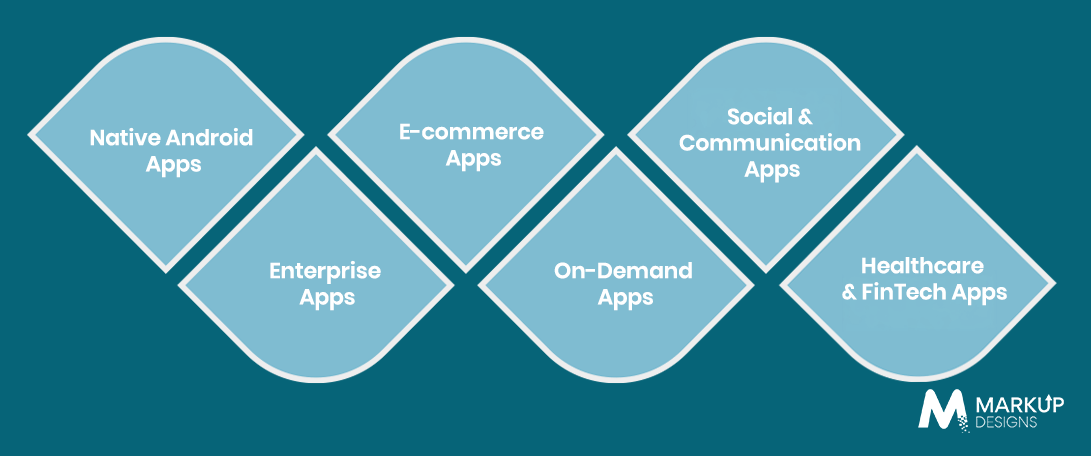
Android, the operating system, has numerous applications that are designed for different purposes. The type of applications to select depends on what the specific business aims for.
Native applications
Native applications are designed specifically for the Android operating system, and they are constructed using Java or Kotlin. They provide fast performance, better execution, enhanced security, and instant access to functionalities like camera, GPS, Bluetooth, sensors, and biometrics. Native project development is often considered the first choice when it comes to apps with many features and which need high performance.
Enterprise apps
Enterprise applications help businesses increase productivity, automate business processes, and improve secure collaboration between employees. These Android applications usually integrate with systems in organizations such as ERP, CRM, HRMS, inventory management, customer support, etc.
E-commerce apps
Android e-commerce applications allow consumers to have a smooth shopping experience along with helping businesses maximize sales. Basic features that e-commerce applications have are catalogues, secure payment methods, tracking orders, etc.
On-Demand Applications
On-demand apps help to link clients with different commodities and services at the time of need. Businesses around the world, including those in delivery services, transportation, health care, home improvement, logistics, and e-commerce, use the Android app platform to introduce service booking, real-time order tracking, and e-payments.
Communication and Social Applications
Communication and social apps help people to connect and cooperate with each other instantly. Most frequently, this type of app is represented by IM, video and voice calls, forums, media sharing, direct streaming, and alerts.
Health Care and FinTech Applications
The healthcare and FinTech applications require high security and perfect performance due to the sensitive information these apps process. Most often, healthcare apps help with telemedicine, planning appointments, as well as providing ID of the patient via the application.
Benefits of Android App Development for Businesses
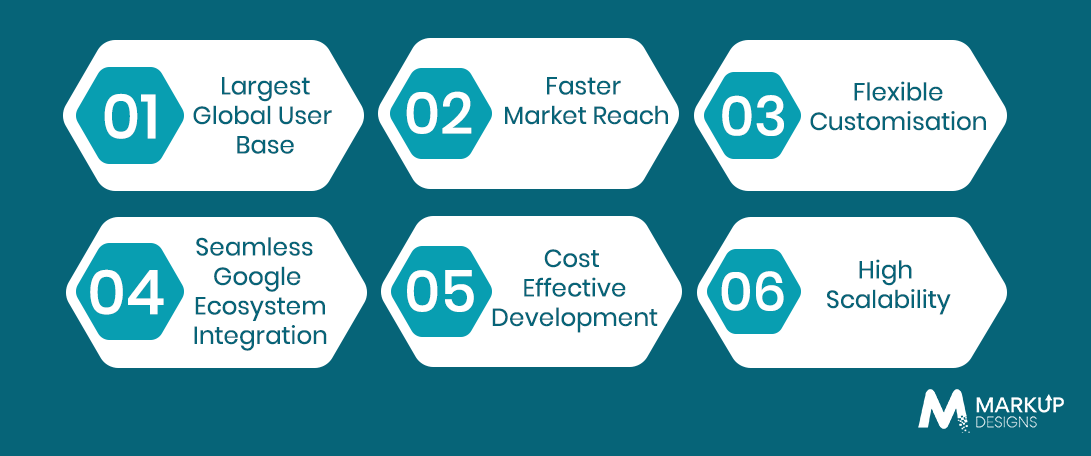
Businesses wishing to appeal to a large population, fast-track digital transformation, and create an attractive user experience favor the Android platform. Its flexibility, wide range of device compatibility, and strong development environment allow companies to create applications that can ensure long-term growth and adjust to changing customer demands.
The Largest Global User Base
With billions of devices in action globally, Android gives companies a chance to access one of the largest mobile audiences. It has a strong presence in both developed and developing markets. Thus, brands can extend their reach and get plenty of new customers across different regions and devices.
Increased Speed to Market
The Android ecosystem enables companies to develop and start working with their applications within a brief time span by utilizing Google Play Store distribution services. Combined with agile development approaches and strong deployment practices, Android allows companies to minimize their time to market and test their ideas quickly.
Flexible Customization
With Android, companies can create applications according to their business needs and branding requirements. The environment offers great flexibility for developers, enabling them to add unique functionality and make their users’ experience more individual.
Seamless Google Ecosystem Integration
The presence of Android applications in the Google ecosystem does not pose the risk of integrating different Google products. It is the seamless operation of solutions such as Google Cloud, Google Maps, Firebase, Google Pay, and Firebase Cloud Messaging that allows Android applications to provide greater and more effective conduct of the app development process.
Cost-Effective Development
The economical aspect of creating Android applications makes it a preferred option for many entrepreneurs. This is due to the open-source essence of Android and the numerous tools that make it possible to develop affordable applications because of the availability of reusable frameworks and libraries.
High Scalability
The use of Android applications for business purposes is also taken into consideration because of the high scalability of applications. Scalable architecture and cloud-based infrastructure help applications develop as needed, meeting the increasing requests and needs of users.
Android App Development Process
The accomplishment of a successful Android application requires a step-by-step approach that will ensure coordination of business and technical objectives. Each phase of the development process contributes to the successful accomplishment of secure, scalable, and high-performing applications.
Define Business Goals and Target Audience
A successful Android app starts by identifying what issues it is trying to address. Organizations need to clarify their aims, outline their metrics, and understand the target market’s needs. During this step, a number of critical aspects, including the app’s ultimate goal, intended users, method of monetization, and value proposition, can be identified.
Conduct Market and Competitor Research
The analysis of competition allows organizations to find and take advantage of market possibilities, as well as understand the user expectations and gaps that they can fill with their app. By looking into competitive apps, client feedback, industry news, and new technologies, the organizations can gather useful information for creating something that would be distinctive in the market.
Gather Requirements and Plan Features
When business goals have been set, functional and technical requirements have to be established. This means single out the most important features, walk through user journeys, check possible third-party applications that could be used, plan how to ensure security, create a realistic timeline, and budget.
Create UI and UX Designs
A user-friendly interface and user experience strongly influence the overall success of an application. During this stage, designers develop wireframes, user flows, prototypes, and visual designs that focus on usability, accessibility, and consistency with Android’s Material Design principles. A well-designed interface enhances user engagement and encourages long-term retention.
Choose the Right Technology Stack
The choice of the technology stack affects application quality immensely; thus, the importance of sound technology stack selection. The choice of one specific programming language, coding framework, backend technology, type of database, and cloud infrastructure depends on the specifics of the project.
Programming Languages (Kotlin vs Java)
For Android development purposes, Kotlin is the preferred programming language as it has a syntactically compact form, improved safety features, and a wider spectrum of available capabilities. On the other hand, Java remains relevant for the maintenance of existing Android apps, as it is compatible with older systems.
Android SDK and Jetpack Libraries
The Android Software Development Kit (SDK) is an essential set of tools, APIs, and components for the development of Android applications. Jetpack provides components that are reusable in app development, such as components for navigation, lifecycle management, and background processing, in order to develop applications more quickly and easily.
Backend Technologies
The backend of the application deals with making the application function correctly, providing authentication services, executing business operations, and storing data. Some of the technologies applied to backend development are Node.js, Python, Java, .NET, and other cloud-based backend technologies, depending on the needed scalability
In selecting the appropriate technology, one can consider different aspects of the apps, including scalability, security, and integration needs, and the anticipated traffic.
Database selection
When selecting a database, the important aspects to consider include the structure of the application’s data, the performance, and the scalability. Relational databases such as PostgreSQL or MySQL work well with structured data. On the other hand, NoSQL databases such as MongoDB and Firebase Firestore provide flexibility when looking for fast and asynchronous applications.
Android App Development
Once the architecture and technology stack have been established, the developers start with the development stage. Here, they start programming the app’s frontend and backend and ensuring the implementation of all core aspects of the application. It is important to write clear and manageable code and ensure the integrity of the app.
API and Third-Party Integration
Many modern applications use other services to enhance the app’s capabilities and improve the customer experience. For example, API integration could be done using various solutions such as payment services, social networks, cloud storage, etc.
Proper API integration ensures secure, reliable, and efficient communication between the application and external platforms.
Testing and Quality Assurance
Through proper testing, issues in functions, performance, security threats, and compatibility can be detected before deployment. Quality assurance is made up of many tests, which include but are not limited to functional testing, usability testing, performance testing, security testing, device compatibility testing, and user acceptance testing.
Deployment to Google Play Store
Before an application can be released, it must comply with the rules set by Google; the process of deployment includes generating a signed build, optimizing the application, preparing the storefront for the app, as well as obtaining approvals from Google.
Ongoing Maintenance and Updates
Once an app is launched, its work only starts; thorough maintenance is needed to keep fixing bugs, improving performance, enhancing security, as well as adapting the app to new versions of Android.
Essential Features Every Android App Should Include
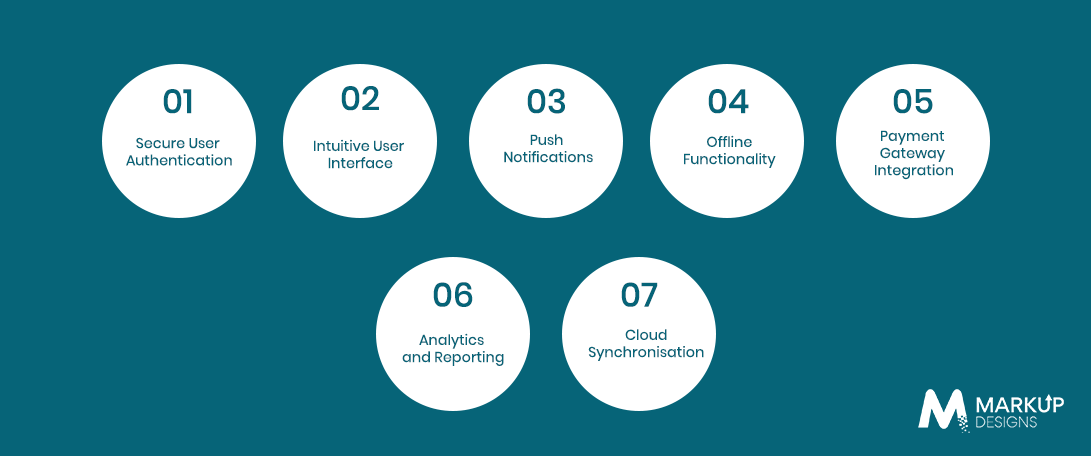
The success of an Android application relies not only on the functionality but also on the features that enhance usability, security, and user satisfaction.
Feature requirements may differ by industry or type of business, but certain functions on Android apps are crucial in offering a seamless, scalable, and easy-to-use application.
Secure User Authentication
User protection is a necessary imperative for any Android app. Various methods of securing users, such as verification via email, use of multifactor authentication systems, fingerprint access authorization, as well as signing in using SSO, have to be employed to avoid any access by criminals and to ensure user safety.
Intuitive User Interface
A good user interface allows all users to use the application easily and efficiently. Following the rules of Material Design for Android apps, ensuring an uninterrupted interface, and creating navigational ease contribute to the satisfaction and retention of users.
Push Notification
Push notifications allow for one-to-one communication and sending up-to-date offers, information, alerts, and announcements to users. If pushed correctly, notifications can lead to better involvement and engagement of users.
Offline Functionality
Offline access gives users the ability to work with key features of the application in challenging environments, meaning low or no internet access at all. Local data storage, synchronization mechanisms, and background updates enhance the overall user experience and ensure consistency in various network environments.
Payment Gateway Integration
Applications that involve purchases, subscriptions, or financial transactions must have reliable payment gateways integrated. Providing multiple payment options, secure transactions with encryption, and adherence to industry security standards will help create users’ confidence and simplify transactions.
Analytics and Reporting
Analytics tools provide valuable information regarding the users’ actions, usage of the new features, time spent in the app, conversion rates, and app performance. This information allows companies to make data-driven business decisions, recognize possible improvements, and optimize the user experience.
Cloud Synchronization
Cloud synchronization helps data remain up to date on different devices by storing and updating users’ data in real-time. This function enhances access to information, facilitates collaboration, ensures data backup, and allows continuing work on different platforms without interruptions.
Android App Technology Stack
The proper choice of technology stack is an essential factor for successful development of a secure, powerful, and scalable Android app. It influences the speed of development, app performance, app support, and further evolution.
Frontend Technologies
The frontend is everything users see and interact with in the application.
Modern Android applications are normally built using either Java or Kotlin programming languages, along with Android Studio, Android SDK, and either Jetpack Compose or XML-based designs for developing responsive user interfaces.
Backend Technologies
The backend handles the business logic, user authentication, database functions, APIs, and server-side processing. Depending on what the application needs, organizations tend to choose different technologies such as Node.js, Java, Python, .NET, or PHP to create a secure and scalable backend structure.
Databases
Databases store and process application data. When an application needs structured data, relational database systems like PostgreSQL and MySQL work perfectly. On the other hand, NoSQL databases such as MongoDB and Firebase Firestore work well for applications that need real-time updates and scalability.
APIs
Application Programming Interface (API) provides a way for Android applications to communicate with other systems and third-party services. APIs are widely used for payment, authentication, mapping, messaging, social networking, customer relationship management, and enterprise software integration.
Cloud Services
Cloud technology provides infrastructure for application hosting, data storage, backend operation management, and scalability. Companies like Google, Amazon, and Microsoft offer superb solutions regarding cloud storage, server processes, analytics, and application deployment.
DevOps and CI/CD Tools
Companies use DevOps practices along with Continuous Integration and Continuous Deployment (CI/CD) pipelines to automate the process of building, testing, and deploying software. These tools allow the development teams to deliver updates faster, reduce manual errors, and improve the quality of software.
Android App Development Cost
The cost to develop an Android app will vary depending on the complexity of the project, the set of features, requirements for design, required integrations, and technical architecture. Understanding the main factors affecting the cost will enable companies to budget their expenses properly.
Factors That Affect Development Cost
Multiple factors affect the total development cost, such as the complexity of the app, user interface design, custom development of features, third-party integrations, infrastructure for the backend, security demands, amount of testing done, and expertise of the developers. Apart from that, compliance with regulations, cloud infrastructure, and support can make the project more expensive.
Cost by App Complexity
The overall cost of the project actually depends on the functionality and complexity of the app.
| App Complexity | Estimated Development Cost* |
| Basic Android App | USD 20,000 to USD 40,000 |
| Medium Complexity App | USD 40,000 to USD 80,000 |
| Advanced or Enterprise App | USD 80,000 to USD 200,000+ |
*These estimates are indicative and may vary based on business requirements, development location, technology choices, integrations, and project scope.
Hidden Costs to Consider
Besides the costs of the initial development of the application, other expenditures are to be accounted for as well, like cloud hosting, subscription to third-party services, Google Play Store fees, application monitoring, application maintenance, enhancement of features, assistance to customers, and regular updates for compatibility with the new Android versions.
Android App Development Timeline
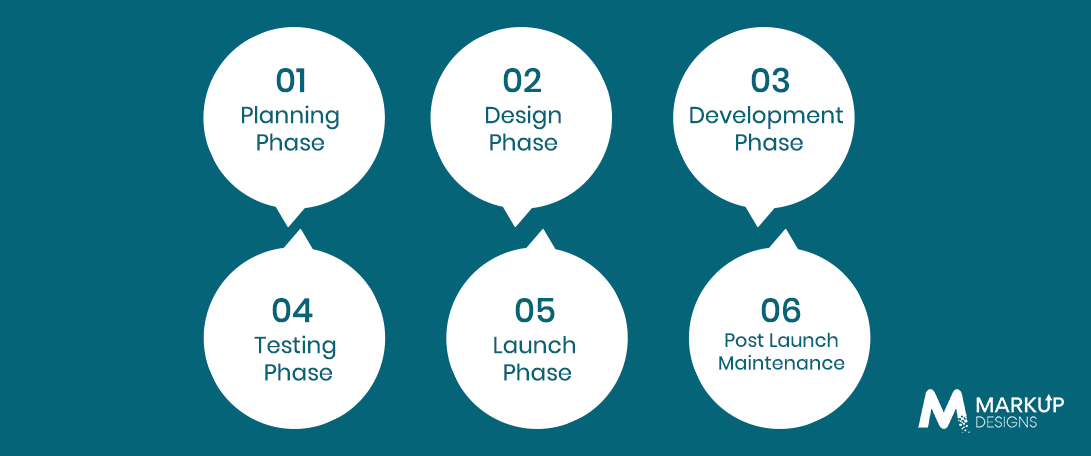
The timeframe of building an application depends on its features, complexity of the design, integrations, and testing. Following the structured development process can help minimize delays while keeping the quality of the project high.
Planning Phase
In this phase, the objectives and goals of the business, target audience, competitors, requirements, and a roadmap are defined. Effective planning allows for establishing a reliable foundation for the entire development process.
Design Phase
In this phase, designers develop wireframes, user journeys, prototypes, and visual interfaces that comply with Material Design rules and are focused on usability and accessibility. Most often, the feedback from the users is taken into account before the beginning of the development.
Development Phase
In this part of the development phases, developers create the front end, the back end, APIs, databases, and all the features of the application development. Regular code reviews and iterative development help ensure quality and maintain project momentum.
Testing Phase
Testing the application provides assessments of its functions, performance, usability, security, and compatibility with various Android devices and OS versions. Solving problems beforehand increases the users’ satisfaction and decreases the risks after launch.
Launch Phase
After the testing is completed, the app is ready for submission to the Google Play Store. At this stage, we perform final quality checks, issue a listing in the store, comply with the respective regulations, and start the production deployment stage.
Post Launch Maintenance
After the completion of the deployment process, the application needs to be constantly monitored, updated, improved, and upgraded to ensure its proper operation, compatibility with all the new Android versions, and compliance with the ever-changing business requirements and customers’ needs.
Common Challenges in Android App Development
Making a successful Android app requires tackling many technical and business difficulties. Solving these problems before launching the app makes the app more effective, improves the clients’ satisfaction, and lowers the cost of support activities in the future.
Device Fragmentation
The best thing about Android is that it can be accessed by lots of devices produced by different manufacturers. Still, such a large presence creates the issue of device fragmentation because
Nonetheless, it poses the problem of device fragmentation, in which apps must work similarly across a wide range of configurations, screen sizes, resolutions, and hardware capabilities. Developers must work on layout adjustments, multiple testing, and responsive design.
Multiple Android Versions
Countless users are still using devices running outdated versions of Android, as new versions are produced with more capabilities. To ensure compatibility on different Android versions, one must plan, backtrack, and test at all times to make sure that everything is running well.
Performance Optimisation
Application performance is crucial to user satisfaction. Slow downloads, high memory usage, battery consumption, and high overhead in background operations will all negatively affect user experience. Developers must optimize the application by reducing code size, resource usage, and making cache management better.
Security Risks
Android apps are dealing with user-sensitive data all of the time, so the issue of security should be in mind all of the time. For example, attacks, unauthorized access, insecure API, and data breaches leave users with a lack of trust in what they are using.
The application of trustworthy authentication, encrypted file storage, honest messaging over APIs, frequent checks for security, and adherence to the standards required by the particular industry will significantly limit the risk of vulnerabilities.
App Store Compliance
According to Google Play policy, Android apps must meet all requirements for user privacy, permissions, increased standards for content, security, and payment procedures. Otherwise, a delay in approval may occur, the course of submission may be rejected, or the application will be taken out of the store. Successful approval can be ensured by following the requirements according to the norms set by Google Play Store.
User Retention
In addition to acquiring new users, it is essential to retain existing ones for a long time, which requires further app improvements based on user experience and feedback, app performance diagnostics, preparing personalized experiences, regularly changing upgrades, and keeping in touch with users through notifications and in-app communications
Best Practices for Successful Android App Development
Adhering to the well-known, tested practices always helps to create secure, convenient, and user-friendly applications, making them capable of being developed in the future.
Follow Material Design Guidelines
Google’s Material Design framework offers useful standards for developing interfaces that are practical and consistently designed. By fulfilling the requirements of the framework, usability, accessibility, navigation, and familiarity are enhanced, resulting in a positive experience for users.
Optimise App Performance
It is very important to give the first place to optimizing performance and keep it in priority mode. Application coding techniques, compression of images, managing processes in the background, optimizing network performance, and frequent monitoring of performance processes help to achieve high-performance times and stable work of the application for different devices.
Prioritize Security
Security should be integrated into the application development process from the very beginning. Thus, the developers ensure that the users can be provided with the best conditions and safe information. Secure authentication, data encryption, role-based access, secure APIs, vulnerability audits, and regular data updates should be included in the development process.
Build for Scalability
The applications should be created with the ability to manage growth in the number of users and the amount of data. Efficient app design, modular coding, good use of cloud technologies, and efficient database designs allow developers to cope with business growth.
Regular Testing Across Devices
Given Android’s diverse device ecosystem, comprehensive testing across multiple screen sizes, manufacturers, hardware configurations, and operating system versions is essential. Automated and manual testing help identify compatibility issues before deployment, ensuring a consistent user experience.
Monitor User Feedback
User feedback provides valuable insights into application performance, usability challenges, and feature requests. Monitoring reviews, analysing user behaviour, tracking performance metrics, and incorporating customer suggestions into future updates enable businesses to continuously improve their applications and strengthen user satisfaction.
How to Choose an Android App Development Company
Selecting the right app development partner is one of the most important decisions in any Android app project. Beyond technical capabilities, businesses should evaluate a company’s development approach, communication practices, industry experience, and long-term support to ensure a successful partnership.
Evaluate Technical Expertise
Choose a development company with proven expertise in Android technologies such as Kotlin, Java, Android SDK, Jetpack libraries, cloud platforms, API integration, and modern development frameworks. A technically skilled team can recommend the most suitable architecture, implement scalable solutions, and follow industry best practices throughout the project.
Review Portfolio and Case Studies
A company’s previous work demonstrates its ability to deliver successful Android applications across different industries. Reviewing portfolios, case studies, and client success stories provides insight into the team’s design capabilities, technical expertise, problem-solving approach, and experience handling projects of varying complexity.
Assess Communication and Development Process
Transparent communication and a structured development methodology are essential for keeping projects on schedule and aligned with business objectives. Look for companies that follow agile development practices, provide regular progress updates, encourage collaborative decision-making, and maintain clear documentation throughout the project lifecycle.
Understand Post-Launch Support
Launching an application is only the beginning of its lifecycle. Reliable development partners provide ongoing maintenance, performance monitoring, security updates, bug fixes, compatibility improvements, and feature enhancements to ensure the application continues to perform effectively as business and user requirements evolve.
Compare Pricing and Engagement Models
Development costs should be evaluated alongside the value delivered rather than considered in isolation. Compare pricing structures, engagement models, project transparency, and the scope of services included. A partner offering flexible collaboration, predictable pricing, and long-term technical support often delivers greater value than choosing solely based on the lowest development cost.
Why Choose Markup Designs for Android App Development
Building a successful Android application requires more than technical expertise. It demands a strategic approach that aligns business objectives with user expectations, scalable technologies, and long-term product growth. At Markup Designs, we combine industry experience, modern Android technologies, and agile development practices to create secure, high-performing applications that deliver measurable business value.
Experienced Android Developers
Our Android development team has extensive experience building mobile applications across industries, including healthcare, fintech, eCommerce, logistics, education, real estate, and enterprise solutions. Leveraging technologies such as Kotlin, Java, Android SDK, Jetpack libraries, and cloud platforms, we develop applications that are reliable, scalable, and aligned with your business goals.
End-to-End Development Services
From idea validation and business analysis to UI UX design, development, testing, deployment, and post-launch optimisation, we manage every stage of the Android app development lifecycle. Our comprehensive approach ensures seamless collaboration, faster delivery, and consistent quality throughout the project.
User-Centric Design Approach
Creating exceptional user experiences is central to every application we build. Our design team focuses on intuitive navigation, accessibility, responsive interfaces, and user behaviour insights to develop Android applications that encourage engagement, improve usability, and increase customer satisfaction.
Agile Development Process
We follow agile development methodologies that promote flexibility, transparency, and continuous improvement. Through iterative development cycles, regular progress updates, collaborative planning, and continuous testing, we ensure projects remain aligned with evolving business requirements while maintaining development efficiency.
Scalable and Secure Solutions
Every Android application is developed with scalability and security in mind. We implement modern architectures, secure coding practices, encrypted data handling, robust authentication mechanisms, and cloud-ready infrastructure to support business growth while protecting sensitive user information.
Ongoing Support and Maintenance
Our partnership continues after your application is launched. We provide continuous monitoring, performance optimisation, security updates, bug fixes, feature enhancements, and compatibility updates to ensure your Android application remains secure, reliable, and competitive as technologies and user expectations evolve.
Turn Your Android App Idea into a High-Performance Mobile Solution
Whether you’re launching a new mobile product, modernising an existing application, or building an enterprise Android solution, Markup Designs helps you transform your vision into a secure, scalable, and high-performing mobile app. Our experts manage every stage of the development journey, from strategy and design to deployment and long-term support.
Final Thoughts
Android app development offers businesses an effective way to reach a global audience, improve customer engagement, and accelerate digital transformation. However, building a successful application requires careful planning, a clear understanding of user needs, the right technology stack, and a structured development process that prioritises quality at every stage.
From defining business objectives and designing intuitive user experiences to developing scalable features, ensuring security, and providing ongoing maintenance, every phase contributes to the application’s long-term success. Partnering with an experienced Android app development company enables businesses to reduce development risks, accelerate time to market, and build reliable mobile solutions that continue delivering value as user expectations and business requirements evolve.
FAQs
1. What is Android app development?
Android app development is the process of designing, building, testing, deploying, and maintaining applications for devices running the Android operating system. It involves technologies such as Kotlin, Java, Android SDK, Jetpack libraries, APIs, databases, and cloud services to create secure, scalable, and user-friendly mobile applications.
2. How long does Android app development take?
The development timeline depends on the application’s complexity, features, integrations, and design requirements. A basic Android application may take around 2 to 4 months, while more advanced or enterprise-level applications can require 6 to 12 months or longer.
3. How much does Android app development cost?
Development costs vary based on project scope, functionality, UI UX design, backend infrastructure, third-party integrations, security requirements, and ongoing maintenance. Simple applications generally require a lower investment than feature-rich enterprise solutions.
4. Should I choose Kotlin or Java for Android development?
Kotlin is Google’s preferred programming language for modern Android development because of its concise syntax, enhanced safety features, and improved productivity. Java remains a reliable option for maintaining legacy applications and certain enterprise environments. The right choice depends on your project requirements and long-term development strategy.
5. How do I publish an Android app on Google Play?
Publishing an Android application involves creating a Google Play Developer account, preparing a signed production build, completing the store listing, uploading required assets, meeting Google Play policy requirements, and submitting the application for review before it becomes available to users.
6. How do I maintain an Android app after launch?
Post-launch maintenance includes monitoring application performance, fixing bugs, releasing security updates, ensuring compatibility with new Android versions, improving existing features, and introducing new functionality based on user feedback and changing business requirements.
7. Why should I hire a professional Android app development company?
An experienced Android app development company provides technical expertise, structured project management, quality assurance, scalable architecture, security best practices, and long-term maintenance support. This helps reduce development risks, improve application quality, accelerate delivery, and maximise your return on investment.
Author's Perspective
The development of Android applications has evolved beyond the creation of mobile applications. Now, it involves developing experiences that provide solutions to real business problems, attract customers and contribute to the long-term development of a particular interface. Creator of Android apps enjoys a very powerful ecosystem with outstanding reach and flexibility but should take into account proper planning, user-oriented design, reliable architecture, and ongoing optimization after the application has been launched. Businesses committed to strategic app development are able to continuously deliver quality products contributing to the technology changes and customer needs.
Discuss Your Project NowJupinder Singh Arora
Founder and CEO
Related Posts
How to Build an App Like Yuka: Features,...
10 Key Factors to Choose the Right Mobile...
Mobile App Development in Kuwait: Cost, Process, Features...
Insights Are Valuable & Execution is Priceless
You’ve read about the digital future. Now, let’s build the infrastructure to take you there. Move your strategy from the page to the product.
Design Your Solution Now
Contact Us
Schedule The Appointment At Your Convenience Date And Time.
30 Min
Web Conference
Time Zone
Indian standard time (08:30pm)

Thanks For Getting In Touch!
You’ve Taken The First Step Toward Transforming Your Digital Presence. Our Experts Will Reach Out Shortly To Take It Forward.
Launch Your Dream Project
Provide a brief overview of your project, and our specialists will evaluate your requirements. We will connect with you to explore how the right digital solutions can help you launch faster.