

In Brief
- Performance measurement is the first step in a performance optimisation process: Companies must be able to identify the parameters that are to be measured before carrying out optimisations.
- Performance relies on the entire performance stack: Startup code, UI rendering, database queries, API calls, images, background processes, and third-party SDKs can all introduce performance problems that hinder any application’s performance.
- Stability is equally important as speed: Memory leaks, high CPU load, inefficient background tasks, bad error recovery, and poor compatibility can lead to crashes, ANRs, and battery drain.
- Optimisation must be completed in practice: Android applications must perform reliably under different devices, operating systems, networks, and usage patterns.
- Performance requires constant monitoring: Profiling, benchmarking, automation testing, Android Vitals, production monitoring, and performance regressions must become an integral part of the development process.
For enterprise applications in Android, performance means much more than app launch speed. Employees will rely on the app to process transactions, access customer data, manage field activities, synchronize business data, and complete time-sensitive processes. Just a slight slowdown can cause productivity issues due to thousands of transactions being performed. There is also a possibility of problems such as crashes, application not responding (ANR), battery issues, memory problems, or unstable application performance on low-end devices affecting the adoption of the app. This means that optimization for Android apps is integral to engineering development and cannot be considered a final stage in the solution’s deployment.
To optimize effectively, developers should look at the application as a whole. They need to measure the app’s startup and rendering performance, identify unnecessary processes performed in the main thread, optimize memory and database use, reduce ineffective network requests, control background processing, manage the app size, and check if the architecture can cope with the workload. Also, enterprise teams need to test the app in real-world environment conditions and avoid relying only on high-end devices.
Continuous monitoring, benchmarking, crash and ANR analysis, and production performance data are necessary to identify regressions and maintain a fast, stable Android experience as the application evolves.
What Is Android App Performance Optimization?
Android application performance optimization is a technique that involves having an application run and become more efficient in terms of effectiveness, responsiveness, and speed across devices and operating conditions. Optimization ensures that any problems that may arise due to the performance of an application are efficiently solved through identifying and eliminating several bugs present during an application interaction process.
For an enterprise application, one should not consider performance optimization a single technical process because several factors might harm performance in the course of application growth: a large number of users, complexity of procedures, heavy use of database activities, different types of connections (third-party applications), and other factors.
Key Parameters of Android Application Performance
- Startup speed
- Responsiveness
- CPU and memory usage
- Battery usage
- Network performance
- Size of the application
- Crash and ANR statistics
- Backend performance
Why Performance of Android Applications is Important for Businesses
- Allows performing business-related functions and activities more efficiently
- Performance of an application should be high regardless of the platform and OS version
- An application should be able to cope with a significant amount of information
- Application performance should not be affected by the quality of the Internet connection
- Must balance performance with security and compliance
- Requires long-term scalability and maintainability
How to Measure Android App Performance Before Optimization
The initiation of optimizing performance must involve measurement as opposed to assumptions. Setting a reference point will allow developers to define real bottlenecks as well as check if optimization leads to an actual improvement.
Define Performance Benchmarks and KPIs
Startup latency, time to interactive, frame rate, API response time, CPU and memory usage, battery consumption, crash and ANR rates, the size of the application, and network data usage.
Analyse Cold, Warm and Hot Starts
It is critical to define how fast the application starts under different circumstances and to eliminate the initialization process that is absolutely unnecessary, synchronous operations, or dependencies that have a negative impact on the startup process.
Monitor Android Vitals
Utilizing Android Vitals is necessary to track crashes, ANRs, unnecessary wake locks, and mobile device performance issues that affect the user experience.
Establish Real World Performance Baselines
Testing should involve devices with different specifications, Android versions, network conditions, memory statuses, and relevant user cases rather than only a development device.
Android App Startup Optimization Best Practices
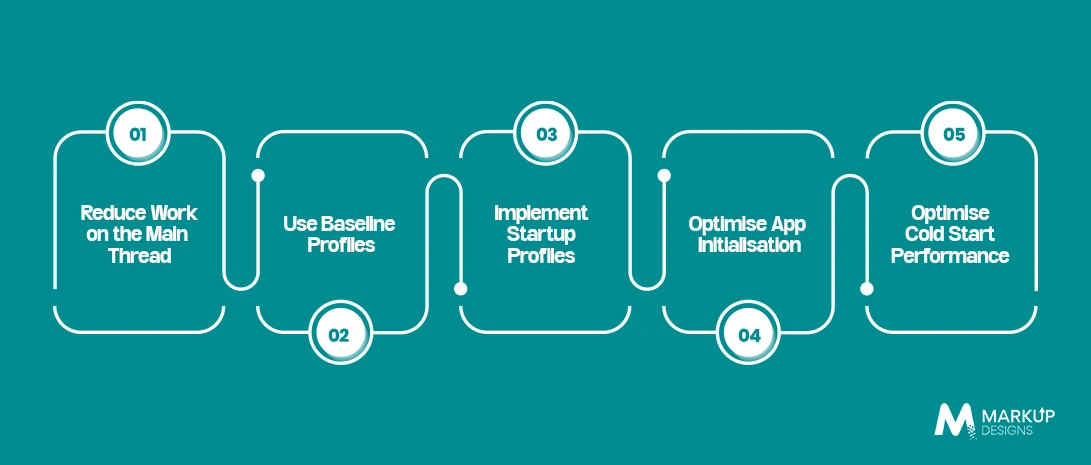
Fast startup is critical for enterprise apps where users expect immediate access to business tools and services. Optimising the launch process requires reducing unnecessary work, prioritising essential code, and ensuring the application becomes interactive as quickly as possible.
Reduce Work on the Main Thread
Keep the main thread focused on essential startup tasks. Move database operations, network requests, file processing, and other heavy workloads to background threads wherever possible. This prevents delays and helps the app become responsive sooner.
Use Baseline Profiles
Baseline Profiles allow Android to precompile frequently used code paths, improving app startup and runtime performance. They are particularly useful for enterprise applications with complex workflows, as they can reduce the processing required when users launch and interact with the app.
Implement Startup Profiles
Startup Profiles help identify and optimise the specific code required during application launch. By prioritising these critical paths, developers can improve compilation efficiency and reduce the amount of work Android needs to perform before the app is ready for use.
Optimise App Initialisation
Avoid initialising every service, SDK, and dependency when the application starts. Initialise only what is required immediately and defer non critical components until they are actually needed. This reduces startup overhead without removing essential functionality.
Optimise Cold Start Performance
Cold starts generally take longer because the application must load its process and initialise required components from scratch. Reduce cold start time by limiting startup dependencies, simplifying the initial screen, avoiding unnecessary synchronous operations, and measuring launch performance across real devices.
Optimization for UI and Rendering for Fast Android Applications
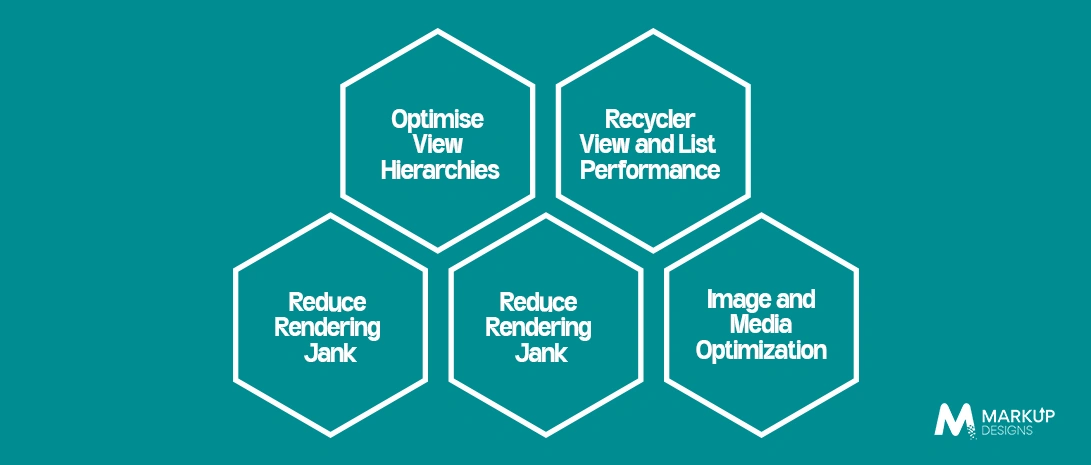
UI and Rendering Optimization for Faster Android Apps
Smooth rendering is essential for enterprise Android apps, especially when users work with dashboards, large data sets, forms, and media rich interfaces. Rendering optimisation focuses on reducing unnecessary UI work, simplifying layouts, and ensuring content appears and responds without visible lag.
Reduce Rendering Jank
Rendering jank occurs when the app fails to render frames consistently, resulting in stuttering or delayed interactions. Reduce it by avoiding expensive operations during rendering, limiting unnecessary UI updates, and keeping intensive processing away from the main thread.
Optimise View Hierarchies
Complex and deeply nested view hierarchies increase the work required to measure and draw the interface. Simplify layouts, remove redundant containers, and use efficient layout structures to reduce rendering overhead and improve screen responsiveness.
Android Jetpack Compose Performance Optimization
For apps using Jetpack Compose, minimise unnecessary recompositions and keep composable functions focused on specific UI responsibilities. Use stable data, remember expensive calculations where appropriate, and avoid triggering recomposition when the underlying UI state has not meaningfully changed.
RecyclerView and List Performance
Large lists can quickly affect scrolling performance when items are complex or poorly managed. Use efficient view holders, stable item handling, pagination, and appropriate list update strategies. Avoid loading or processing unnecessary data for items that are not currently visible.
Image and Media Optimization
Large images and media files can increase memory usage and slow down rendering. Use appropriately sized assets, efficient formats, caching, and lazy loading to reduce resource consumption. For media heavy enterprise apps, loading content based on visibility can also improve scrolling and overall responsiveness.
Optimization of Memory in Android and Its Stability
Inefficient memory use results in slow operation, excessive garbage collection, crashing, and poor performance on constrained devices.
Identifying and Preventing Memory Leaks
Memory leaks in Activity, Fragment, Context, listener, callback, and third-party libraries should be identified to prevent objects from being released when they are no longer needed.
Optimisation of Memory for Images and Bitmaps
Images should be presented at their optimized resolution, and caching techniques should ensure optimal memory saving during image processing.
Reducing Garbage Collection Pressure
Efficient object creation should be applied, as well as avoiding temporary and excess processing.
Handle Low Memory Conditions
Design the application to operate gracefully under memory pressure by managing resources carefully and limiting unnecessary background activity.
CPU and Battery Performance Optimization
CPU-intensive operations and excessive background activity can slow applications down while significantly increasing battery consumption.
Reduce Unnecessary CPU Work
Optimise expensive computations, repeated processing, inefficient algorithms, and unnecessary background workloads.
Optimise Background Tasks
Use WorkManager and other appropriate scheduling mechanisms for deferrable work instead of running unnecessary continuous background processes.
Minimise Wake Locks
Use wake locks only when required, release them correctly, and monitor excessive partial wake locks that can keep devices active unnecessarily.
Reduce Battery Consumption
Optimise location, sensors, network requests, synchronisation, background services, and push notification activity to reduce unnecessary battery drain.
Network Performance Optimization for Enterprise Android Apps
Network inefficiencies can slow down enterprise applications, particularly when they depend on frequent API requests or operate under unstable connectivity. Reducing unnecessary calls, keeping payloads lightweight, and using appropriate caching can improve response times and reduce data consumption.
Reduce Unnecessary API Calls
Batch related requests, prioritise critical calls, prevent duplicate requests, and design APIs to retrieve only the data required for each workflow.
Optimise API Payloads
Use pagination, compression, selective data retrieval, and efficient serialization to reduce payload size and improve transfer speed.
Implement Effective Caching
Use local and HTTP caching strategically to reduce repeated network requests. Cache invalidation should be handled carefully so users receive data that is sufficiently fresh while still benefiting from faster access.
Design for Unreliable Networks
Enterprise apps should account for slow or intermittent connections through appropriate timeouts, retry mechanisms, offline functionality, and reliable data synchronisation.
Maintain Secure and Efficient Network Communication
Use secure communication through TLS while avoiding unnecessary authentication, certificate, or connection overhead that can introduce latency.
Database and Local Data Optimization
Efficient local data management helps applications respond quickly while reducing unnecessary processing and storage overhead.
Optimise Database Queries
Use efficient queries, appropriate indexing, and query profiling to identify slow database operations and eliminate unnecessary data retrieval.
Improve Room Database Performance
Use a well-structured schema, efficient DAO operations, background database processing, and appropriate transactions to keep database work from affecting the UI.
Manage Large Local Datasets
Use pagination, data pruning, efficient synchronisation, and sensible storage management when applications handle large volumes of local data.
Android App Size Optimization
A smaller application can reduce download time, installation overhead, storage requirements, and the amount of unnecessary code and resources shipped to users.
Use R8 for Code and Resource Optimization
Enable code shrinking and resource optimisation to remove unused components while applying obfuscation where required.
Optimise Images and Assets
Compress media, use suitable formats, remove redundant resources, and avoid shipping unnecessarily large assets.
Manage Dependencies
Review third-party libraries regularly and remove dependencies that add unnecessary functionality, size, or runtime overhead.
Reduce the Download and Installation Footprint
Use Android App Bundles, dynamic delivery, feature modules, and appropriate ABI configuration where they provide meaningful size reductions.
Read Also: iOS or Android : Which App Launch First?
Android App Architecture for Long Term Performance
Performance should be considered at the architectural level because inefficient foundations become increasingly difficult to fix as an enterprise application grows.
Choose a Performance-Focused Architecture
Use modular, maintainable architecture with clear separation of responsibilities so individual components can scale without creating unnecessary processing overhead.
Optimise Dependency Injection
Avoid loading unnecessary dependencies during startup and use lazy initialisation where appropriate to keep dependency graphs manageable.
Modularise Large Enterprise Applications
Feature-based modularisation can improve maintainability, build efficiency, and the ability to deliver functionality independently or on demand.
Avoid Performance Anti-Patterns
Limit main thread blocking, unnecessary observers, excessive object creation, repeated data transformations, and overly complex abstractions that add processing without providing meaningful value.
Android Performance Testing Strategy
Performance testing should demonstrate whether an application actually becomes faster and more stable after optimisation, rather than relying on subjective observations.
Benchmark Before and After Optimization
Establish a baseline, apply targeted changes, and compare measurable results to confirm that an optimisation has produced a real improvement.
Use Macrobenchmark
Test important scenarios such as startup, scrolling, navigation, and other realistic user journeys under controlled conditions.
Use Android Studio Profiler
Use CPU, memory, network, and energy profiling to identify resource-intensive operations and performance bottlenecks.
Use Perfetto and System Tracing
Analyse threads, startup activity, rendering behaviour, and system-level interactions when conventional profiling does not provide enough detail.
Test Critical User Journeys
Measure performance across workflows such as login, search, dashboard loading, data entry, checkout, and synchronisation rather than testing isolated screens only.
Test Across Real Devices
Include low, mid, and high specification devices, different Android versions, and varied hardware configurations to identify device-specific issues.
Read Als : Android vs iOS: The Ultimate App Development
Continuous Performance Monitoring in Production
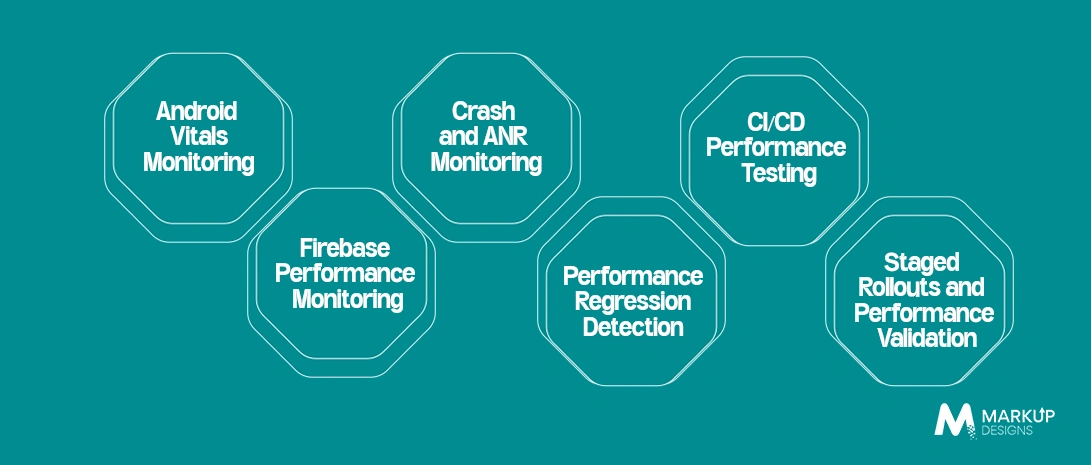
Performance optimisation should not stop once an Android app reaches production. Enterprise applications need continuous monitoring to identify slowdowns, crashes, ANRs, and regressions as real users interact with the app across different devices and network conditions.
Android Vitals Monitoring
Android Vitals provides key performance signals such as startup time, excessive battery usage, crashes, and ANRs. Monitoring these metrics helps teams identify issues affecting real users and prioritise improvements based on measurable performance data.
Firebase Performance Monitoring
Firebase Performance Monitoring tracks application behaviour in real usage, including app startup, network requests, and screen rendering. Teams can use this data to identify slow transactions and understand how performance varies across devices, locations, and network conditions.
Crash and ANR Monitoring
Crashes and Application Not Responding (ANR) events can directly affect user experience and app reliability. Monitor them continuously to identify recurring failures, affected devices, and problematic application flows before they become widespread production issues.
Performance Regression Detection
Performance can degrade as new features, dependencies, and code changes are introduced. Establish performance baselines and compare new releases against them to detect increases in startup time, memory consumption, rendering delays, or network latency.
CI/CD Performance Testing
Integrate performance checks into the CI/CD pipeline to catch issues before deployment. Automated tests can measure startup behaviour, rendering performance, resource consumption, and critical user journeys as part of the release process.
Staged Rollouts and Performance Validation
Release major changes to a limited percentage of users before expanding deployment. Monitor performance metrics, crashes, and ANRs during the rollout to validate the release under real-world conditions and identify problems before they affect the wider user base.
Common Android App Performance Problems Enterprises Should Avoid
Slow Application Startup
Excessive initialisation, synchronous operations, and unnecessary SDK loading can delay the first meaningful screen.
Excessive Main Thread Work
Heavy processing on the UI thread can create freezes, slow interactions, and rendering problems.
Memory Leaks
Poor lifecycle management and retained objects can gradually increase memory usage and lead to instability.
Inefficient APIs and Database Queries
Repeated requests and poorly designed queries can create unnecessary latency and resource consumption.
Excessive Background Processing
Unnecessary background tasks, synchronisation, and wake locks can affect both performance and battery life.
Unoptimised Media and UI
Large images, complex layouts, and inefficient rendering can cause slow screens and janky interactions.
Excessive Third Party SDKs
Every additional SDK can introduce startup work, dependencies, network activity, and potential performance overhead.
Ignoring Lower Specification Devices
Optimising only for development machines or flagship devices provides a misleading picture of real-world performance.
Optimising Without Measurement
Changes should be based on profiling and measurable benchmarks rather than assumptions.
Treating Performance as a One-Time Activity
Performance needs continuous attention as features, dependencies, user volumes, and device environments change.
Enterprise Best Practices for Maintaining Android App Performance
Maintaining performance requires defined standards and ownership across the development lifecycle.
Establish Performance Budgets
Set practical limits for startup time, memory usage, rendering, network consumption, and application size so performance expectations are measurable.
Make Performance Part of the Development Lifecycle
Consider performance during requirements, architecture, development, testing, deployment, and post-launch monitoring rather than addressing it only before release.
Create Performance Ownership
Developers, QA, DevOps, and product teams should have clearly defined responsibilities for identifying, testing, monitoring, and prioritising performance issues.
Monitor Performance Across Releases
Track performance trends between versions, identify regressions early, and prioritise fixes according to their impact on users and business-critical workflows.
How Markup Designs Approaches Android App Performance Optimization
Markup Designs can support enterprises across the full performance optimisation lifecycle, from identifying technical bottlenecks to improving application architecture and monitoring production performance.
Performance Assessment and Bottleneck Identification
Analyse application behaviour to identify the areas creating measurable performance constraints.
Android Architecture and Code Optimization
Improve application architecture and code efficiency to create a stronger foundation for long-term performance.
Startup and Rendering Optimization
Address slow startup, UI responsiveness, rendering inefficiencies, and resource-intensive interactions.
Memory, Battery and Network Optimization
Optimise resource consumption, background processing, API communication, caching, and local data handling.
Performance Testing Across Devices
Validate application performance across different Android devices, versions, hardware capabilities, and real-world conditions.
Production Monitoring and Continuous Optimization
Monitor application behaviour after deployment and use performance data to identify and resolve regressions.
Enterprise Android Application Development
Build scalable Android applications development with performance, stability, security, and maintainability considered throughout the development lifecycle.
Is Your Android App Fast Enough for Enterprise Demands?
Identify performance bottlenecks, improve responsiveness, and build a more stable Android experience with expert performance optimization and engineering support.

Conclusion
Android app performance optimization is not simply about reducing loading time. For enterprise applications, it involves maintaining responsiveness, stability, efficient resource usage, reliable network communication, and consistent performance across devices and operating conditions. By combining measurable benchmarks, efficient architecture, targeted optimisation, rigorous testing, and continuous production monitoring, enterprises can build Android applications that remain dependable as their users, data, and business requirements grow.
FAQs
What is Android app performance optimization?
Android app performance optimization involves improving an application’s speed, responsiveness, stability, and resource efficiency. It covers areas such as startup time, UI rendering, memory, CPU, battery, networking, database operations, and application size.
Why is Android app performance important for enterprises?
Enterprise applications often handle complex workflows, large datasets, multiple integrations, and thousands of users across different devices. Poor performance can reduce productivity, increase user frustration, cause crashes and ANRs, and affect business operations.
How can I improve Android app startup time?
Reduce unnecessary initialization, avoid blocking the main thread, defer non-critical tasks, minimise startup dependencies, and use Baseline and Startup Profiles to optimise frequently executed and startup-critical code.
What are the most important Android performance metrics?
Key metrics include startup latency, time to interactive, frame rendering performance, CPU and memory usage, battery consumption, API response time, application size, crash rate, and ANR rate.
How do Android Vitals help improve app performance?
Android Vitals provides production performance signals such as crash rates, ANRs, and excessive wake locks. These insights help development teams identify issues affecting real users and prioritise performance improvements.
Author's Perspective
Enterprise Android performance should be engineered from the beginning rather than fixed after users start experiencing problems. An application may perform well in development and still struggle on older devices, unstable networks, or under real production workloads. The right approach is to establish measurable performance targets, profile the application, optimise the areas creating the greatest bottlenecks, and continuously monitor performance after deployment. This turns performance from a one-time technical task into an ongoing part of reliable Android application development.
Discuss Your Project Now
Gaurav Goyal
Global Sales- VP
Insights Are Valuable & Execution is Priceless
You’ve read about the digital future. Now, let’s build the infrastructure to take you there. Move your strategy from the page to the product.
Design Your Solution Now
Contact Us
Schedule The Appointment At Your Convenience Date And Time.
30 Min
Web Conference
Time Zone
Indian standard time (08:30pm)

Thanks For Getting In Touch!
You’ve Taken The First Step Toward Transforming Your Digital Presence. Our Experts Will Reach Out Shortly To Take It Forward.
Launch Your Dream Project
Provide a brief overview of your project, and our specialists will evaluate your requirements. We will connect with you to explore how the right digital solutions can help you launch faster.