

In Brief
- The rising need for mobile applications that are both user-friendly and advanced has transformed the digital landscape in the UK.
- While an aesthetically pleasing interface is crucial, it cannot bring success without an effective customer experience.
- By the end of 2026, users will demand a fast, customized, accessible, and smooth experience from every interaction.
- UI/UX design, which is user-centered, improves retention of customers, engagement, conversions, and the growth of business.
- This guide describes the most important UI/UX design best practices, design processes, tools, trends, and practical solutions to create the best mobile applications in the UK.
The UK mobile application market is on the rise due to the growing interest of various industries in digital solutions because businesses strive to meet the expectations of clients. Whether it is a retail platform, a healthcare app, a fintech, or a service app, users expect the app to be usable at all stages of customer satisfaction and interaction. Therefore, it is very important to stick to UI/UX design best practices for successful mobile apps in the UK.
In 2026, customers expect personalised interactions, responsive designs, accessibility, and seamless functionality across every device. A user-centric approach to UX Design for Mobile Apps not only improves customer satisfaction but also supports higher retention, stronger brand loyalty, and sustainable business growth. This guide explores proven UI/UX design principles, development processes, industry-leading tools, emerging trends, and practical best practices to help businesses create high-performing mobile applications for the UK market.
Understanding UI and UX Design for Mobile Apps
To have an effective mobile application, it is necessary to focus not only on the eye-catching design and usefulness of the app but also on the User Interface (UI) and User Experience (UX), which together can help create an application that will not only look pretty but be convenient for use and meet the expectations of the users. While UI design can be characterized by how the app looks and feels, UX design can be described as working on the fact that the app can be used effectively, easily, and enjoyably.
What is User Interface (UI) Design?
User Interface (UI) design means designing visual and interactive components of a certain mobile application. UI design aims to create an interface that would look attractive, consistent, and easy to use. Thoughtful interface design helps users navigate features effortlessly and complete tasks without friction.
Different aspects of UI design include:
Layouts: A convenient structure of the screens providing information to a user and making it easy for him or her to move through the app.
Colours: A carefully selected colour palette that reinforces brand identity, highlights important actions, and enhances readability.
Typography: The use of clear and easily readable fonts with the right size and spacing can enhance readability on any device.
Icons: The implementation of basic icons understood by many might make it easier for users to know what action to take without reading.
Buttons: Good placement and clear marking of buttons might assist users in interacting with the application easily.
Animations: Use of little animations and micro interactions may offer visual feedback and make the interaction more natural while remaining unobtrusive.
Brand Consistency: Using the same colors, fonts, icons, and design elements on every screen can help in creating trust and reinforcing brand recognition.
For businesses targeting customers in the United Kingdom, visual design should rely on simple and minimalist design rather than an overcrowded look and heavy animations.
What is UX design?
User experience (UX) design is about how users act and feel when using a particular mobile app. Instead of focusing on the looks of the app, UX involves the design of a smooth experience solving user problems while providing them with value.
Integrating solid UX practices into your development process ensures your app relies on real research, usability testing, and user-centric design.
Main components of a proper UX design include:
User Journey: Examine every single interaction from onboarding till completion of the task to remove unnecessary steps.
Simplicity: Develop simple workflows that allow users to make little effort while their learning curve is reduced.
Accessibility: Make the app useful for people with different levels of ability by following principles of usability.
Navigation: Develop clear menus and screen flows allowing users to find what they are looking for easily.
User Satisfaction: Provide users with a reliable app in terms of its performance and intuitiveness, encouraging them to use it again.
Functionality: Ensure that every feature works efficiently and contributes to the fulfillment of users’ goals.
Emotional Experience: Create a trusting atmosphere with the help of interactions that provide feedback to the user and a frustration-free experience.
An effective UX strategy improves Mobile App Usability, increases customer retention, and encourages long-term engagement by making every interaction meaningful and effortless.
UI vs UX: What’s the Difference?
Although UI and UX work closely together, they serve different purposes within the mobile app design process. UI shapes the visual appearance and interactive elements of an application, while UX focuses on the overall experience users have as they navigate and accomplish tasks.
| User Interface (UI) | User Experience (UX) |
| Focuses on visual design | Focuses on the complete user journey |
| Determines the app’s appearance | Shapes the overall user experience |
| Uses colours, typography, and visual elements | Prioritises usability and accessibility |
| Creates layouts and screen designs | Improves functionality and workflow efficiency |
| Reinforces brand identity and consistency | Increases customer satisfaction and engagement |
| Designs buttons, icons, and interactive elements | Solves user problems through intuitive experiences |
A visually impressive application may attract users initially, but poor navigation, confusing workflows, or slow interactions can quickly lead to frustration and uninstalls. Likewise, an app with excellent functionality but outdated or inconsistent visuals may struggle to build trust and credibility. Successful mobile applications combine thoughtful UI Design Principles with user-centred UX strategies to deliver experiences that are visually appealing, highly functional, and aligned with the expectations of modern UK users.
Even the best functioning apps may give an impression of being untrustworthy if their visuals are not modern or unified. The most successful applications on the market provide their customers with great user experience, combining excellent UI Design principles with user-centric UX practices.
The Importance of UI/UX Design for Success of Mobile Apps in the UK
With the smartphone ownership level in the UK holding a record high of over 93%, users have little tolerance for poor digital experiences and will uninstall an app immediately after the first 30 seconds of use if it comes across as slow or unclear. Thus, it is crucial to invest in UI/UX Design Best Practices for successful mobile apps in the UK in order to be able to attract users and keep them happy and loyal.
Good UX Design ensures tangible business results, such as:
- Higher rates of user retention through providing seamless experiences.
- Increased customer engagement through intuitive navigation, personalized interactions, and other technologies.
- Higher conversion rates achieved through simplified processes such as registration, purchases, or bookings.
- By achieving a positive first impression, the uninstall rate has been lowered.
- Further implementation of convenience features has made the app accessible to a broader user group.
- A more favorable brand image is obtained via uniform design and a professional perspective.
- Improved App Store rating and favorable user reviews are achieved as well.
- Moreover, better ROI is a result of improved retention and customer lifetime value.
All of the presented examples prove that user experience is crucial in every industry, including FinTech software. There are many examples of apps that work well in the field, like Monzo, Revolut, and Starling Bank. Mobile application design often uses the NHS Digital Design Manual since it helps improve usability.
Large corporations such as ASOS and Tesco have incorporated the best practices into their apps by enabling smooth checkout. Finally, New Zealand Post and Deliveroo have made effective use of live tracking in their applications.
The Complete Mobile App UI/UX Design Process
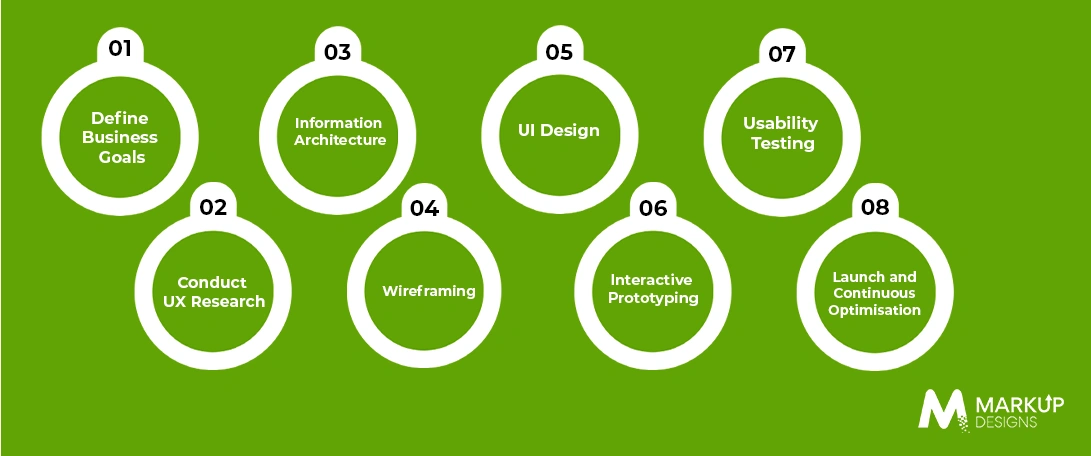
Step 1. Define Business Goals
Any successful application starts with the definition of the company’s goals.
Before the design begins, it is essential for companies to check who their users are, find out their expectations, and set measurable performance indicators.
Step 2: Execute UX Study
A successful UX study allows you to create solutions designed for real users’ needs. At this stage, it is vital to perform user interviews, surveys, analytics, competitor investigation, and persona creation. It is essential to tailor personas specifically for the UK apps. For instance, a London commuter using an app on a crowded train has very different needs than a user in rural Wales or Scotland with spotty connectivity.
Step 3: Information Structure
An efficient information structure provides opportunities and solutions to group the information logically, specify the paths for users, and establish user-friendly navigation.
Step 4: Wireframing
Low-fidelity wireframes outline the flow of users and application layout before the visual design begins. This approach assists validation of the idea from the very beginning and prevents expensive design changes in the future.
Step 5: User Interface Design
Next, the interface is turned into a final visual solution, based on colour theory, typography, symbols, reusable elements, visual hierarchy, white space, and consistent branding in order to increase the level of readability.
Step 6: Interactive Prototyping
Clickable prototypes imitate the actual application’s usage. This allows testing navigation, workflow, and usability before starting development.
Step 7: Usability Testing
Carrying out tests with actual users reveals usability barriers via tools like A/B testing and heatmaps, along with behavioral analysis. In regard to UK applications, testing must feature different demographics to cover accessibility, regional usability, as well as compliance with the relevant norms.
Step 8: Launch and Continuous Optimisation
After releasing the app, continuous optimization is the key. User feedback, performance analysis, and introduction of new features help in retaining satisfied users.
Core UI/UX Design Principles Every Mobile App Should Follow
Simplicity
Keep the interface free from clutter without irrelevant elements for speedy and painless task accomplishment.
Consistency
Consistent layout, color palettes, typography, and navigation patterns make the experience familiar for users.
Accessibility
Design user-friendly products that comply with the WCAG standards along with the framework of the Equality Act 2010, which minimizes legal threats for app creators while making the app usable for the audience.
Visual Hierarchy
Use size, spacing, color contrast, and positioning in the content layout to direct the attention of users to the most important actions.
User-Centered Design
Design decisions must be based on thorough user research and comprehension of their requirements and expectations.
Intuitive Navigation
Set up logical menus, straightforward labels, and user journeys that are uncomplicated so that the users do not have to exert any unnecessary effort in getting the information.
Feedback and Microinteractions
Integrate subtle motion and status notifications of actions taken so that the users are made aware of the outcomes.
Error Prevention and Recovery
Mitigate errors through simplifying validation, creating meaningful error messages, and providing simple recovery methods to find satisfaction.
Performance and Speed
Make sure that the processes are well optimised to meet UK needs and preferences, including any offline modes and caching of important data.
Trust, Privacy and Security by Design
Implement privacy policies in accordance with the requirements of EU GDPR and the Data Protection Act of 2018, and ensure that the privacy measures and cookie agreements do not disturb users when they start working with applications.
UI/UX Design Best Practices for Successful Mobile Apps in the UK
Adhering to the principles of effective UI/UX Design in Mobile Apps for the UK allows organisations to make apps that are user-friendly and easy to operate, leading to customer satisfaction and benefits for the business.
Design for Mobile First
Consider small screens first in designing processes to optimize effective delivery of content, screens, and interactions on mobile devices first and then scale to larger devices.
Keep Navigation Simple
Utilize simple menus, intuitive screen flows, and unobtrusive navigation mechanisms for the ease of finding needed information.
Reduce Cognitive Load
Displaying only relevant information on the screen, clear labeling, and dividing complex tasks into manageable parts will help to keep decision-making processes simple.
Create Fast Loading Interfaces
By optimizing the use of images, minimizing the number of animations, and effectively managing the coding process, it is possible to achieve a low loading time and maintain customers’ attention.
Build Responsive Experiences
Make sure that the app can function consistently on all screens, operating systems, and devices.
Optimise Touch Interactions
There should be easy-to-use buttons and enough space between them to ensure an easy and smooth experience of interactions while commuting or using one hand for the device.
Use Clear Call to Actions
Provide specific buttons for significant actions and clear messages for users to finish their objectives.
Maintain Brand Consistency
Using the same colors, fonts, icons, and visual elements for each screen reinforces the brand image and contributes to better recognition.
Design for Accessibility(WCAG)
Conform to WCAG accessibility criteria while complying with the UK Equality Act of 2010 for the purpose of providing accessible design solutions to those with different physical challenges, thereby minimizing legal responsibilities.
Personalise User Experiences
Utilize user preferences and user behavior to provide relevant content, suggestions, and notifications without bombarding the user with unnecessary information.
Minimise User Input
Minimize the need for typing by means of using auto-fill, drop-downs, biometrics, and one-tap actions, hence simplifying the actual completion of tasks.
Optimise Onboarding Experience
Ensure the onboarding process is of minimum length by introducing the main elements and allowing users to go through the application easily while requiring only the essential permissions.
Use Meaningful Animations
Use simple animations and micro-interactions to appropriately respond to users, highlight the essential aspects, and make the process more user-friendly.
Regularly Test with Real Users
Collect continuous feedback via usability testing and analysis in order to find problems, check the effectiveness of the changes introduced, and create a better user experience gradually.
Essential UI/UX Design Tools Used by UK App Designers
Leading digital agencies across London and the UK rely on advanced design tools to streamline collaboration, improve workflows, and create high-quality mobile experiences. By using these industry-standard platforms, Markup Designs delivers world-class UI/UX solutions that align with modern design practices.
Figma
Figma is a cloud-based design software that’s often used for collaborative design projects, reusable design templates, common features, and prototype designs that help companies stay in sync throughout the entire course of a project.
Adobe XD
Adobe XD helps designers wireframe and create interactive prototypes while the software incorporates Adobe Creative Cloud.
Sketch
Sketch is a dedicated vector design software on macOS that comes loaded with a variety of plugins and has solid interface development features.
InVision
InVision is well-known for prototype creation, collaboration between team members, and feedback from customers regarding UX design before moving on to actual app development.
Maze
Maze is an online platform that allows teams to gain relevant user insights and allows designers to analyze their design through how real users interact with it.
Miro
Miro is a powerful user journey mapping and collaborative brainstorming tool that is appropriate for designing some elaborate UX design concepts involving several teams.
Common UI/UX Mistakes That Reduce Mobile App Performance
Although a mobile app is extremely complicated, it can still suffer from poor performance due to frequent mistakes. Businesses should avoid these types of mistakes, which include:
- Complex navigation, making it hard to find needed information.
- Long and complicated onboarding processes.
- Layouts, colors, and other elements not being consistent.
- Not taking accessibility and inclusive design into account.
- Performance-wise, slow loading screens.
- Too many unnecessary notifications.
- Small touch targets that make buttons difficult to tap accurately.
- Visual hierarchy being ineffective enough to hide the most important activities.
- Poor typography choices that reduce readability.
- Insufficient or non-existent usability testing prior to a launch.
- Making users fill out long forms or provide unnecessary information.
- Ignoring analytics and customer feedback.
UI/UX Design Trends Shaping Mobile Apps in 2026
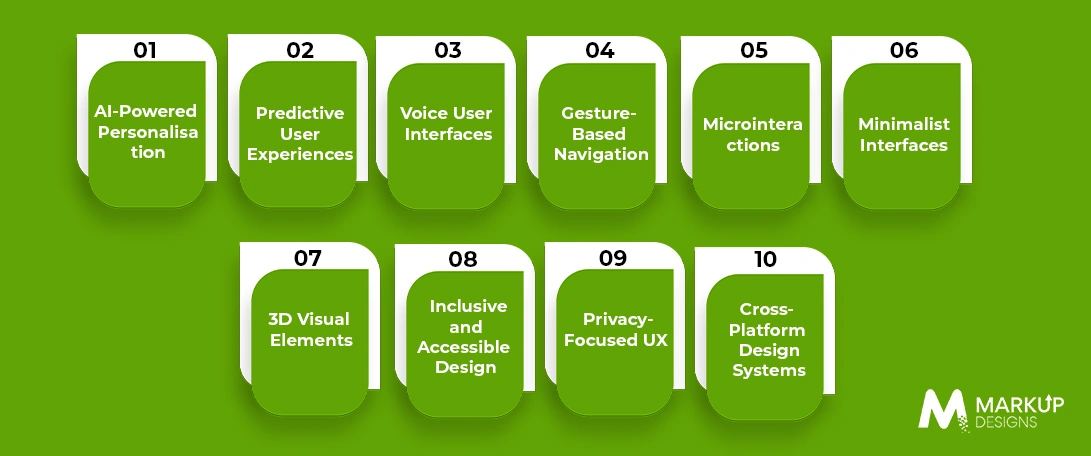
Given that people’s preferences keep changing, companies must keep up with the trends.
AI-Powered Personalisation
Thanks to AI, users receive tailored content and recommendations.
Predictive User Experience
Mobile apps can provide suggestions and prompt actions without the users’ active involvement.
Voice User Interfaces
Voice-enabled interactions make mobile apps more accessible and convenient, particularly for hands-free use.
Gesture-Based Navigation
Contemporary gesture controls enable a smoother interface and expedite navigation across multiple services.
Microinteractions
Small animations and visual responses help improve usability, as they allow confirming user actions and offer responsiveness.
Minimalist Interfaces
White spaces, clean designs, and meaningful content help to enhance readability and minimize distractions that users prefer.
3D Visual Elements
Using interactive 3D digital images and immersive visuals is a great way to elevate product demonstrations and engage users while maintaining usability.
Inclusive and Accessible Design
While the UK population continues to age, inclusive interfaces must be designed to be increasingly dependent on mobile banking, health care, and public services.
Privacy-Focused UX
UK consumers have become more aware of how their personal data is collected. Good UX should explain data collection and the user journey properly.
Cross-Platform Design Systems
Cross-channel design systems provide standardized design solutions for branding, reusable modules, and smooth outgoing user protocols for platforms such as Android, iOS, tablets, and web services without compromising on the quality of design services.
Read Also: Compare iOS Vs Android App Development in UK
Choosing the Best UI/UX Design Agency in the UK
The decision of picking the right design agency in the UK goes beyond analyzing cases presented by them. Look for a design studio that has evidence of experience in their field and that has made some leading implementations in the field of UX research, wireframing, prototyping, and user testing.
The design agency needs to know UK GDPR, UK Equality Act 2010, and the obligatory guidelines concerning accessibility before moving ahead with your app project.
Choose the team that is used to working in the agile model, and that provides continuous support to their client.
Why Working with Markup Designs for Your Mobile UI/UX Project is an Excellent Idea?
Markup Designs has over 12 years of expertise in the field, more than 300 professionals on the staff, and thousands of successful mobile apps made. We deliver user-centered mobile experiences due to a range of services from UX strategy to updated UI design systems
From concept to deployment and post-launch optimisation, we provide end-to-end mobile app development services that help UK businesses build scalable, high-performing, and future-ready digital products.
Transform Your Mobile App with Exceptional UI/UX Design
Create intuitive, visually engaging, and user-focused mobile applications with Markup Designs. Our UI/UX specialists combine research, creativity, and modern design practices to build experiences that improve engagement, customer retention, and business growth.

Conclusion
A successful mobile application requires the perfect balance of intuitive UI and user-focused UX. By following proven design principles, adopting modern tools, and continuously refining the user experience through testing and optimisation, businesses can improve usability, increase engagement, and drive higher conversions.
Partnering with an experienced UI UX Design Company UK like Markup Designs gives businesses access to research-driven design strategies, accessibility focused development, and scalable solutions that meet the evolving expectations of UK users. Whether you are launching a new application or enhancing an existing one, investing in quality UI/UX design lays the foundation for long-term digital success.
FAQs
1. How does UI design differ from UX design?
UI design is concerned with the aesthetics of mobile apps, like their colours, layout, typography, and interaction features. When it comes to UX design, it is all about the journey of the user while making sure that the app is usable and satisfies the user.
2. What role does UI/UX play in mobile app success?
Well-designed UI/UX increases usability, encourages users to engage, decreases the number of uninstalls, boosts brand loyalty, and improves conversion.
3. How much does UI/UX cost for mobile apps in the United Kingdom?
The cost depends on how complicated the project is. In general, the MVP of a startup is priced quite low; that is why it usually costs around £8,000 – £15,000. As for enterprise-level projects, our customers should expect prices starting from around £25,000 if they want to turn to professional UI/UX designers and want to get a functional app.
4. How much time does it take to do UI/UX?
Generally, UI/UX design takes 4 to 12 weeks due to the number of screens, research methods, and other factors.
5. What tools are used in UI/UX design?
Renowned design teams use Figma, Adobe XD, Sketch, InVision, Maze, and Miro for wireframing, prototyping, collaborating, usability testing, and design system management.
6. What impact does accessibility have on a mobile application?
Creating an accessible design helps companies adhere to the UK Equality Act 2010. It allows for better usability and wider usage by the general public. Moreover, it helps companies increase their user base through the 16 million disabled people living in the UK, thus improving customer satisfaction.
7. How regularly should the UI/UX of an app be improved?
The UI/UX of a mobile app should be improved regularly, following usability test results, feature additions, and design updates.
Author's Perspective
At Markup Designs, we believe that all mobile apps should be designed with people in mind, not technology. By cooperating with users and applying advanced techniques based on thorough market research and customer feedback, our experts create digital solutions that enable firms to make their customers loyal and gain real profits.
Our approach ensures every mobile app is visually refined, easy to navigate, compliant with UK standards, and designed to meet the evolving expectations of modern users.
Discuss Your Project NowGaurav Goyal
Global Sales- VP
Related Posts

How UI UX Design Impacts Mobile App Performance...
Insights Are Valuable & Execution is Priceless
You’ve read about the digital future. Now, let’s build the infrastructure to take you there. Move your strategy from the page to the product.
Design Your Solution Now
Contact Us
Schedule The Appointment At Your Convenience Date And Time.
30 Min
Web Conference
Time Zone
Indian standard time (08:30pm)

Thanks For Getting In Touch!
You’ve Taken The First Step Toward Transforming Your Digital Presence. Our Experts Will Reach Out Shortly To Take It Forward.
Launch Your Dream Project
Provide a brief overview of your project, and our specialists will evaluate your requirements. We will connect with you to explore how the right digital solutions can help you launch faster.