

In Brief
- Yuka-like apps allow users to scan products and access information about ingredients, nutrition, allergens, and overall product quality.
- The cost to build a Yuka-like app depends on its features, scanning capabilities, product database, integrations, AI functionality, and development platform.
- Essential features can include barcode scanning, product profiles, ingredient analysis, product scoring, personalised recommendations, and healthier alternatives.
- The development process involves market research, product database planning, UI/UX design, app development, integrations, testing, security, and deployment.
- Ongoing costs can include product data updates, database management, cloud hosting, third-party APIs, security, maintenance, and feature enhancements.
Product-scanning apps are becoming a practical way for consumers to understand what they are buying before making a purchase. Apps like Yuka allow users to scan a product and quickly access information about its ingredients, nutritional composition, potential allergens, and overall product assessment.
Building an app like Yuka requires more than barcode scanning. It involves a reliable product database, ingredient analysis, intuitive user experience, secure integrations, and a scalable technology infrastructure. This guide covers the key features, development process, technology requirements, cost factors, compliance considerations, and monetisation options involved in building a Yuka-like app.
What Is an App Like Yuka?
A Yuka-like app is a product-scanning application that helps consumers understand the composition and quality of products before purchasing them. Users can scan a product barcode to retrieve information about ingredients, nutritional values, allergens, and other relevant product details from a connected database.
The app can analyse this information using predefined scoring criteria or AI-based algorithms and present the results through a simple product score or rating. It can also highlight ingredients that may be relevant to specific dietary preferences and recommend alternative products based on the user’s needs.
How Much Does It Cost to Build an App Like Yuka?
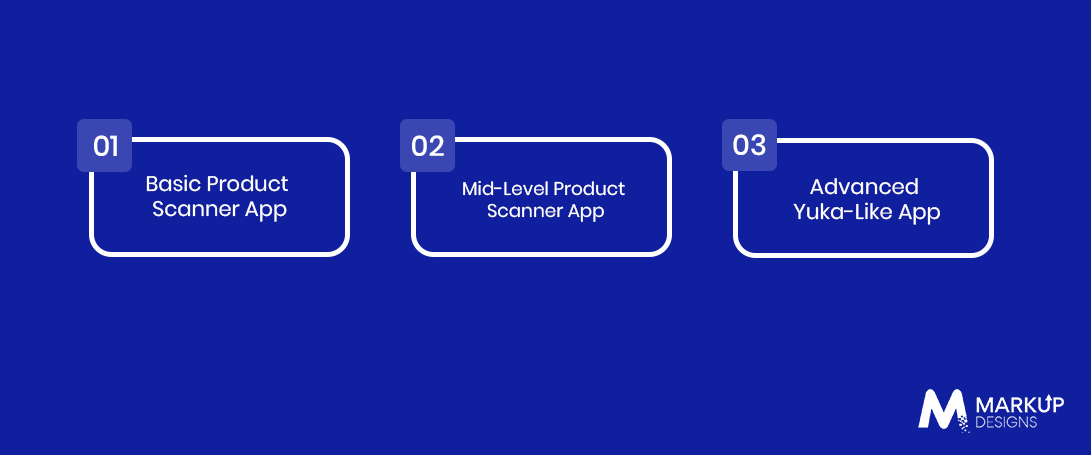
The cost to build an app like Yuka can range from $40,000 to $400,000+, depending on the application’s complexity, database requirements, scanning capabilities, integrations, and advanced features. A basic product scanner requires fewer development resources, while an advanced platform with AI-powered analysis, personalised recommendations, extensive product data, and multiple integrations requires a larger investment.
| App Type | Estimated Cost | Development Timeline |
| Basic Product Scanner App | $40,000–$80,000 | 3–5 months |
| Mid-Level Product Scanner App | $80,000–$200,000 | 5–8 months |
| Advanced Yuka-Like App | $200,000–$400,000+ | 8–12+ months |
Basic Product Scanner App
A basic version can include barcode scanning, product search, product information, ingredient details, basic scoring, user accounts, and scan history. It is suitable for validating the core concept before introducing advanced capabilities.
Mid-Level Product Scanner App
A mid-level application can add personalised recommendations, allergen alerts, nutritional analysis, favourites, notifications, a larger product database, third-party integrations, and an admin dashboard.
Advanced Yuka-Like App
An advanced solution can incorporate AI-powered ingredient analysis, OCR-based label scanning, personalised recommendations, real-time data updates, advanced analytics, extensive product databases, and sophisticated scoring or recommendation engines.
Key Factors Affecting Development Cost
App Complexity and Feature Set: The number and complexity of features directly influence development effort, testing requirements, and overall project cost.
Barcode Scanning and Product Recognition: Advanced scanning, recognition, and image-processing capabilities may require additional technologies and development work.
Product and Ingredient Database: Building, licensing, integrating, and continuously updating a large product database can become a significant part of the overall investment.
AI and Recommendation Capabilities: AI-based ingredient analysis, personalised recommendations, and predictive features require additional models, data processing, testing, and infrastructure.
Third-Party API Integrations: Product databases, payment gateways, analytics tools, authentication services, and other APIs can add both development and recurring integration costs.
UI/UX Requirements: A simple scanning flow and clear presentation of product information require thoughtful UI/UX design, particularly when users need to understand complex ingredient or nutritional information quickly.
Security and Compliance: Data protection, secure authentication, API security, and applicable regulatory requirements can affect both development and ongoing maintenance costs.
Development Team Location: Development rates vary by team location, technical expertise, project complexity, and engagement model.
Maintenance and Infrastructure: Hosting, database updates, API usage, security monitoring, bug fixes, and new feature development contribute to the long-term cost of operating the application.
Key Features to Include in an App Like Yuka
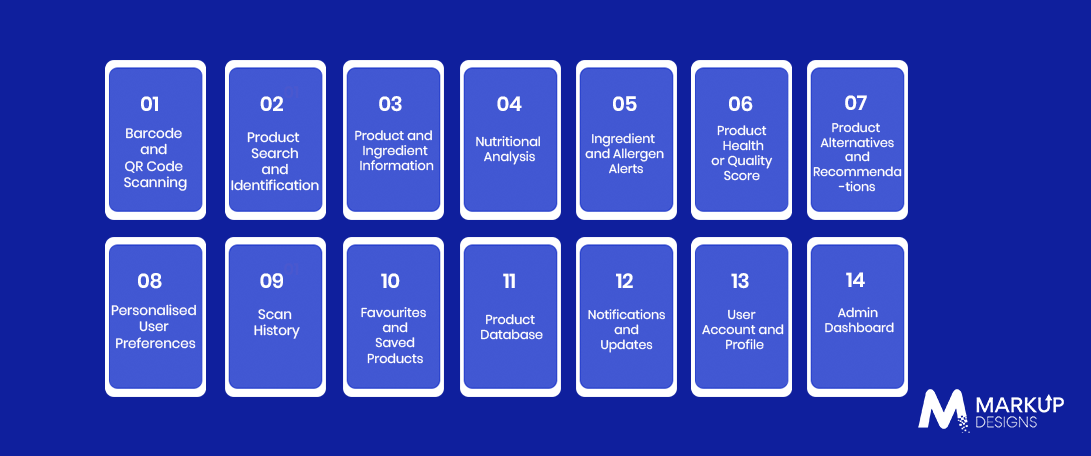
A Yuka-like app should make product information easy to access and understand while providing useful analysis based on the user’s requirements. The following features can form the foundation of the application.
Barcode and QR Code Scanning
Allow users to scan product barcodes or QR codes using their smartphone camera and retrieve the corresponding product information quickly.
Product Search and Identification
Enable users to search for products manually when a barcode is unavailable and identify products using names, brands, categories, or other relevant details.
Product and Ingredient Information
Display product descriptions, ingredients, nutritional information, brand details, product categories, and other relevant data in a structured format.
Nutritional Analysis
Analyse nutritional values and present information such as calories, sugar, fats, protein, sodium, and other relevant nutritional metrics.
Ingredient and Allergen Alerts
Highlight specific ingredients, allergens, additives, or other product attributes that may be relevant to the user’s dietary preferences or requirements.
Product Health or Quality Score
Use predefined criteria or an analysis engine to generate a product score that helps users quickly understand how the product performs against selected assessment criteria.
Product Alternatives and Recommendations
Suggest alternative products based on ingredients, nutritional characteristics, user preferences, product scores, or dietary requirements.
Personalised User Preferences
Allow users to set dietary preferences, allergies, ingredient restrictions, or other requirements so the app can tailor product information and recommendations.
Scan History
Store previously scanned products so users can revisit product information without scanning the same item again.
Favourites and Saved Products
Allow users to save products they frequently purchase, compare, or want to review later.
Product Database
Maintain a structured database containing product details, ingredients, nutritional information, categories, brands, and other relevant attributes.
Notifications and Updates
Notify users about product updates, saved items, new recommendations, database changes, or other relevant information.
User Account and Profile
Provide secure account creation and profile management for storing preferences, scan history, favourites, and personalised settings.
Admin Dashboard
Give administrators tools to manage product records, update ingredient and nutritional information, monitor user activity, manage content, and maintain the product database.
Advanced Features to Consider
AI-Powered Ingredient Analysis: Use AI to analyse ingredient lists and identify patterns, additives, allergens, or other attributes based on defined criteria.
Personalised Recommendations: Analyse user preferences and previous activity to provide more relevant product suggestions.
OCR-Based Label Scanning: Allow users to capture and extract ingredient or nutritional information directly from product labels when a barcode is unavailable.
Voice Search: Enable users to search for products or access information using voice commands.
Dietary Preference Detection: Use user-provided preferences and product data to identify products that align with specific dietary requirements.
Real-Time Product Data Updates: Keep product information current through database synchronisation, APIs, administrator updates, or other data sources.
How to Build an App Like Yuka?
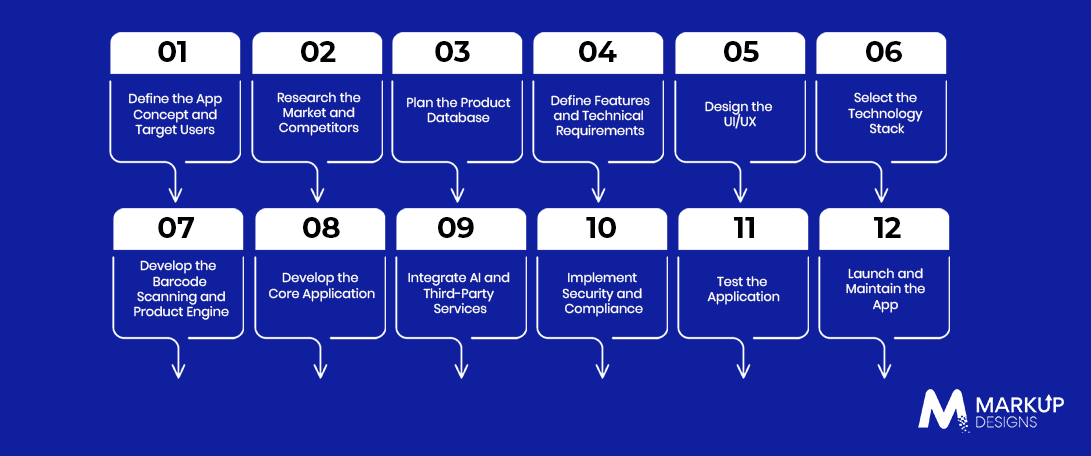
Building an app like Yuka requires more than developing a barcode scanner. The application needs a reliable product database, clear scoring logic, intuitive UX, secure integrations, and a scalable architecture that can support continuous product and ingredient updates. A structured development process helps bring these components together effectively.
Step 1: Define the App Concept and Target Users
Start by defining the purpose of the application, target audience, product categories, and the problems it aims to address. Establish the core value proposition and determine how users will benefit from scanning and analysing products.
Step 2: Research the Market and Competitors
Analyse existing product-scanning applications to understand their features, user experience, pricing, and positioning. Identify user expectations, market gaps, and opportunities to differentiate your application.
Step 3: Plan the Product Database
Define how product names, ingredients, nutritional values, allergens, brands, categories, and other information will be collected and structured. Establish processes for verifying, updating, and maintaining product data as product formulations and information change.
Step 4: Define Features and Technical Requirements
Prioritise the features required for the initial MVP and determine the technical requirements for scanning, product scoring, recommendations, user accounts, APIs, administration, and data management. This helps establish a clear development scope and technology roadmap.
Step 5: Design the UI/UX
Design an intuitive experience that allows users to scan a product and understand the results quickly. Focus on clear product information, visual scores, ingredient insights, alerts, and recommendations without making the interface unnecessarily complex.
Step 6: Select the Technology Stack
Choose technologies based on the app’s platform, performance requirements, database size, integrations, and scalability needs. The technology stack may include mobile development frameworks, backend technologies, databases, cloud services, barcode scanning tools, APIs, and AI technologies.
Step 7: Develop the Barcode Scanning and Product Engine
Build the barcode scanning functionality and connect it with the product database. Develop the underlying product identification and analysis engine to retrieve relevant information and generate results based on the application’s defined scoring criteria.
Step 8: Develop the Core Application
Develop the primary application features, including user accounts, product profiles, ingredient analysis, product scores, recommendations, scan history, favourites, notifications, and other planned functionality.
Step 9: Integrate AI and Third-Party Services
Integrate AI models, recommendation engines, OCR, analytics tools, payment gateways, product databases, or other third-party services where required. Each integration should be evaluated for accuracy, security, reliability, cost, and long-term maintainability.
Step 10: Implement Security and Compliance
Apply appropriate security measures to protect user accounts, product data, APIs, and other application components. Address applicable privacy, data protection, payment, and regulatory requirements based on the target market and app functionality.
Step 11: Test the Application
Conduct functional, usability, performance, security, and compatibility testing across supported devices and platforms. Test barcode recognition, product data accuracy, API integrations, scoring logic, recommendations, and application performance under different conditions.
Step 12: Launch and Maintain the App
Deploy the application to the relevant app stores and establish monitoring processes for performance, security, crashes, and user activity. Continue updating product information, maintaining integrations, fixing issues, and introducing improvements based on user feedback and changing requirements.
Technology Stack for a Yuka-Like App
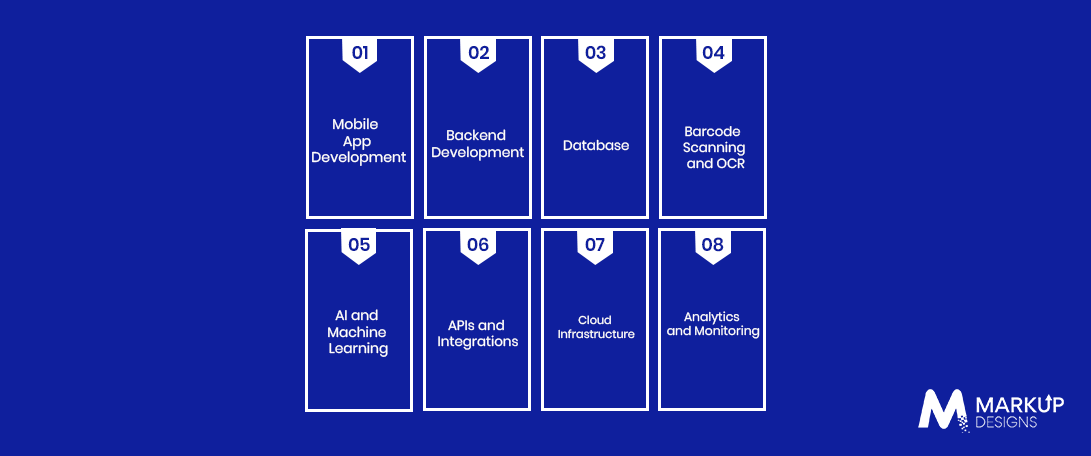
The technology stack should support fast product scanning, reliable data processing, secure user management, and scalable product databases. The final selection depends on the application’s features, platforms, integrations, and expected user volume.
Mobile App Development
Use technologies such as Flutter, React Native, Swift, or Kotlin based on the required platforms, performance, and development approach.
Backend Development
Backend technologies such as Node.js, Python, Java, or .NET can support APIs, business logic, authentication, product analysis, and application services.
Database
Use scalable databases such as PostgreSQL, MySQL, MongoDB, or cloud-based database services to manage product, ingredient, nutritional, user, and scanning data.
Barcode Scanning and OCR
Integrate barcode-scanning frameworks and OCR technologies to identify products and extract information from labels when required.
AI and Machine Learning
Use Python, TensorFlow, PyTorch, or cloud-based AI services for ingredient analysis, recommendations, classification, and other intelligent capabilities.
APIs and Integrations
Connect the application with product databases, payment gateways, authentication services, analytics platforms, and other third-party APIs required by the business model.
Cloud Infrastructure
Use cloud platforms such as AWS, Microsoft Azure, or Google Cloud for application hosting, databases, storage, APIs, computing, and scalable infrastructure.
Analytics and Monitoring
Integrate analytics and monitoring tools to track application performance, user behaviour, crashes, errors, scanning activity, and other relevant metrics.
Regulatory and Compliance Considerations
Compliance requirements for a Yuka-like application depend on its target market, the type of data collected, product information provided, integrations, and business model. These requirements should be assessed during the planning stage rather than added after development.
Data Privacy and User Data Protection
Protect personal information through appropriate data collection, storage, access controls, encryption, and privacy practices based on applicable data protection requirements.
Product and Health Information Accuracy
Ensure that product, nutritional, ingredient, and allergen information is sourced responsibly and maintained through appropriate verification and update processes.
Third-Party Data Licensing
Review the licensing terms and permitted use of external product databases, APIs, images, nutritional information, and other third-party data sources.
Payment and Subscription Compliance
If the app offers premium subscriptions or paid features, implement secure payment processing and address applicable requirements for billing, transactions, refunds, and subscription management.
Security and Access Controls
Use secure authentication, role-based access, API protection, encryption, monitoring, and other appropriate controls to protect user accounts and application data.
Challenges in Building an App Like Yuka
Maintaining Accurate Product Data
Product formulations, ingredients, nutritional values, and packaging information can change over time. The application development therefore needs reliable processes for verifying and updating its database.
Managing a Large Product Database
Supporting a broad range of products requires a structured database app architecture design that can handle large volumes of product records while maintaining fast search and retrieval.
Ensuring Reliable Ingredient Analysis
Ingredient analysis and scoring need consistent rules and reliable data. Incorrect or outdated information can affect the usefulness of the results presented to users.
Barcode Coverage and Recognition
Not every product may have complete or accessible barcode information. The application needs appropriate fallback options, such as manual search, OCR, or user-submitted product information.
Handling Product Data Updates
A product database needs continuous maintenance to reflect new products, reformulations, discontinued products, and changes in nutritional or ingredient information.
Protecting User Data
The application may collect account information, dietary preferences, allergies, and usage data. Appropriate privacy and security controls are required to protect this information.
Scaling the Application
As the user base and product database grow, the application needs scalable infrastructure, efficient APIs, database optimisation, and reliable monitoring to maintain performance.
Maintaining Recommendation Accuracy
Recommendations should remain relevant as product information, user preferences, and scoring criteria change. Regular data validation and algorithm monitoring can help maintain recommendation quality.
How Can You Monetise a Yuka-Like App?
A Yuka-like application can combine free access with premium features or commercial partnerships to create multiple revenue streams.
Freemium Model
Offer core scanning and product information for free while providing advanced analysis, personalised recommendations, or additional functionality through paid upgrades.
Premium Subscription
Charge users a recurring subscription for access to advanced features, expanded product insights, personalised tools, or an ad-free experience.
Affiliate Partnerships
Generate revenue by directing users to purchase recommended products through affiliate links or participating retailer programmes.
Brand and Retailer Partnerships
Partner with relevant brands or retailers for product discovery, promotional campaigns, or other commercial opportunities while maintaining clear transparency around sponsored content.
Paid Features
Offer specific premium capabilities such as advanced dietary analysis, detailed reports, additional personalisation, or enhanced product comparison tools.
Enterprise or White-Label Solutions
Provide the underlying product-scanning, database, analysis, or recommendation technology to retailers, brands, wellness platforms, or other businesses through enterprise or white-label solutions.
How Long Does It Take to Build an App Like Yuka?
The development timeline for a Yuka-like app depends on the number of features, product database requirements, integrations, AI capabilities, and supported platforms. A basic product-scanning MVP may take around 3–5 months, while a more advanced application can require 8–12+ months.
| Development Stage | Estimated Timeline |
| Discovery and Planning | 2–4 weeks |
| UI/UX Design | 3–5 weeks |
| MVP Development | 8–12 weeks |
| Integrations and Database Setup | 3–6 weeks |
| Testing and Quality Assurance | 3–5 weeks |
| Deployment | 1–2 weeks |
| Post-Launch Improvements | Ongoing |
Advanced product databases, AI-powered ingredient analysis, OCR, recommendation engines, multiple third-party integrations, and complex scoring systems can extend the development timeline. The actual schedule also depends on the size of the development team, feature scope, data availability, and project requirements.
How to Reduce the Cost of Building a Yuka-Like App?
A phased development approach can help control the initial investment while allowing the application to evolve based on user feedback and business requirements.
- Start with an MVP: Launch the core product-scanning experience before investing in advanced features.
- Prioritise Core Scanning Functionality: Focus initially on barcode scanning, product identification, product information, and basic analysis.
- Use Existing APIs Where Appropriate: Integrate reliable third-party services where they can reduce development time and effort.
- Choose Cross-Platform Development When Suitable: A cross-platform approach can help build applications for multiple platforms from a shared codebase.
- Build the Database in Phases: Start with priority product categories and expand the database as adoption grows.
- Add Advanced AI Features After Validation: Introduce AI-based analysis and recommendations after validating the core product and user demand.
- Use Scalable Cloud Infrastructure: Select infrastructure that can scale with the application’s users, data, and processing requirements.
- Plan Maintenance and Updates From the Beginning: Establish processes for product data updates, security, API maintenance, and application improvements from the initial planning stage.
Why Choose Markup Designs to Build a Yuka-Like App?
Markup Designs can help businesses build custom product-scanning applications that combine mobile experiences with reliable backend systems and data-driven functionality. Our development approach can cover barcode scanning, product databases, AI-powered capabilities, third-party integrations, security, testing, deployment, and post-launch maintenance based on the application’s requirements.
Build a Smarter Product-Scanning App With Markup Designs
Turn product information into a more accessible digital experience with a scalable Yuka-like application. From barcode scanning and product databases to AI-powered analysis and personalised recommendations, we can help you build the technology around your business requirements.

Conclusion
Building an app like Yuka requires a combination of reliable product data, efficient scanning technology, intuitive UX, accurate analysis, and scalable application architecture. The development cost and timeline will depend on the features, database, integrations, AI capabilities, platforms, and level of customisation involved.
Starting with a focused MVP can help validate the core product before expanding into advanced capabilities such as AI-powered analysis, OCR, personalised recommendations, and larger product databases. Continuous data maintenance, security updates, performance monitoring, and feature improvements are equally important for long-term application development.
FAQs
1. How much does it cost to build an app like Yuka?
The cost can range from $40,000 to $400,000+, depending on the app’s complexity, features, database requirements, integrations, AI capabilities, and development platform.
2. How long does it take to develop an app like Yuka?
A basic MVP can take around 3–5 months, while a feature-rich application with advanced databases, AI, OCR, integrations, and recommendation capabilities may take 8–12+ months.
3. What features should a Yuka-like app have?
Core features can include barcode scanning, product search, ingredient and nutritional information, allergen alerts, product scoring, recommendations, user profiles, scan history, favourites, notifications, and an admin dashboard.
4. How does barcode scanning work in a product scanner app?
The app uses the device camera and barcode-scanning technology to recognise a product’s unique barcode. It then uses the barcode to retrieve the corresponding product information from an internal or connected product database.
5. Can AI be used to analyse product ingredients?
Yes. AI can support ingredient classification, product analysis, personalised recommendations, OCR-based label processing, and other intelligent features. The AI functionality should be designed around reliable data and clearly defined analysis criteria.
Author's Perspective
A successful Yuka-like app is not defined by barcode scanning alone. The real value comes from how accurately the application collects, processes, and presents product information to users. Businesses planning this type of application should therefore treat the product database, analysis logic, user experience, and ongoing data maintenance as core parts of the development strategy rather than secondary components.
Discuss Your Project NowJupinder Singh Arora
Founder and CEO
Related Posts

10 Key Factors to Choose the Right Mobile...
Mobile App Development in Kuwait: Cost, Process, Features...

Navigation App Development Guide: Building GPS Apps Like...
Insights Are Valuable & Execution is Priceless
You’ve read about the digital future. Now, let’s build the infrastructure to take you there. Move your strategy from the page to the product.
Design Your Solution Now
Contact Us
Schedule The Appointment At Your Convenience Date And Time.
30 Min
Web Conference
Time Zone
Indian standard time (08:30pm)

Thanks For Getting In Touch!
You’ve Taken The First Step Toward Transforming Your Digital Presence. Our Experts Will Reach Out Shortly To Take It Forward.
Launch Your Dream Project
Provide a brief overview of your project, and our specialists will evaluate your requirements. We will connect with you to explore how the right digital solutions can help you launch faster.