
In Brief
- Understand how multi-factor authentication strengthens mobile app security.
- Choose authentication factors that balance security, usability and accessibility.
- Protect OTPs, biometric data, recovery methods and authentication sessions.
- Prevent common threats such as phishing, SIM swapping, credential stuffing and account takeover.
- Build MFA into the mobile app development lifecycle with continuous testing and monitoring.
Mobile apps handle sensitive information, financial transactions and personal data, making account security a critical business priority. Passwords alone are no longer sufficient protection against threats such as credential theft, phishing, brute force attacks and account takeover. Multi-factor authentication adds an additional layer of security by requiring users to verify their identity through more than one authentication factor before accessing an account or completing a sensitive action.
However, implementing MFA is not simply about adding an OTP screen to a mobile app. Enterprises need to select appropriate authentication methods, protect verification data, design secure recovery processes, and ensure that the experience remains convenient for legitimate users. Poorly implemented MFA can create security gaps, increase user frustration, and expose applications to new attack methods.
This blog explores the key security best practices for implementing multi-factor authentication in mobile apps, from choosing authentication factors and securing OTPs to protecting biometric data, preventing bypass attempts, and maintaining reliable authentication throughout the app lifecycle.
What Is Multi-Factor Authentication in Mobile Apps?
Multi-factor authentication (MFA) requires users to verify their identity through two or more different authentication factors before accessing a mobile application. Unlike traditional two-step verification, which may use two steps of the same type, MFA combines different factor categories:
- Something you know: A password or PIN.
- Something you have: A registered device, security key or authenticator app.
- Something you are: A fingerprint or face scan.
Using different factors makes it harder for attackers to access an account with stolen credentials.
How Does MFA Work in a Mobile Application?
A typical MFA process follows these steps:
- Login attempt: The user enters their username and password.
- Primary authentication: The app verifies the initial credentials.
- Additional factor verification: The user confirms their identity through an OTP, biometric check, push approval or passkey.
- Token or session creation: The server generates a secure authentication session.
- Application access: The user can access the app according to their permissions.
Why Do Mobile Apps Need MFA?
MFA helps prevent account takeover, even when passwords have been exposed. It is particularly important for applications that handle financial information, personal data, healthcare records, or business accounts.
It also supports compliance requirements, reduces the impact of credential theft, and increases user confidence in the security of mobile applications.
Common MFA Methods for Mobile Applications
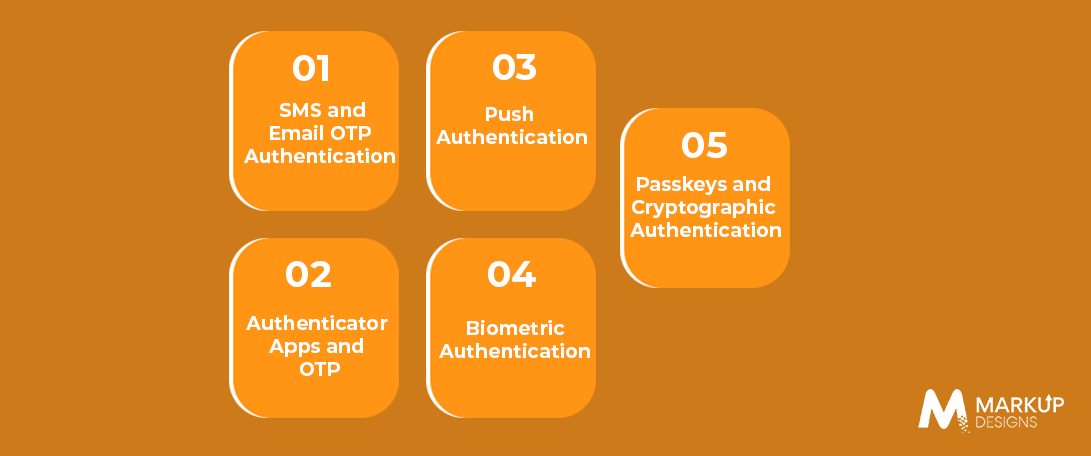
SMS and Email OTP Authentication
The app sends a one-time password to the user’s registered phone number or email address. This method is familiar and easy to implement, but SMS can be affected by SIM swapping, interception, and social engineering. It suits lower-risk applications or as a recovery option, but it should not be the only high-security factor.
Authenticator Apps and TOTP
Authenticator apps generate time-based one-time passwords (TOTP). These codes work without mobile network connectivity and generally provide stronger protection than SMS. They are useful for enterprise applications and users who need regular secure access.
Push Authentication
Push authentication sends an approval request to a registered device. It offers a convenient experience, but repeated unwanted prompts can lead to MFA fatigue. Number matching, request details and approval limits can help reduce this risk.
Biometric Authentication
Fingerprint and face recognition allow users to verify their identity through the device’s biometric system. Mobile apps should use secure platform authentication rather than storing raw biometric data. Biometrics are most effective when combined with another security mechanism.
Passkeys and Cryptographic Authentication
Passkeys use public key cryptography to provide passwordless authentication. A private key remains protected on the user’s device, while the service verifies the corresponding public key. Passkeys reduce password related risks and are becoming increasingly relevant for secure mobile access.
How to Choose the Right MFA Method for Your Mobile App
Consider the Sensitivity of User Data
Apps handling financial, healthcare or confidential business information require stronger authentication than applications with limited personal data.
Evaluate User Experience and Friction
Choose a method that protects users without creating unnecessary login barriers. A convenient method is more likely to be used consistently.
Consider Device and Platform Capabilities
Review the availability of biometric authentication, passkeys, secure device storage and authenticator support across the platforms your app serves.
Account for Recovery and Accessibility
Recovery methods should be secure, accessible and available when users lose access to their primary device or authentication factor.
Match Authentication Strength to Risk
Use stronger verification for sensitive actions such as changing account details, transferring funds or accessing confidential information.
Security Best Practices for Implementing MFA in Mobile Apps
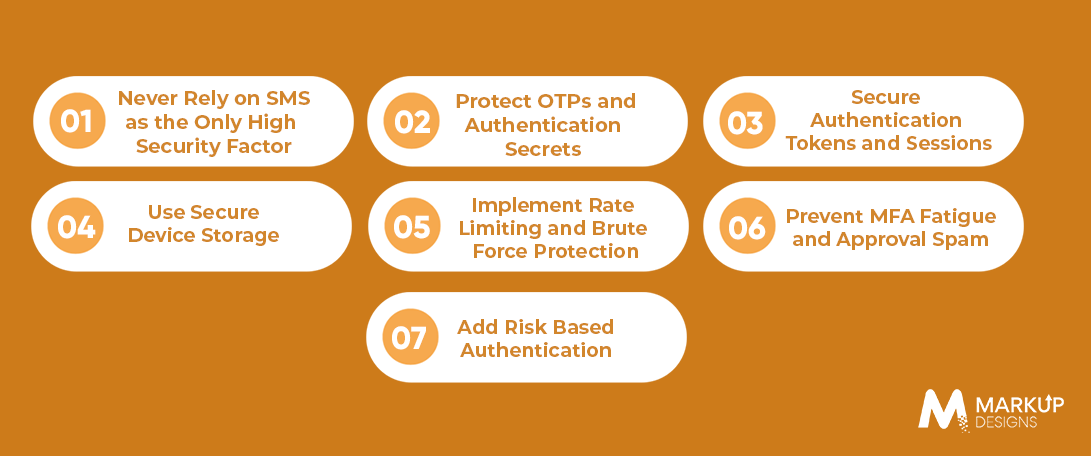
Never Rely on SMS as the Only High Security Factor
SMS can be exposed through SIM swapping, number interception and social engineering. Use stronger alternatives for sensitive accounts and transactions.
Protect OTPs and Authentication Secrets
Use short expiration windows, secure transmission, attempt limits and one time usage. Never allow an OTP to be reused after successful verification.
Secure Authentication Tokens and Sessions
Use short lived access tokens, protect refresh tokens and store them securely. Sessions should be invalidated after logout, account compromise or other high risk events.
Use Secure Device Storage
Store sensitive credentials and tokens using platform security features such as iOS Keychain and Android Keystore. Avoid insecure local storage for authentication secrets.
Implement Rate Limiting and Brute Force Protection
Limit failed attempts, apply temporary lockouts and monitor suspicious authentication activity to reduce automated attacks.
Prevent MFA Fatigue and Approval Spam
Use number matching, contextual approval requests and push request throttling to prevent attackers from overwhelming users with repeated authentication prompts.
Add Risk-Based Authentication
Apply additional verification when the app detects a new device, unusual location, suspicious login behaviour or a high risk transaction.
Designing a Secure MFA User Experience
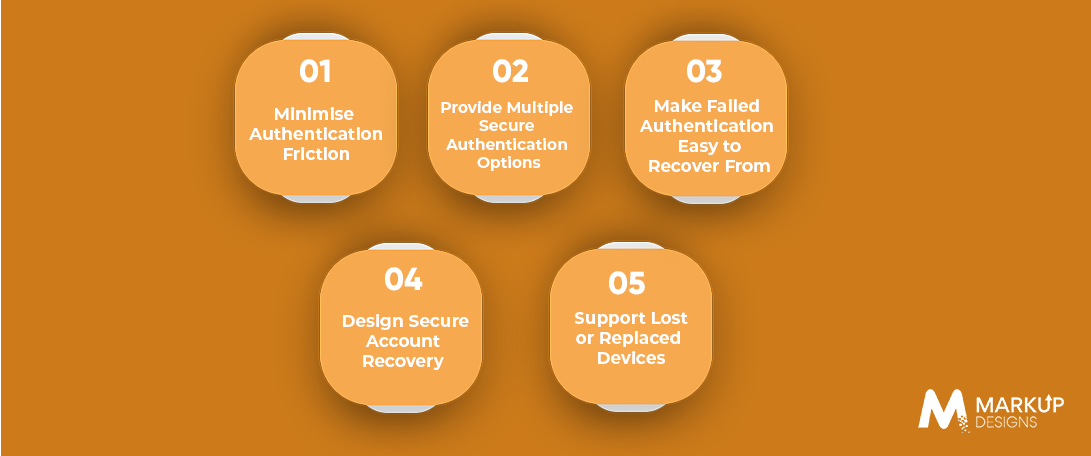
A secure MFA process should protect users without making authentication unnecessarily difficult. The experience must also account for failed verification, device changes and account recovery.
Minimise Authentication Friction
Use clear instructions, familiar authentication methods and verification only when necessary. Risk based authentication can reduce repeated prompts while maintaining stronger protection for sensitive actions.
Provide Multiple Secure Authentication Options
Offer suitable alternatives such as authenticator apps, passkeys and device based biometrics. Multiple options improve accessibility and reduce dependence on a single authentication method.
Make Failed Authentication Easy to Recover From
Explain why verification failed and provide secure next steps. Avoid revealing sensitive account details, while allowing legitimate users to retry or use an approved alternative.
Design Secure Account Recovery
Account recovery should require appropriate identity verification and should not provide an easier route around MFA. Recovery attempts should be monitored and protected against social engineering.
Support Lost or Replaced Devices
Allow users to register a new device through a secure process, revoke access from a lost device and manage active sessions. Backup authentication methods can help users regain access without weakening security.
Important: Account recovery can become the weakest link in an otherwise strong MFA implementation. It should be designed, tested and monitored as carefully as the primary authentication process.
MFA Architecture for Mobile Applications
A secure MFA implementation involves more than the login screen. It connects the mobile app, backend authentication services, identity providers and security monitoring into one coordinated architecture.
Mobile App Layer
The mobile app provides the authentication interface, biometric prompts and secure access to device protected credentials. It should collect only the information needed for verification and avoid storing sensitive authentication data insecurely.
Backend Authentication Layer
The backend verifies credentials, validates OTPs, manages authentication tokens and controls access to protected resources. MFA decisions should be enforced on the server rather than relying only on mobile app logic.
Identity and Access Management
Technologies such as OAuth 2.0 and OpenID Connect support secure authorisation and identity verification. Identity providers can also centralise authentication across multiple enterprise applications.
Monitoring and Security Layer
Authentication logs, suspicious activity detection, alerts and audit trails help security teams identify unusual behaviour and investigate authentication incidents.
Common MFA Implementation Challenges
Balancing Security and User Experience
Too many verification steps can frustrate users, while weak authentication can leave accounts exposed. The aim is to provide strong protection with minimal unnecessary friction.
SMS and Network Dependency
SMS based authentication depends on mobile network availability and can be affected by SIM swapping or delivery delays. Alternative methods can improve reliability and security.
Device Loss and Account Recovery
Users may lose access to their registered device or authentication factor. Recovery processes must verify identity without creating an easy route for attackers to bypass MFA.
Cross Platform Compatibility
Authentication methods may behave differently across Android and iOS devices. Testing should account for platform capabilities, operating system versions and device security features.
MFA Bypass Attacks
Attackers may target recovery flows, session handling, push approvals or poorly protected APIs. MFA must be enforced consistently across every authentication and sensitive transaction path.
Authentication Failures and False Rejections
Network issues, expired codes and device changes can prevent legitimate users from signing in. Clear error handling and secure fallback methods help reduce unnecessary account lockouts.
Compliance and Data Privacy
Applications handling sensitive information must consider applicable security, privacy and data protection requirements. Authentication data should be collected, stored and processed responsibly.
MFA for Different Types of Mobile Applications
The required authentication strength should reflect the sensitivity of the application and the potential impact of unauthorised access.
Banking and Fintech Apps
These applications require strong authentication for account access, payments, fund transfers and other high risk transactions. Additional verification may be required when unusual activity is detected.
Healthcare Apps
Healthcare applications handle sensitive patient and medical information. MFA helps protect patient accounts, clinical records and access to healthcare services.
E-commerce Apps
E-commerce apps should protect customer accounts, payment details and order information. Stronger verification may be needed for payment changes, account recovery or unusual purchases.
Enterprise Applications
Business applications often require MFA to protect internal systems, confidential documents and administrative functions. Authentication policies can vary according to employee roles and access permissions.
Social and Consumer Apps
These apps may use simpler authentication for low risk access, but stronger protection is important for account recovery, private messages, payment features and other sensitive actions.
How to Test MFA Security in a Mobile App
Test Authentication Flows
Verify that MFA is correctly triggered during login, device registration, password changes and sensitive account actions.
Test OTP and Token Security
Check expiration, reuse prevention, validation, secure transmission and token handling across different authentication scenarios.
Test Brute Force Protection
Confirm that repeated failed attempts trigger appropriate rate limits, delays or temporary restrictions.
Test MFA Bypass Scenarios
Test whether attackers can bypass MFA through API manipulation, recovery processes, session reuse or direct access to protected endpoints.
Test Device and Session Management
Verify that lost devices, revoked sessions and logged out accounts cannot continue accessing protected resources.
Test Account Recovery
Ensure recovery methods verify the user’s identity securely and do not provide a weaker alternative to MFA.
Conduct Mobile Application Security Testing
Use code reviews, vulnerability assessments and mobile application security testing to identify weaknesses in authentication, storage, APIs and session management.
How Markup Designs Can Help Implement Secure MFA in Mobile Apps
Mobile App Security Consulting
Assess authentication risks and recommend MFA strategies based on the application’s users, data and business requirements.
Custom Mobile App Development
Build mobile applications with secure authentication flows and MFA integrated into the overall application architecture.
Authentication and Identity Integration
Integrate identity providers, OAuth 2.0, OpenID Connect and secure authentication services into enterprise mobile applications.
Biometric and Passkey Integration
Implement supported biometric and passkey capabilities while maintaining secure fallback and recovery options.
API and Backend Security
Protect authentication APIs, tokens, sessions and access controls against common security threats.
Security Testing and QA
Test MFA workflows, device handling, recovery processes and bypass scenarios before deployment.
Maintenance and Security Updates
Monitor application security, address vulnerabilities and update authentication mechanisms as threats and platform capabilities evolve.
Conclusion
MFA should not be treated as a feature added to the login screen. For a secure mobile application, it needs to be designed as part of the wider authentication, session management, device security and account recovery architecture.
The strongest approach is not necessarily adding the maximum number of authentication steps. It is using the right authentication factors for the application’s risk level while keeping the experience practical for legitimate users. When security, usability and continuous testing are considered together, MFA becomes a reliable part of the application’s overall protection.
Build a More Secure Mobile App
Protect user accounts with secure MFA, stronger authentication flows and reliable identity management.

FAQs
1. What is MFA in mobile app security?
MFA is a security method that requires users to verify their identity using two or more different authentication factors, such as a password, registered device or biometric verification.
2. What is the most secure MFA method for mobile apps?
Passkeys and hardware security keys generally provide strong protection against phishing. Authenticator apps and device-based biometrics can also provide effective security when implemented correctly.
3. Is SMS OTP secure enough for mobile applications?
SMS OTP is better than password only authentication, but it is vulnerable to SIM swapping, interception and social engineering. It should not be the only high-security factor for sensitive applications.
4. Can biometrics be used for MFA?
Yes. Fingerprint and face recognition can be used as an authentication factor. They should rely on the device’s secure biometric system and work alongside appropriate account and session protection.
5. How can MFA prevent account takeover?
MFA adds another verification requirement beyond the password. Even if an attacker obtains a user’s credentials, they may still be unable to access the account without the additional factor.
Author's Perspective
MFA is not about adding as many verification steps as possible. It is about choosing authentication methods that match the application’s risk while keeping access practical for legitimate users. A secure implementation must also protect tokens, devices, recovery processes, and APIs. When these elements are designed together, MFA becomes a meaningful security control rather than just another login feature.
Discuss Your Project NowAjit Kumar Jha
VP - Business Operations
Related Posts
How to Hire Mobile App Developers in the...

How Much Does It Cost to Build a...

How to Build a Secure Payment Gateway Integration...
Insights Are Valuable & Execution is Priceless
You’ve read about the digital future. Now, let’s build the infrastructure to take you there. Move your strategy from the page to the product.
Design Your Solution Now
Contact Us
Schedule The Appointment At Your Convenience Date And Time.
30 Min
Web Conference
Time Zone
Indian standard time (08:30pm)

Thanks For Getting In Touch!
You’ve Taken The First Step Toward Transforming Your Digital Presence. Our Experts Will Reach Out Shortly To Take It Forward.
Launch Your Dream Project
Provide a brief overview of your project, and our specialists will evaluate your requirements. We will connect with you to explore how the right digital solutions can help you launch faster.