
In Brief
- Recognize how AI coding tools make application development faster without removing the necessity for engineering supervision.
- Ensure you have planned architecture, security, scalability, and application requirements prior to coding.
- Implement a systematic procedure for creating, testing, evaluating, and implementing AI-backed programs.
- Handle risks like security flaws, technology debt, inconsistent code, and testing gaps.
- Merge AI-backed development with human code evaluation, automated testing, observation, and constant improvement.
AI coding tools reshape the way software teams conduct application development by enabling code creating, troubleshooting, code improvement, testing, and documentation, among others. AI coding tools shorten the total period needed to convert an idea into running code, which comes in handy while working on prototypes and expediting specific portions of the development process. Nevertheless, fast code production does not guarantee that the newly developed application will be fit for launch.
Production applications involve more than just writing good code. They include designing a sophisticated system architecture, handling data securely, successfully integrating various software applications, testing everything, making sure the application works as needed, being able to develop its performance and upgrade the applications when needed. In the guide, we will show how to develop a production-level application with the help of AI coding tools at all phases of the development – from planning to testing.
Understanding AI Coding Tools and Their Role in Application Development
AI tools today are no longer limited to mere code completion. A modern tool can provide developers with an opportunity to generate code using human language, give explanations about the code, recommend fixes, create testing software, etc. The value of AI coding tools surely depends on the way you use the tools.
What Are AI Coding Tools?
AI coding tools can be regarded as software development assistants that help developers in writing code. Depending on the tool, it can generate various application components based on prompts provided by developers, give code recommendations, etc.
These instruments are capable of functioning in code editors, integrated development environments, development platforms or command-line workflows. Their functions depend on aspects such as programming languages, frameworks, complexity of project, security measures and development procedures.
How AI Coding Tools Support Software Development
AI coding tools help in a variety of aspects during the development process. They can assist in writing boilerplate code, developing functions and components, creating unit tests, correcting bugs, removing repetitive code, writing documentation, and exploring different variants of implementation.
Moreover, they can speed up prototyping by transforming functional requirements or descriptions in plain language into the preliminary code structure, which allows the developer’s team to test the concepts and improve the features of the product.
AI-Assisted Coding vs Traditional Software Development
In traditional software development, the entire procedure of creating the application code is carried out manually by developers using traditional engineering methodologies and tools. With the help of AI-assisted coding, AI may write or change some parts of that code according to the directives of developers and the context.
Therefore, the distinction is not so much in the substitution of traditional development but rather in the manner in which the code is created and examined. While AI can aid in speeding up the execution and executing monotonous tasks, the developers are still entrusted with responsibilities related to architecture, interpretation of requirements, validation, safety, and quality of production.
Can AI Coding Tools Create Ready-for-Production Applications?
AI coding tools can be very effective when it comes to creation of applications for production, but the creation of code is not enough for the purposes of readiness for production. The application must meet certain aspects in terms of efficiency, security, and quality.
The degree of AI assistance depends on the complexity and the risk profile of the project. While for a prototype or a tool for the internal purposes of the company the use of AI-generated code will be mostly acceptable, for the applications dealing with sensitive data, financial transactions, healthcare information and large crowds of users stricter engineering practices will be required.
Where AI Coding Tools Work Well
The benefits of using AI coding programs can be mostly appreciated when it comes to routine as well as clearly defined processes that require development. They can produce standard applications, prepare tests, clarify bugs, transform code from one format to another, suggest reforming ideas, and create documents.
Apart from that, they can facilitate prototyping and proof-of-concept development so that teams can check their workflows before spending resources on implementation. It may save experienced developers much time on regular coding activities, thus allowing them to focus on architecture, problem-solving, and product requirements.
Where Human Engineering Expertise Is Still Required
AI tools cannot take responsibility for business goals, technical limitations, operational environment, and maintenance of the project. Therefore, developers and engineering teams need to make decisions on architecture, technology, security, data models, integrations, and performance.
AI-generated code must also be checked by the human. AI-coded programs might contain logical mistakes, vulnerable solutions, unwanted dependencies, wrong statements, etc. Critical behavior of the processes must be proven rather than accepted only because the produced code seems to be functional.
Factors That Determine Production Readiness
Production readiness depends on whether an application can operate reliably under its expected conditions and continue to be maintained as requirements change. Key factors include:
- Functionality: Features work according to defined business and user requirements.
- Security: Multi factor Authentication mobile apps, authorisation, data protection, and application security controls are appropriately implemented.
- Reliability: The application can handle expected failures and recover without compromising critical operations.
- Performance: Response times, resource usage, and throughput meet defined requirements.
- Scalability: The architecture can accommodate increases in users, transactions, data, or workloads.
- Testability: Critical functionality is covered by appropriate automated and manual testing.
- Maintainability: Code is understandable, documented, modular, and manageable over time.
- Observability: Logs, metrics, traces, and alerts provide sufficient visibility into application behaviour.
- Operational readiness: Deployment, rollback, monitoring, incident response, and maintenance processes are established.
How to Build Production-Ready Applications with AI Coding Tools
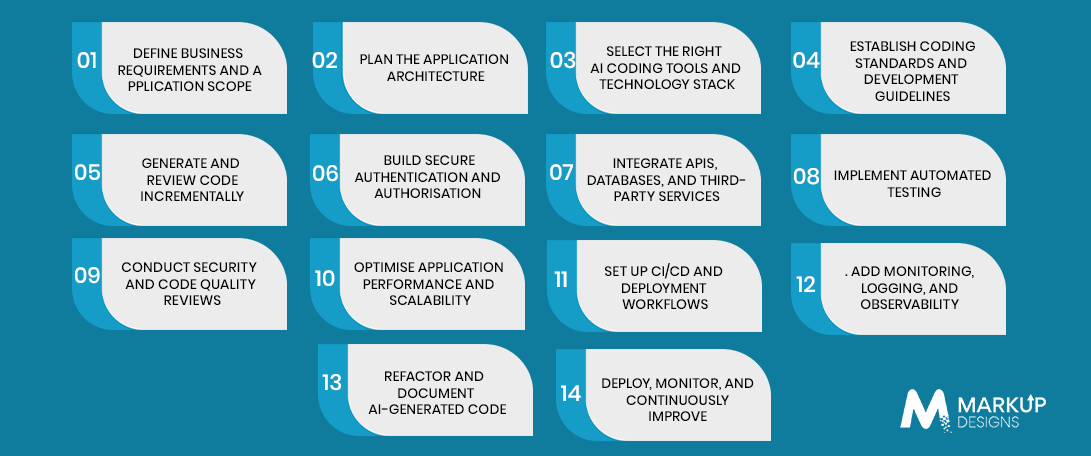
Building a production-ready application with AI coding tools requires a controlled workflow rather than unrestricted code generation. Each stage should establish the context and safeguards needed for the next, with developers reviewing AI-generated output before it becomes part of the production codebase.
1. Define Business Requirements and Application Scope
Start by establishing what the application needs to accomplish, who will use it, which workflows it must support, and what constraints apply to development. Define functional requirements, non-functional requirements, target platforms, expected users, data requirements, integrations, and production objectives.
2. Plan the Application Architecture
Define the application’s architecture before asking AI tools to generate significant amounts of code. Determine the major components, data flows, APIs, database structure, authentication model, external integrations, and infrastructure requirements.
3. Select the Right AI Coding Tools and Technology Stack
Choose AI coding tools based on the project’s programming languages, frameworks, development environment, team workflow, security requirements, and level of AI assistance required.
The technology stack should also be selected based on application requirements rather than on what an AI tool happens to generate easily.
4. Establish Coding Standards and Development Guidelines
Define conventions for naming, project structure, error handling, documentation, dependency management, testing, security, and code review. These standards give developers and AI tools a consistent framework for producing code.
5. Generate and Review Code Incrementally
Avoid generating an entire application in one large prompt. Break the application into manageable components and generate code incrementally.
Developers should review each significant output for logic, architecture, dependencies, security, performance, and compatibility before building additional functionality on top of it.
6. Build Secure Authentication and Authorisation
Implement authentication and authorisation according to the application’s security requirements. Access controls should clearly define who can access specific resources and actions.
AI-generated implementations should be reviewed carefully for issues involving credentials, session management, token handling, password storage, permissions, input validation, and sensitive configuration.
7. Integrate APIs, Databases, and Third-Party Services
Production applications commonly depend on APIs, databases, payment systems, cloud services, analytics platforms, communication services, and other external components. Define these integrations clearly and validate how AI-generated code handles authentication, data validation, errors, retries, timeouts, rate limits, and service failures.
8. Implement Automated Testing
Create automated tests alongside development rather than waiting until the application is complete. Depending on the system, this can include unit, integration, API, end-to-end, regression, and performance testing.
9. Conduct Security and Code Quality Reviews
Review AI-generated code using code review processes, static analysis, dependency scanning, vulnerability testing, and other appropriate security controls.
Teams should examine authentication, authorisation, data exposure, input handling, dependency risks, error handling, injection risks, and other vulnerabilities relevant to the application’s architecture.
10. Optimise Application Performance and Scalability
Test how the application behaves under expected and increased workloads. Evaluate database queries, API response times, memory and CPU usage, caching, background processing, network requests, and resource-intensive operations.
AI-generated code that works for a small test dataset may not perform efficiently at production scale.
- Set Up CI/CD and Deployment Workflows
Automate the process of building, testing, validating, and deploying application changes through a suitable CI/CD pipeline. Automated checks can prevent code that fails tests, security checks, or quality gates from reaching production.
12. Add Monitoring, Logging, and Observability
Production applications need visibility into how they behave after deployment. Implement structured logging, application metrics, distributed tracing where appropriate, health checks, and alerts for important failures or performance issues.
Observability also helps teams identify whether AI-assisted changes introduce unexpected behaviour after release and provides the information required to troubleshoot production incidents.
13. Refactor and Document AI-Generated Code
Generated code should not remain untouched simply because it works. Refactor unnecessary complexity, duplicated logic, unclear abstractions, and inconsistent patterns before they accumulate into technical debt.
Document important architectural decisions, APIs, configurations, business logic, and operational procedures so that future developers can understand and maintain the application without relying on the original AI prompts.
14. Deploy, Monitor, and Continuously Improve
Production deployment should be treated as the beginning of an ongoing engineering cycle rather than the final step. Monitor application performance, errors, security events, infrastructure usage, and user behaviour after release.
Use production insights to identify defects, optimise performance, improve features, and refine future AI-assisted development workflows.
Key Features of Production-Ready AI-Assisted Applications
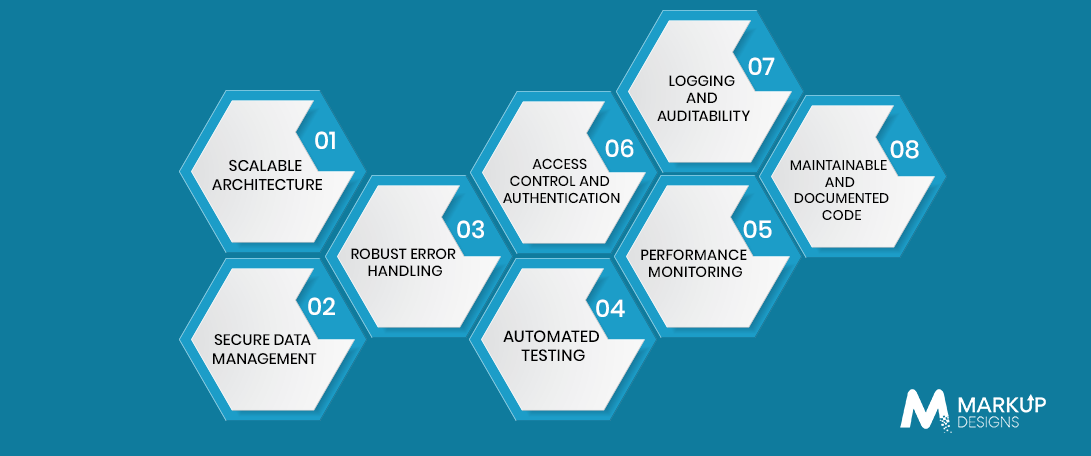
A production-ready AI-assisted application is one where the produced components follow engineering principles to establish a system that is safe, dependable, scalable, and easily maintainable.
Scalable Architecture
The application must employ an architecture that is able to meet growing demands in terms of users, operations, data, and workload. For this purpose, the use of modular components, smart database configuration, as well as caching, asynchronous processing, and scalable system setup should prevent performance problems under increased demand.
Secure Data Management
Security measures must be available to apply all means of obtaining, processing, storing and sending sensitive information. Access to data must follow the rules of permission management letting secrets, credentials and sensitive settings be handled secured instead of using them in application code.
Robust Error Handling
Applications in production must behave reliably in case of a failure of APIs, unavailability of databases, provision of invalid input or an occurrence of unforeseen application errors. Systematic error handling must stop the failure from leaking sensitive information or affecting unrelated application activities.
Automated Testing
Automation makes testing a repeatable task in terms of validating application operation when the code is being changed. The production-ready application must be adequately covered with tests targeting the most important features and functionalities, as well as interfaces, edge cases and target components.
Performance Monitoring
Monitoring performance is needed to enable teams to evaluate such metrics as response times, resource consumption, throughput, errors, and others for determining the state of the application. They help detect and eliminate potential performance issues before they affect users and operations.
Access Control and Authentication
Authentication is about user identity, while authorisation is about determining what can be done by authenticated users. The relevant security measures must be applied consistently in suitable interfaces, APIs and platforms.
Logging and Auditability
Logs provide a record of important application development and system events, while audit trails can help organisations track security-sensitive or business-critical activities. Logging should provide useful operational information without unnecessarily exposing personal or confidential data.
Maintainable and Documented Code
Production code needs to remain understandable as teams, features, and requirements change. Clear structure, consistent coding practices, meaningful documentation, manageable dependencies, and regular refactoring help prevent AI-assisted development from creating avoidable technical debt.
Common Challenges of Building Applications with AI Coding Tools
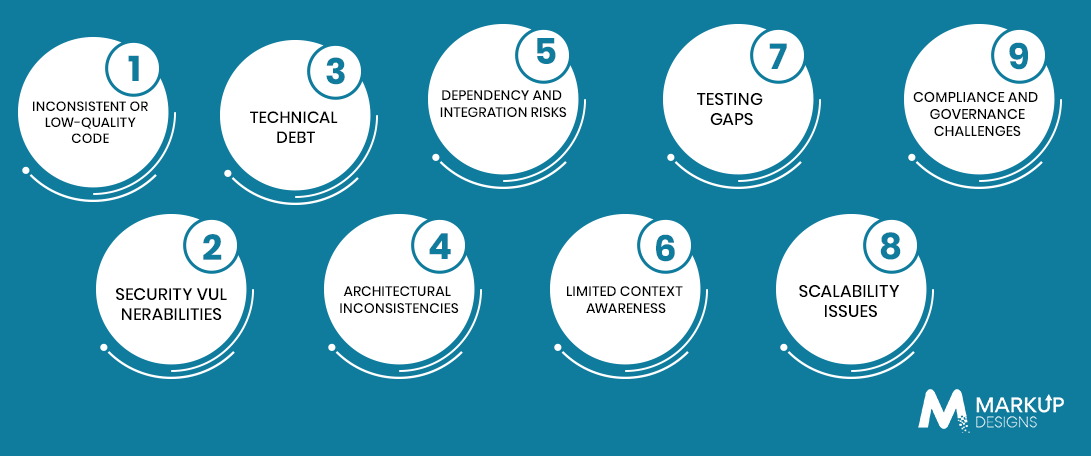
Although AI coding tools can speed up development, the effectiveness of their output must still be weighed against the overall application. The most frequently encountered issues include coding quality, safety, structure, testing and sustainability.
Inconsistent or Poor Quality Code
AI-generated code can differ in terms of format, naming conventions, error handling and implementation patterns, especially if different prompts or tools are applied throughout a project. Without regular code reviews, the code will be difficult to maintain.
Security Vulnerabilities
Code generated can have unsecured configuration, poor authentication logic, unsafe input management, disclosed credentials, or vulnerable dependencies. Therefore, security checks and human reviews must be conducted before releasing into production.
Technical Debt
Quickly generated code results in redundant code, unnecessary dependencies and workarounds that are hard to remove in future. Regular refactoring will prevent such shortcuts.
Architectural Inconsistencies
If separate functionalities are generated without any structural concept, components will be working in different ways and will not be interacting appropriately. A good architecture will keep everything in order.
Dependency and Integration Risks
AI tools may suggest libraries, packages, APIs, or implementation approaches that are outdated, unnecessary, or incompatible with the existing stack. Dependencies and integrations should be reviewed before adoption.
Limited Context Awareness
AI tools may not fully understand an application’s business rules, legacy code, infrastructure, or organisational requirements. Developers need to provide relevant context and validate generated solutions against the wider system.
Testing Gaps
Generated code can appear functional while missing edge cases or important business scenarios. Automated and manual testing are required to verify actual application behaviour.
Scalability Issues
Code that works for a prototype may not perform efficiently under production workloads. Database queries, API calls, memory usage, and processing patterns should be evaluated before scaling.
Compliance and Governance Challenges
Applications handling regulated or sensitive data may need specific controls for privacy, security, access, logging, and data handling. AI-assisted development does not remove these requirements.
How to Mitigate Risks When Using AI-Generated Code
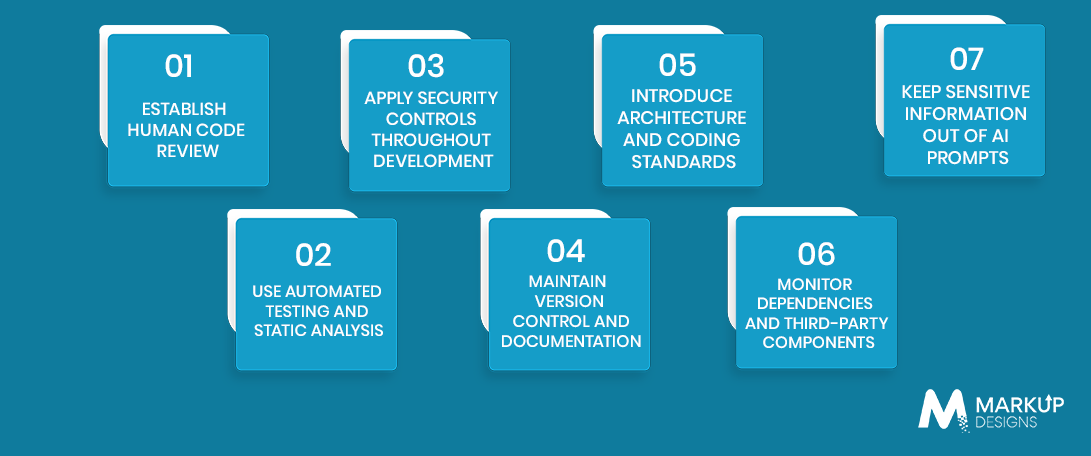
Establish Human Code Review
Have developers review significant AI-generated code for functionality, security, architecture, and maintainability before it is merged.
Use Automated Testing and Static Analysis
Combine unit and integration testing with static analysis and dependency scanning to identify defects and potential vulnerabilities early.
Apply Security Controls Throughout Development
Build authentication, authorisation, secure data handling, secrets management, and vulnerability checks into the development lifecycle rather than adding them just before launch.
Maintain Version Control and Documentation
Track AI-assisted changes through version control and document important implementation and architectural decisions so changes remain traceable.
Introduce Architecture and Coding Standards
Define project-wide patterns for structure, naming, dependencies, error handling, testing, and security to keep generated code consistent.
Monitor Dependencies and Third-Party Components
Review package versions, licences, vulnerabilities, maintenance status, and compatibility before adding AI-suggested dependencies or services.
Keep Sensitive Information Out of AI Prompts
Do not provide passwords, API keys, private customer information, confidential business data, or other sensitive information to AI tools unless the tool and its approved enterprise configuration explicitly support the required protections.
AI Coding Tools Across the Software Development Lifecycle
AI coding tools can support different stages of development, but the level of engineering oversight should remain appropriate to the risk and complexity of each stage.
| Development Stage | How AI Coding Tools Can Help | Engineering Oversight |
| Planning | Requirements analysis and technical suggestions | Product and architecture validation |
| Architecture | Design suggestions and code structure | Architecture decisions |
| Development | Code generation and refactoring | Code review |
| Testing | Test generation and debugging | Test validation |
| Security | Identifying potential vulnerabilities | Security assessment |
| Deployment | Configuration and automation | Infrastructure review |
| Maintenance | Debugging and optimisation | Monitoring and change management |
Best Practices for Using AI Coding Tools in Production
Treat AI-Generated Code as Draft Code
Use generated code as an implementation starting point rather than assuming it is production-ready.
Keep Architecture Human-Led
Let experienced engineers make decisions about system architecture, data flows, technology choices, and critical application behaviour.
Build Security Into the Development Process
Review security requirements from the planning stage through deployment instead of treating security as a final checklist.
Test Every Critical Workflow
Prioritise testing for authentication, payments, data processing, core business logic, integrations, and other production-critical workflows.
Review Dependencies and Generated Packages
Validate every important third-party package for security, compatibility, maintenance, and licensing considerations.
Maintain Clear Documentation
Document architecture, APIs, configurations, business rules, and operational procedures so the application remains maintainable beyond its initial development.
Monitor Production Behaviour
Use logs, metrics, alerts, and application monitoring to identify errors, performance problems, and unexpected behaviour after deployment.
Refactor Before Technical Debt Accumulates
Regularly simplify generated code, remove unnecessary dependencies, and bring new components into alignment with established architecture and coding standards.
How AI Coding and Traditional Development Can Work Together
AI coding tools and traditional engineering practices can complement each other when responsibilities are clearly defined.
Use AI for Development Acceleration
Use AI for repetitive coding, prototyping, debugging, test generation, documentation, and other tasks where it can reduce manual effort.
Use Engineers for Architecture and Critical Decisions
Keep decisions involving architecture, security, data, infrastructure, business logic, and production risk under appropriate engineering oversight.
Combine Automated and Human Testing
AI can help create tests and identify potential issues, while developers and QA teams validate whether the application behaves correctly in real-world scenarios.
Establish Clear Review and Governance Processes
Define when AI-generated code requires review, which environments it can be used in, what information can be shared with AI tools, and how changes are approved and tracked.
How Much Does It Cost to Build an Application Using AI Coding Tools?
The use of AI coding tools can change how development resources are allocated, but it does not eliminate the costs associated with building and operating a production application. Total cost depends on the application’s scope, complexity, integrations, security requirements, and ongoing maintenance needs.
Factors Affecting Development Costs
The main factors include application complexity, number of features, technology stack, dedicated development team requirements, integrations, infrastructure, testing, security, and post-launch support.
AI Tool and Infrastructure Costs
Costs may include AI coding tool subscriptions or usage, model access, cloud infrastructure, development environments, and other supporting services.
Development and Engineering Costs
AI-assisted development still requires developers, architects, QA professionals, and other specialists to plan, review, integrate, test, and maintain the application.
Testing and Security Costs
Security assessments, automated testing infrastructure, performance testing, compliance requirements, and remediation can contribute to the overall development budget.
Maintenance and Scaling Costs
Post-launch expenses can include infrastructure, monitoring, bug fixes, feature updates, dependency upgrades, optimisation, and scaling as application usage grows.
How Markup Designs Helps Build Production-Ready Applications With AI Coding Tools
Markup Designs can help businesses incorporate AI coding tools into a structured software development process, combining AI-assisted implementation with architecture planning, engineering review, testing, security, deployment, and ongoing application support. The focus is on using AI to accelerate development while maintaining the engineering controls required for production applications.
Build Faster With AI. Build Better With Engineering.
AI coding tools can accelerate development, but production-ready applications need the right architecture, security, testing, and software engineering services oversight. Partner with our experts to turn AI-assisted development into reliable, scalable software.

Conclusion
AI coding tools can make software development much quicker, but that does not mean that the product is suitable for production. The best method is one in which AI-assisted development is combined with proper architecture, security, automated testing, human scrutiny, deployment discipline, and constant monitoring. With these measures in place, teams can engage AI coding tools to achieve speed without sacrificing reliability, security, scalability, and maintainability of products.
FAQs
1. Will AI programming tools be able to create a complete production-ready program?
AI programming tools can make a big contribution to the development of the program, but to make the program truly production-ready it needs architecture, testing, safety audit, deployment controls, monitoring, and continuous engineering attention.
2. Is the AI-created code safe to use in production?
AI-created code can be used in production, provided that the code goes through reviews, testing, safety audits, and is confirmed with application needs and risk profile.
3. What are the main risks of using AI in programming?
Key risks include security hazards, inconsistent coding, technical debt, false implementation, problems with dependencies, lack of testing or architectural inconsistency.
4. How do you test AI-created code?
You will need to conduct unit testing, integration testing, API testing, end-to-end testing, safety testing, and performance testing according to the needs of the application, but human common sense will still be necessary to check business logic and edge cases.
5. Will AI programming tools cut development time?
They will shorten time on repetitive coding, prototyping, debugging, documentation, and test generation, but the actual time saved will depend on the complexity of the project, level of developers expertise, and how effectively the tools are integrated into the workflow.
6. How can AI-generated applications be made scalable?
Start with an appropriate architecture, review generated code for performance, optimise databases and APIs, use suitable caching and processing strategies, conduct load testing, and monitor the application after deployment.
Author's Perspective
AI coding tools have changed the way programmers work. While speed of code generation has improved, this does not mean that engineering skills are not required. The biggest challenge for developers is knowing what processes can be accelerated with the help of AI and what tasks should be handled exclusively by humans.
In production, firms should not focus on the potential of AI coding tools, but concentrate on code analysis, testing, integration, and maintenance.
Discuss Your Project NowJupinder Singh Arora
Founder and CEO
Related Posts
Cost, Benefits & Business Impact: Generative AI vs....
Case Management Software Development: Enterprise Features & Implementation...
Farm Management Software Development in Australia: Features, AI...
Insights Are Valuable & Execution is Priceless
You’ve read about the digital future. Now, let’s build the infrastructure to take you there. Move your strategy from the page to the product.
Design Your Solution Now
Contact Us
Schedule The Appointment At Your Convenience Date And Time.
30 Min
Web Conference
Time Zone
Indian standard time (08:30pm)

Thanks For Getting In Touch!
You’ve Taken The First Step Toward Transforming Your Digital Presence. Our Experts Will Reach Out Shortly To Take It Forward.
Launch Your Dream Project
Provide a brief overview of your project, and our specialists will evaluate your requirements. We will connect with you to explore how the right digital solutions can help you launch faster.