
In Brief
Mobile applications process sensitive customer information every second, making security a critical business priority rather than a technical afterthought. In this blog, you’ll learn:
- Why mobile app security risks are increasing and how AWS helps mitigate them: Discover the driving forces behind the rise in sophisticated mobile threats, from data interception on unsecure Wi-Fi networks to reverse-engineering of app code, and how AWS counters these vulnerabilities with a massive, globally resilient infrastructure that acts as your first line of defense.
- Essential AWS security services every mobile app should use: Get a comprehensive breakdown of the core AWS security toolkit, exploring how specialized services like AWS WAF block malicious bot traffic and how Amazon GuardDuty leverages intelligent threat detection to continuously monitor your entire cloud ecosystem for hidden anomalies.
- Best practices for securing user authentication, APIs, databases, and cloud infrastructure: Step-by-step strategies to lock down your mobile backend, including managing user identities securely with Amazon Cognito, shielding API endpoints from external manipulation, and implementing end-to-end data encryption for both storage and live transit.
- Common mobile app security mistakes businesses make on AWS: An honest look at the hidden pitfalls that jeopardize compliance, such as leaving open database ports, granting overly permissive access rights to internal teams, or accidentally exposing secret cryptographic keys inside the application’s public source code.
- How to build a scalable, compliant, and secure mobile ecosystem with the right development partner: A strategic roadmap on how to safely scale your mobile application to millions of users while meeting strict regulatory standards (like GDPR, HIPAA, or PCI-DSS), highlighting how an expert development partner bridges the gap between secure cloud infrastructure and flawless mobile performance.
Think about how much data your phone processes every single day. If you run a fintech platform, a healthcare app, or an e-commerce store, your mobile app is where everything happens. It processes payments, tracks locations, and holds personal user details.
That also makes it a massive target for hackers.
Between API attacks, data leaks, and simple cloud misconfigurations, developers are up against a lot. A single oversight can expose thousands of customer records overnight. When that happens, the fallout hits hard, reputational damage, legal headaches, and massive financial losses.
Most development teams turn to Amazon Web Services (AWS) because it has an incredible lineup of security tools. But just dropping your app onto AWS doesn’t automatically make it bulletproof. AWS Cloud security depends entirely on how your team configures, manages, and monitors the architecture.
Let’s look at how to actually lock down your mobile backend on AWS.
The AWS Shared Responsibility Model

Before tweaking any technical settings, we need to clear up a massive misconception that moving to AWS does not mean security is suddenly 100% off your plate.
Cloud security is a two-way street. AWS explicitly divides these duties into two brackets: Security of the Cloud (their job) and Security in the Cloud (your job).
What AWS Knocks Out (Security of the Cloud)
AWS handles the physical foundation. They take care of the heavy lifting you can’t touch:
- Data Center Security: Keeping the physical buildings locked down with biometrics and armed security.
- Global Infrastructure: Managing the fiber-optic cables, network routing, and hardware that keep the global cloud running.
- Hardware Maintenance: Fixing broken servers, monitoring power grids, and stopping physical tampering.
- Disaster Recovery: Keeping systems online across different global zones even if a power grid fails.
What Is Up to You (Security in the Cloud)
Since you own the app, you control everything built on top of that foundation. Your team is responsible for:
- The Code: Writing secure app logic, patching bugs, and stopping reverse-engineering.
- Identity Management: Managing user logins, enforcing tough password rules, and making sure your team uses Multi-Factor Authentication (MFA).
- Encryption: Making sure data is scrambled both while sitting in a database and while moving through the air to a phone.
- Network Settings: Configuring firewalls, setting up security groups, and closing open ports that shouldn’t be public.
AWS builds the vault, but you have to lock the door. If your developers leave a database wide open or hardcode administrative passwords, AWS can’t save you.
Why Mobile App Security Is Non-Negotiable
Mobile apps don’t live inside a safe corporate office network. They live on millions of unverified personal devices out in the wild, using public Wi-Fi networks every day. Hackers know this, and they actively target them to get to the good stuff.
What Are the Most Prominent Vulnerabilities
- Login Info: Passwords and session tokens that they can use to hijack accounts.
- Financial Data: Saved credit cards, bank details, and payment histories.
- PII & Health Records: Names, IDs, and medical histories that fetch a high price for identity theft.
- Business Logs: Internal data or proprietary code that gives competitors an edge.
What Happens If Things Go Wrong
A breach doesn’t just mess up your codebase; it can sink a business:
- Data Leaks: Hackers scrape your database and put your users’ private lives on display.
- Financial Strain: The bills pile up fast when you hire forensic teams, pay legal fees, and rebuild broken architecture.
- Fines: Violating GDPR, HIPAA, or PCI DSS results in massive compliance penalties.
- Lost Trust: Trust takes years to earn but vanishes the second an app gets hacked. Users will uninstall it immediately and jump to a competitor.
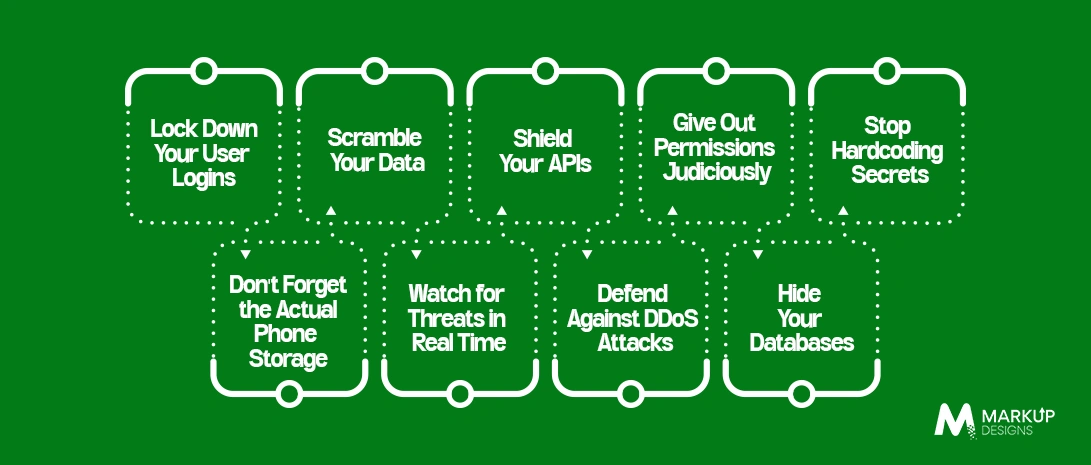
1. Lock Down Your User Logins
Authentication is your front door. If it’s weak, nothing else matters.
Don’t Build It from Scratch, Instead Use Amazon Cognito
Building an identity system from the ground up is a recipe for security flaws. Instead, use Amazon Cognito. It handles sign-ups, sign-ins, social logins (like Google or Apple), and account recoveries out of the box. It gives you enterprise-grade user management without the massive coding headache.
Enforce Multi-Factor Authentication (MFA)
Passwords get leaked all the time. Enforcing MFA via text codes or authenticator apps adds a critical second barrier. Even if a hacker buys a user’s password on the dark web, they still can’t get past the MFA prompt.
2. Scramble Your Data
Data should never be readable by an outsider. Period.
Data in Transit
Everything moving between your mobile app and your backend needs to use HTTPS with TLS encryption. This keeps hackers from intercepting data over shady coffee shop Wi-Fi. AWS Certificate Manager (ACM) can automate and renew the SSL certificates you need to keep these pipelines secure.
Data at Rest
Any data sitting still inside Amazon S3, RDS, or DynamoDB needs to be encrypted. Turn on native encryption inside these services and use AWS Key Management Service (KMS) to control who has the keys to decrypt it.
3. Shield Your APIs
APIs are the communication highways connecting your phone app to your cloud. Since they sit on the public internet, they get pounded by automated attack bots constantly.
- Deploy Amazon API Gateway: Think of this as a security guard for your backend. It handles request validation, traffic monitoring, and access controls before traffic ever touches your actual servers.
- Turn on Rate Limiting: Prevent brute-force attacks and DDoS attempts by limiting how many requests a single user or IP address can send per second.
- Use JWT Tokens: Instead of constantly passing raw usernames and passwords over the web, use JSON Web Tokens (JWT) to safely authorize actions after a user logs in.
4. Give Out Permissions Judiciously
Don’t give everyone the keys to the entire castle just because it’s easier. Use AWS Identity and Access Management (IAM) to set incredibly tight boundaries. Your application servers, your developers, and your third-party integrations should only have access to the exact databases or files they need to do their jobs. If a rogue API key ever leaks, the blast radius is tiny because that key has almost no permissions.
5. Stop Hardcoding Secrets
Never, ever put database passwords, third-party API keys, or private tokens inside your app’s source code. If that code repository is ever exposed or reverse-engineered, your whole business is compromised.
Instead, pull those keys out of your code and put them into AWS Secrets Manager. It stores them securely, rotates them automatically, and allows your backend to grab them safely via an API call at runtime.
6. Don’t Forget the Actual Phone Storage
Cloud security is only half the battle. If an Android or iOS device is rooted or stolen, local data can be scraped.
Never save plain text passwords or tokens directly on a device’s basic storage. Always use hardware-backed, encrypted local storage options:
- iOS Keychain (for Apple)
- Android Keystore (for Android)
These built-in options keep local session tokens safe from prying eyes.
7. Watch for Threats in Real Time
You can’t fix a security breach if you don’t know it’s happening. Real-time monitoring is how you catch issues before they blow up.
AWS gives you a great toolkit for this:
- AWS CloudTrail: Logs every single action and API call made inside your AWS account so you have a clear audit trail.
- Amazon CloudWatch: Monitors app performance and fires off alerts the second something looks weird.
- Amazon GuardDuty: An AI-driven detective that watches your cloud traffic 2026-style, instantly flagging strange logins, weird data transfers, or compromised accounts.
8.Defend Against DDoS Attacks
DDoS attacks try to crash your app by overwhelming it with fake traffic.
AWS includes AWS Shield by default to protect your app from common network-level floods. If you are running a high-profile app with massive traffic, upgrading to AWS Shield Advanced gives you specialized mitigation support and immediate response teams to keep your backend online during an active attack.
9. Hide Your Databases
Your databases hold your most valuable assets, so keep them completely off the grid.
Never expose an Amazon RDS, Aurora, or DynamoDB instance to the public internet. Put them inside private subnets within your Virtual Private Cloud (VPC). Only allow your specific application servers to talk to them, keep audit logs on, and schedule automatic, encrypted backups so you can recover instantly if things go sideways.
The Most Common AWS Mistakes We See
Even great engineering teams drop the ball on the basics sometimes. Watch out for these traps:
- Leaving AWS S3 storage buckets publicly accessible by accident.
- Hardcoding private API keys into code files.
- Giving broad “admin” access to simple automated services.
- Skipping MFA on root administrative accounts.
- Forgetting to set up active monitoring alerts.
Fixing these five things alone puts you ahead of most of the market.
Compliance Is Never Optional
Depending on what your app does and where your users live, you have legal standards to meet, whether that’s GDPR, HIPAA, PCI DSS, or SOC 2.
AWS gives you compliance-ready infrastructure, but the way you build your app workflows is still on you. You need to ensure your data handling practices match up with whatever regulations govern your industry.
Let’s Build Something Secure Together
Getting mobile code and cloud infrastructure to work together securely takes a specific mix of engineering skills.
At Markup Designs, we don’t just build apps that look good, we build them to last on architecture that protects your business. We handle everything from setting up secure cloud infrastructure to automating your DevSecOps pipelines.
Our services focus on:
- Building secure, isolated AWS cloud architectures.
- High-performance mobile app development with encrypted local storage.
- Secure identity setups using Amazon Cognito.
- Automating vulnerability scanning in your development cycle.
- Ironclad API security and database isolation.
Mobile security isn’t something you handle once and cross off a list. It’s an ongoing process.
AWS gives you an incredible set of tools to secure your data, monitor threats, and handle logins. But those tools are only as good as the strategy behind them. By taking a proactive approach and embedding security into your development lifecycle early, you protect your revenue, keep your users safe, and build a brand people actually trust.
Build AWS-Powered Mobile Applications with Confidence
Protect your users, secure your assets, and scale your business with enterprise-grade mobile security solutions.

FAQ
1. Is AWS automatically secure for mobile apps?
No. AWS secures the physical infrastructure, servers, and global network. You are entirely responsible for securing your own app code, user data, and access permissions.
2 .Why should I use Amazon Cognito?
Because it handles the incredibly complex task of user authentication, password resets, social logins, and multi-factor authentication securely, saving your team from coding it manually.
3. What is the biggest mistake companies make on AWS?
Leaving databases or storage buckets open to the public internet, and hardcoding private passwords directly into the application code.
4. How does encryption protect my app?
If a hacker steals data while it’s encrypted, it’s just scrambled, useless text. They can’t read a single word of it without your private KMS keys.
5. How do I catch hacker threats early on AWS?
By combining AWS CloudTrail (for tracking actions), CloudWatch (for alerts), and Amazon GuardDuty (which uses machine learning to spot weird behavior).
Author's Perspective
It’s easy to focus entirely on slick UI features and snappy performance during development while pushing security to the side. But the best features in the world don’t matter if your app leaks customer data.
The apps that succeed long-term are the ones users trust implicitly. AWS provides the tools to build that trust, but you have to use them intentionally from day one. When you treat security as a foundational feature rather than a final chore, you protect your customers, stay compliant, and scale your business without looking over your shoulder.
Discuss Your Project NowGaurav Goyal
Global Sales- VP
Related Posts
How to Hire Mobile App Developers in the...

How Much Does It Cost to Build a...

How to Build a Secure Payment Gateway Integration...
Insights Are Valuable & Execution is Priceless
You’ve read about the digital future. Now, let’s build the infrastructure to take you there. Move your strategy from the page to the product.
Design Your Solution Now
Contact Us
Schedule The Appointment At Your Convenience Date And Time.
30 Min
Web Conference
Time Zone
Indian standard time (08:30pm)

Thanks For Getting In Touch!
You’ve Taken The First Step Toward Transforming Your Digital Presence. Our Experts Will Reach Out Shortly To Take It Forward.
Launch Your Dream Project
Provide a brief overview of your project, and our specialists will evaluate your requirements. We will connect with you to explore how the right digital solutions can help you launch faster.